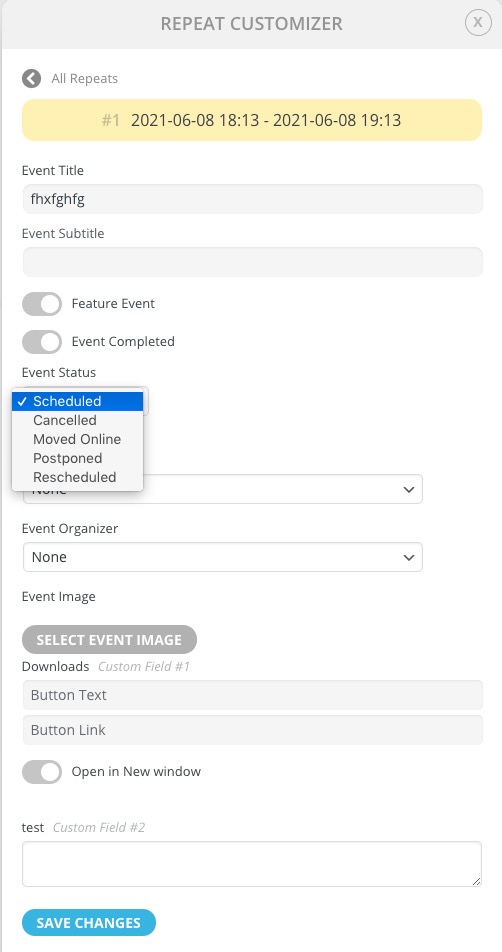
Thanks for the reply. I have seen what Repeat Customizer can do on some level through a demo link I found in another public ticket. However, you mentioned a “” option. I can’t seem to find it in the that demo’s event options or in the Repeat Customizer interface. Can you elaborate a bit on that feature and where I would find it?
Also, I appreciate the info on refunding tickets or updating orders in WooCommerce. I’m afraid it doesn’t answer my question, though. Purchasing being enabled in an instance of a rescheduled or postponed event is confusing to me. If an event ends up being moved to a new date but there’s no option to set that date in Repeat Customizer then why is Add to Cart being displayed? I assumed it would be turned off in an instance like that. Details added in Repeat Customizer would direct a customer to find the new date in the calendar where they could make a purchase.
This will definitely a cause for concern for my client as well who has difficulty understanding a lot of the concepts in EventON. I’d really appreciate a bit more info. Thanks!
That’s great.. Thank you 🙂
Awesome.. And sorry for the mistake.. Thank you..
Thanks, I appreciate that. I am trying my best to be an EventOn evangelist, and have recommended to several clients. Epiphany Center for the Arts is my PRIMARY concern right now. Its a$10 million facility and is just now opening up. Unfortunately they have an in house guy who adds/ updates events – this unable to save thing seems to only happen to him. I have not had the same problem, but I get called every time it happens. I have even tried going into php myadmin and removing the description content – thinking maybe that was causing the issue- no luck. Still unable to open the event to edit – even though it displays fine in eventlist. This has been going on for months now and they are not happy
also, I only need Action User and NOT Action User Plus?
Thanks!
Thanks for the quick reply!
Just to make sure I have this correct:
- Let’s say I have a client called ‘JetBlue’.
- I give some people the ‘JetBlue’ role when they register.
- When I create the events, I can then select ‘assign users to this event’ and select the ‘JetBlue’ role.
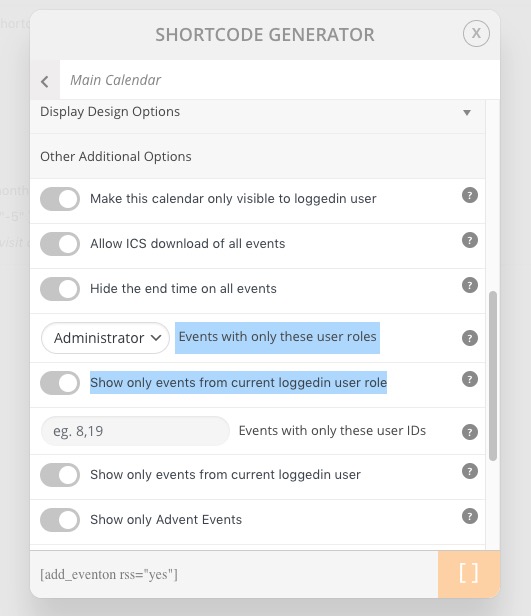
- Then in the shortcode generator I would select ‘show only events from current user logged in role’.
- If a user logs in with the ‘JetBlue’ role, if there are 1500 events in the system and only 10 are assigned to the ‘JetBlue’ role, this user would only see those 10?
- If another user logs in with the ‘IBM’ role, if there are 1500 events in the system and only 20 are assigned to the ‘IBM’ role, this user would only see those 20? It’s theh same shortcode, right?
You can change this in regular Text Editor, like Notepad or similar. CSV files are regular text files you can edit almost anywhere.
Hello,
You need to use Action User add-on https://www.myeventon.com/addons/action-user/. Try on https://dev.myeventon.com/wp-admin/.
In order to show events for a specific role or user you can use these options:
You can assign roles and users to an event from Edit Event: https://docs.myeventon.com/documentations/assign-users-events/.
You must purchase Action User add-on and also Plus (if you want to use Events with only these user roles and Show only events from current loggedin user role).
Hello,
You cannot hide canceled repeats, you can only delete them using Custom Repeat Type.
You’ve seen what Repeat Customizer allows you to do to repeats, haven’t you:
If a new date and/or time can’t be set in the instance, why is purchasing allowed? Wouldn’t it be buying a ticket for the previously set date/time?
When you change dates you can either refund purchased tickets or update them from WooCommerce > Orders > Edit.