Hi John,
You can fix that by adding the custom CSS code below in Appearance > Customize > Additional CSS
.eventon_list_event .evo_eventcard_time_t {display: inline-block; line-height: 30px;}
Replies for tickets on suppota
Hi John,
You can fix that by adding the custom CSS code below in Appearance > Customize > Additional CSS
.eventon_list_event .evo_eventcard_time_t {display: inline-block; line-height: 30px;}
Hi Fred,
You can change the first day of the week to Monday which will turn change the last day to Sunday. You can do that from your WordPress dashboard by going to Settings > General > Week Starts on
You are welcome! If you have a moment, we would greatly appreciate if you could kindly leave us a review at codecanyonfrom your account > downloads.
Cheers!
Thank for all support, everything works!!!!
this is not working. We tried it 30 times in different ways and it works once. Everytime I disable Manage ticket stock it activates place ticket out of stock.
Here’s the username and password you can use :
Username : Eventon_Support
Password : K9gsYoV%S$bAY7cut$33k4&c
login url: http://aitorando.com/orohena
username: aito
password: orohena2018
Thanks !
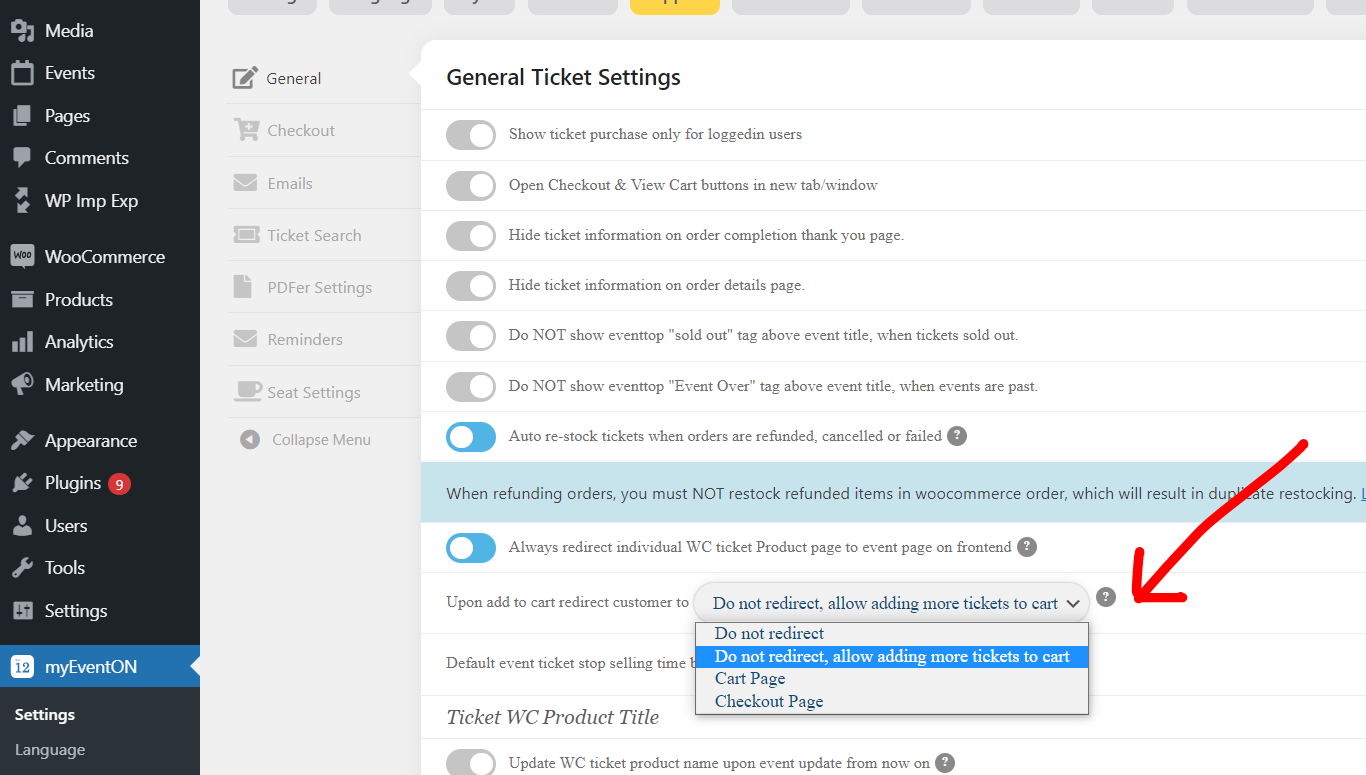
for eventon tickets see myeventon>>>>>>tickets
you have the option to tell what the button does when you add to cart see screenshot
I don’t see any empty locations; would you please elaborate?
Also, the new problem is that the months that don’t have any events are showing “No Events”, we don’t want to show empty months. The page didn’t use to show months with no events; now it does. Sometimes venues that hire our band like to explore past events. Now they have to scroll far down the page to see our oldest shows because there’s years of “No Events” months showing. It wasn’t like that before. Please advise.
Thank you