I hope that resolved your issue 🙂 If you have a moment, we would greatly appreciate if you could kindly leave us a review at codecanyon! from your account > downloads. Cheers!
Archives: Replies
Replies for tickets on suppota
Reply to: tickets(236844)
If you have more questions, kindly send us a new ticket and we would be more than happy to help you resolve your issues!
Reply to: tickets(237762)
Good Day,
I was wondering if you had any news about the search.
Thank you for your time
Reply to: tickets(238968)
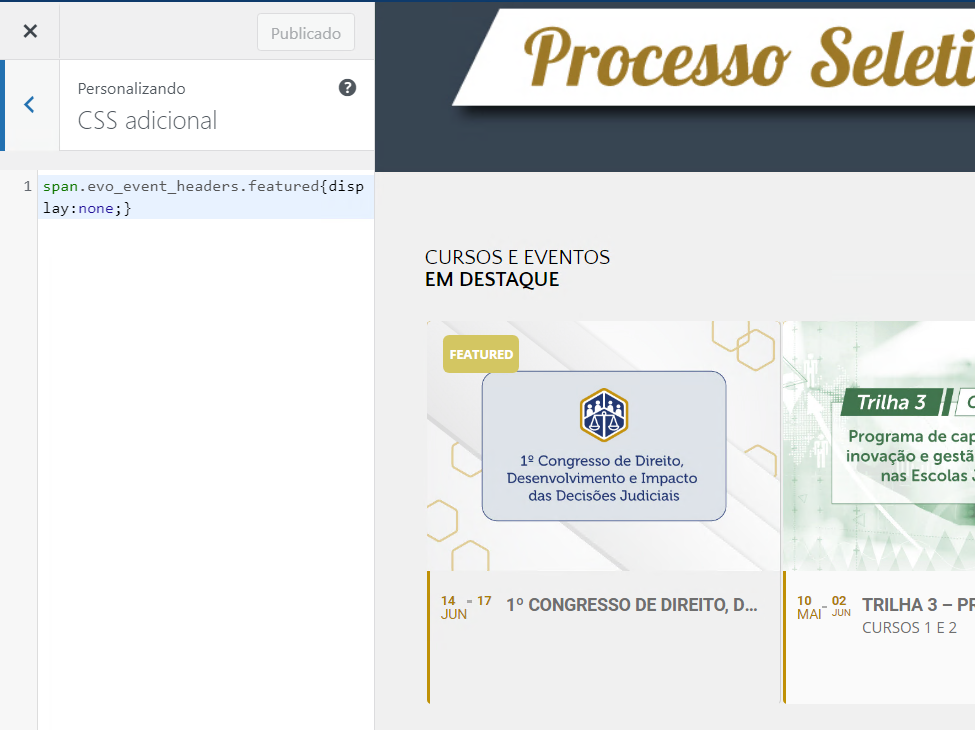
Sorry, could you tell me the path to where I should paste this custom css? Tried via Appearence > Personalize and EventOn > Style, but none of them worked.
Reply to: tickets(238984)
You are welcome. If you have any other questions please do not hesitate to create a new ticket.
Reply to: tickets(238984)
OK – Thank you
Reply to: tickets(238984)
Hi Tom,
I am afraid that option is not available now. You can, however, send us a customization request from Customize EventON Page.
Reply to: tickets(238970)
Hi James,
Could you please try the instructions mentioned in this documentation to make sure your issue is indeed coming from eventon. Also, ensure that you are using eventon version 3.1.5, which is the latest version.
Reply to: tickets(238969)
Hi Daniel,
You can enable the time and progress bar display by going to myeventON > Settings > Event top
Reply to: tickets(238968)
Hi Pedro,
You can use the custom CSS code below to hide the featured tag.
span.evo_event_headers.featured{display:none;}