Ok. Thank you.
Archives: Replies
Replies for tickets on suppota
Reply to: tickets(234771)
Ashan,
The same on dev2: https://dev2.myeventon.com/events/vir/
Reply to: tickets(234771)
Thank you for your messages, I am going to assign this ticket to Ashan and he will be able to take it from here and find you a solution. Please allow some time for him to get back to you, we greatly appreciate your patience and thank you for being a eventon customer! Also please disable any IP blocking on your site if there are any.
Reply to: tickets(237981)
Reply to: tickets(237981)
Ah yes. As a temporary solution please add this CSS code to EventON > Styles (If you don’t see any change, EventON > Scripts & Styling > turn off Write styles to header > save settings > turn on Write styles to header):
.evoslider.ajde_evcal_calendar.ss_imgtop .eventon_events_list .eventon_list_event .desc_trig, .evoslider.ajde_evcal_calendar.ss_imgleft .eventon_events_list .eventon_list_event .desc_trig { justify-content: flex-start; }
I am also going to assign this ticket to Ashan and he will be able to take it from here and find you a solution. Please allow some time for him to get back to you, we greatly appreciate your patience and thank you for being a eventon customer! Also please disable any IP blocking on your site if there are any.
Reply to: tickets(232990)
Thank you.
I think what I can do is add a new event of this type for each month and hide end date–so long as they can buy once the event has already “started”?
I’ll work with the link you sent to get the dropdown to work.
Reply to: tickets(235916)
Thank you for your feedback.
A few more questions:
- can you choose as many fields as you want?
- can you choose the order of apperance?
- can you choose to capture a date/phone/number/alphabetical format?
- can you choose to make them optional/mandatory on field level?
- can you display the additional ticket information in the order confirmation email?
- can you display the additional ticket information in the user’s Woocommerce order history?
- do you have a demo site on which I can experience it?
- is possible to configure all of these in an admin test site?
Thx in advance for your responces.
Cheers
Steph
Reply to: tickets(238022)
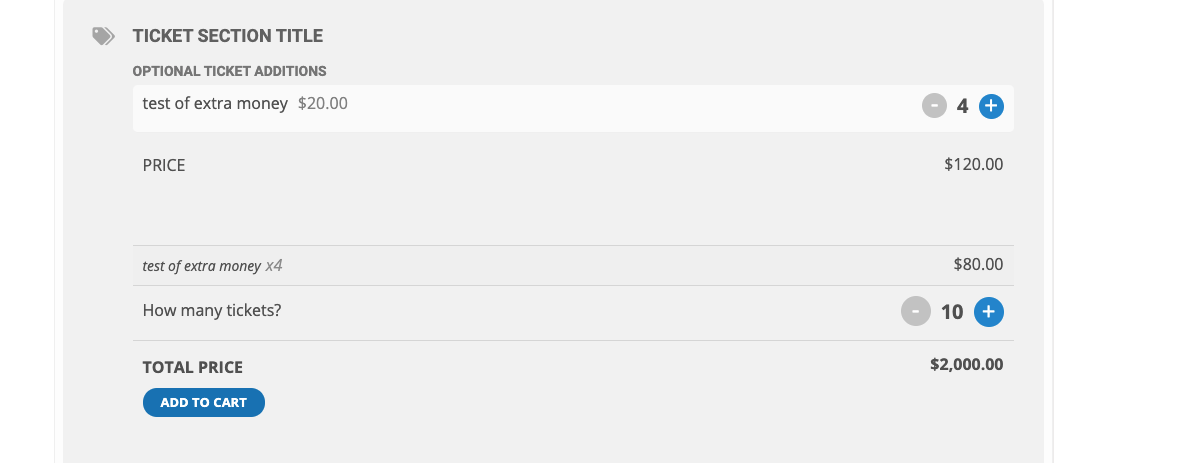
If I add more tickets now it gets really wild:
4 extra $20 additions now give me $2000.
I’m sorry bad this made me look very bad with an important client.
I’d like to get this resolved as soon as possible.
While we are at it, the design of the ticket does not make sense.
In the example attached, the optional ticket options should be below the regular price. Optional ticket additions have no reason to be at the top of the form and it is extremely confusing.
Please work with me in solving this issue. I just spent a lot of money upgrading trusting the option of adding ticket variations was going to be seamless.
Thank you
Reply to: tickets(238243)
Regardless of slider, if you view any of the events on an iPhone you will see what I mean.
Reply to: tickets(238022)
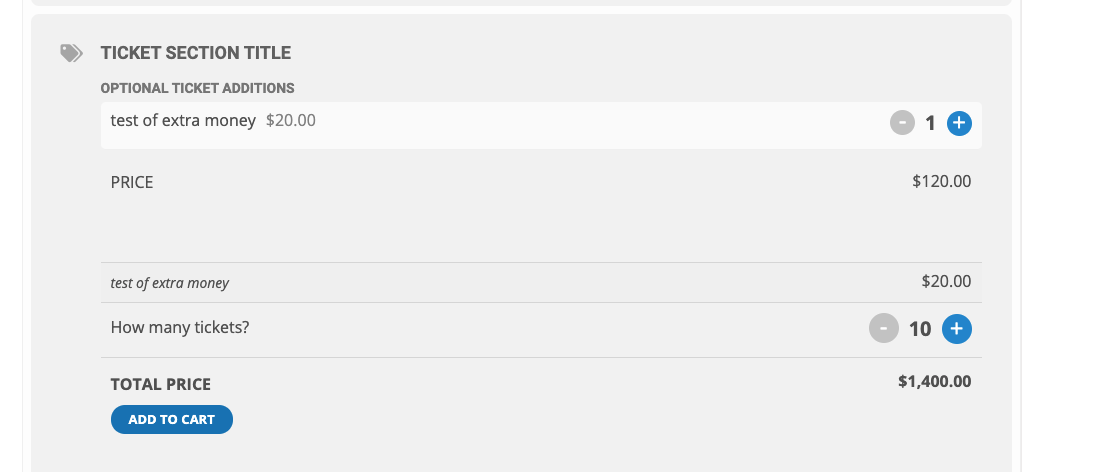
If I now submit a variation for $20 dollars my price jumps to $1400 instead of $1220 which is what I’d expect.