Is this normal behaviour? Can you make sure, when you test an event, that the number of available tickets will be the same afterwards?
This is not normal. Not sure how two different websites can affect each other.
I tried the temporary login link and also provided username/password, but none worked. Could you check?
Hello,
Are you referring to this Slider:
https://www.myeventon.com/addons/event-slider/
Or
https://www.eventonslider.com/
Because only the first one is our product.
Hello Josh, Thank you for letting us know of this and we are terribly sorry your custom styles were stripped out. Let us see what we can do from our end to allow special characters go through in the settings.
The changes we make to saving styles were inline with security vulnerability fixes.
Thank you friends!
Just released an update 2.5.1 — https://docs.myeventon.com/documentations/au-changelog/
This will resolve that issue 🙂 Enjoy the other new features added in 2.5!!
Hello Dave, thank you for letting us know of this. We have received similar messages from few other customers as well about access compromised. on Message shared in here as private.
We have since introduced “Secure Access Share” from rightside of this ticket page, where the information is encrypted before saving to our database. This should help protecting the shared access information in the future.
So, can you confirm that if points are enabled all rsvp can only be done using points?
Hello,
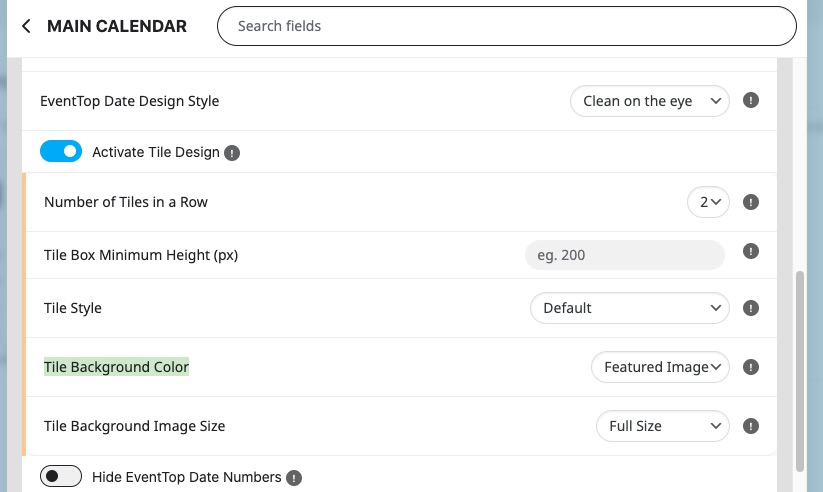
1. If you enable Tile Design, you can add a featured image as background:
[add_eventon tiles=”yes” tile_bg=”1″]
However, the sizing of a tile will be different.
In order to show a small featured image on EventTop, please add this to your shortcode:
show_et_ft_img=”yes”
However, it’s not compatible with Tile Design.
2. Please see 1. You can use it for Main Calendar as well as Event Lists shortcodes.
3.
a) Please add this CSS code to EventON > Styles (If you don’t see any change, EventON > Scripts & Styling > turn off Write dynamic styles to header > save settings > turn on Write dynamic styles to header). You can also add this code to wp-admin > Appearance > Customize > Additional CSS.
.evoet_eventtypes.evcal_event_types em.evoetet_val.evoet_dataval {font-size: 20px !important}
b) You can change Event Type color by going to EventON > Appearance > EventTop Styles > Other text ( Eg. Time, location etc.). If you don’t see any change, EventON > Scripts & Styling > turn off Write dynamic styles to header > save settings > turn on Write dynamic styles to header.
c) Please go to wp-admin > Events > Event Type > change icon.
4. Please follow
https://docs.myeventon.com/documentations/change-css-calendar/
You need to create custom styling to achieve this.
Please send us wp-admin access to your site from “Access Info” box on right side menu, to further assist your situation.
Hello,
On my side


Could you try manually clearing your browser cache?
I won’t be able to help because I need to check the HTML code.
You can try the instructions mentioned in this documentation to figure out which plugin or the theme causes this.