Hi there,
Could you have activated the addon license on a development or staging site?
Replies for tickets on suppota
Hi there,
Could you have activated the addon license on a development or staging site?
www.foodsorcery.co.uk/login
eventON
rAkhG!bp2SLfEe9k
Thanks
Helen
It’s both the eventON and woo emails where the problem lies.
Thanks
Helen
Sorry the correct info is as follows:
username: externalsupport
password: W@lkerMoonRang3r!
I provided access to the backend when I initially submitted the ticket.
The username is: externaluser
password: W@lkerMoonRang3r!
Thanks for your reply. But as you can see there must be an order as all the events have the same titles. Why is it different in every location? Where is this order coming from? The database?
It ist not: the alphabet, the ID, the SKU…
So, what is it?
With regard to the 1st video, that “scroll” element is not there, and so it’s not included at the bottom of the dropdown stack. Only 3 other pages that I manage as well. So we’ll try option “A” by removing me, and readding me as an Admin of that page….I just wanted to clarify that as well. My fault for not stating that in initial response. 🙂
Hello Ashan….Yes, as per the 2nd video, that is what I have been doing in the interim since the “Share” option ever since the Calendar stopped functioning, and mimics the same issue the user in the video has. I contacted someone else who is an adminstrator on the page, and they do not have the same problem as I do. It works perfectly fine for them. One other option/resolve that was discussed was removing me as an administrator, and then readding me back. We will try this as well to see if it corrects the issue. We will update the ticket with our findings!! Much appreciated…
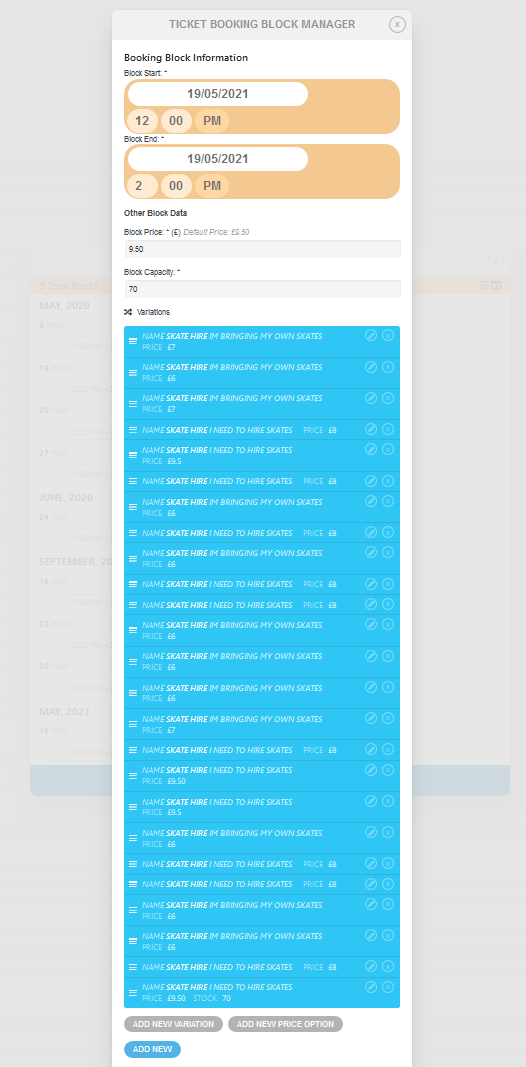
Another example: Created a new date for an event, then went back in to add some variations and there were 25 already on show. I assume these are all the variations from the previous event dates.
Hello,
There are only two options at the moment: https://docs.myeventon.com/documentations/customize-single-events-page/ and https://docs.myeventon.com/documentations/add-sidebar-single-events-page
Please check and let us know.