Reply to: tickets(236756)
Replies for tickets on suppota
That’s awesome – thank you! I will leave a good review, support has been great.
That’s awesome – thank you! I will leave a good review, support has been great.
I’ll resubmit as a new request, thanks
I’m still having problems with the log in issue. The password protect on the page only works for adding events. It doesn’t work that way for the event dashboard. So I do need this issue resolved with how to get the logins to work right. Could you look to see why it’s still not working and going to a “page does not exist”?
I think I figured out a work around to fix this login problem. I just changed the settings back to allow anyone to enter events without being logged in. Then I set a password protect setting for those pages. I just tested it out and it works, but I wondered how it would assign the events. It doesn’t, it just says no assigned user, but that’s okay for our needs. So I can let this go like this with the password privacy on the pages. It works.
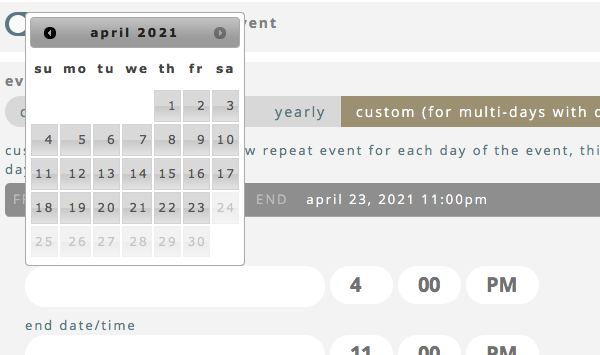
Were you able to look at that other problem where the dates are blocked off for custom days? Let me show you a screenshot.
This example is for April 23, 24 and 25th. I needed custom hours for these 3 days. Once I put in April 23rd, when I went to add the next custom day, it shows the days after the 23rd blocked out and I can’t select them.
The issue is not customization work. Please make sure you have the latest version of the plugin and all addons.
Hi, I deactivated the cache plugin for the two specific pages for the action user form page and the event manager dashboard. Then I went back and changed the settings back to only allow logged-in users to submit events. When I try to login, it now goes to a non-existing page.
I don’t want the for to sit on a public page without a login. Anyone could add events to our events calendar.
Could you see why the login still does not work. I’m confused.
Yes you need to look the ones down there like
“Tercero api”
“categorias”
Please send the wp-admin in a private message. That’s the secure way.