I understand and thank you.
Archives: Replies
Replies for tickets on suppota
Reply to: tickets(234993)
So yeah seats is not set up for exactly what you are after
Brainstorm of ideas below:
so you can’t really control a vendor who sells food to buy in the food section- you just have to make it clear that if you sell food you can ONLY buy in the food section
Alternatively you could create an event for each product/service
have the food event and the seats would only show food booth options- probably not ideal but I like to brainstorm
then you would have the crafts event only showing craft booths available
Yeah I can foresee some issues with that but each event would have all the food buyers in one location (as in their contact details etc) and you could then use the event tickets to send an email out to only those who purchased a food booth.
As for only buying one Booth there is the option in tickets to limit it to one ticket per person
see video
But they can still try to buy in the wrong zone so you need to have strong wording to say food must be in the food zone
Reply to: tickets(235064)
well if you are going in and deleting events you could tweak the calendar shortcode and remove the event type number as well
if you add filter_show_set_only=”yes” to the shortcode it will only show the selected event types and not event types or associated events that you don’t want to display
you may be interested in events list and items as that can show a list of event organisers (and if you make the event organisers the band name you’ll be able to have a list of bands)
how are you using the event organisers fields- are these the band names or are they the organisers of the venue?
if the event organiser was the band name you could have a drop down of band names without needing to create an event type
all you need to do is delete the event organiser and it should technically vanish from the calendar
Reply to: tickets(235142)
getting an 502 Bad Gateway error when trying to visit your site
Reply to: tickets(235063)
eventon seems to be installed – you just need to add events
heres a video on how to do a few things
Reply to: tickets(235063)
WordPress Access
http://events.richbroes.com/wp-admin/
admin
p9@S4Rbx@1
Envato purchase code
f46fa25f-ad60-48df-abbb-33eaca219c49
Reply to: tickets(235002)
https://events.12-gates.com/wp-admin
login: 120pds
password: 12bc2021Temp
Reply to: tickets(235005)
Hello,
Please check Booking add-on: https://www.myeventon.com/addons/bookings/ and also Variations https://www.myeventon.com/addons/ticket-variations-options/. They are compatible. Try on https://dev.myeventon.com/wp-admin/.
The rest is on WooCommerce’s Checkout.
In order to add more fields to Checkout please check https://docs.myeventon.com/documentations/how-to-add-additional-fields-at-checkout/
Reply to: tickets(235079)
Hello,
Could you tell us how do you translate EventON? Through WPML https://docs.myeventon.com/documentations/wpml-eventon-front-end/ or Language Corresponding Events https://docs.myeventon.com/documentations/setup-language-corresponding-events/?
Reply to: tickets(235114)
Hello,
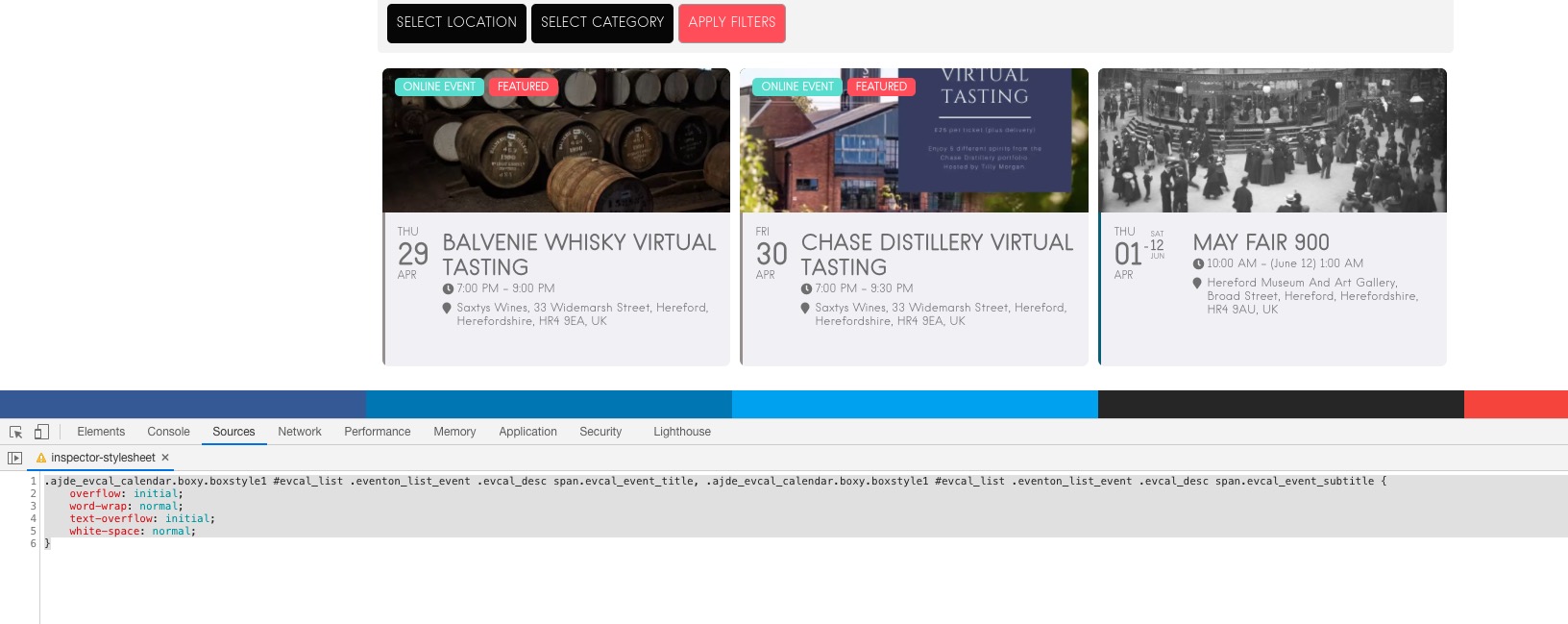
Please add this CSS code to EventON > Styles (If you don’t see any change, EventON > Scripts & Styling > turn off Write styles to header > save settings > turn on Write styles to header):
.ajde_evcal_calendar.boxy.boxstyle1 #evcal_list .eventon_list_event .evcal_desc span.evcal_event_title, .ajde_evcal_calendar.boxy.boxstyle1 #evcal_list .eventon_list_event .evcal_desc span.evcal_event_subtitle { overflow: initial; word-wrap: normal; text-overflow: initial; white-space: normal; }