I have read al the replies above and counted how many times we asked for documents,
video´s, the zoom conversation and our money back.
You didn´t send anything. Our first complaint was already in july 2020.
You just wanted to make quick money. That´s all.
I don´t know why you didn´t install the plugin rsvp points. Would have saved me a lot of time and frustrations.
I hope you feel good about yourself, knowing that you took money from people that work hard for it and support 3 kids.
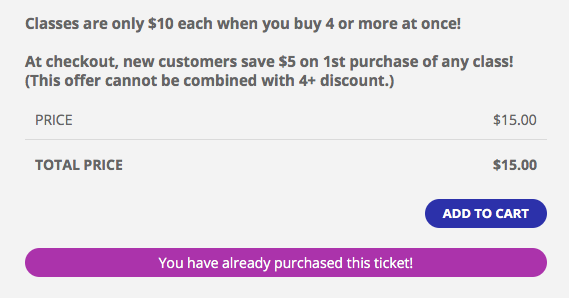
Ashan- theres no translation options for You have already purchased this ticket!
I am going to assign this ticket to Ashan and he will be able to take it from here and find you a solution. Please allow some time for him to get back to you, we greatly appreciate your patience and thank you for being a eventon customer!
he may be able to tweak the back end- please reply with the exact sentence you want to change it to
username or password did not work for us
I respect the client just fine.
I have been hunting you for a lot of time and you where ignoring me.
The work was supplied, I installed specific plugins, added specific ways for the image to be uploaded to profile and add them the details.
The work has been delivered.
Thanks Ashish 🙂
Can You please add preference coloring calendar of „Event type 2“ with ID 244?
If there’s one event, select color from this, and if there more events in one day, show color from event in Event type 2 = 244.
Thank you in advance, Petr
I’ll create a Feature Request for that and thanks for the suggestion.
My client is loathe to add any additional boxes/info to the modal. I think she’s viewing on a tiny monitor and is stuck on the idea that the modal cannot require scrolling. I’ve convinced her the Virtual Event Details are critical and did as you suggested, moving Add Class to the bottom.
For the Add Class box, though, I’m wondering if you could let me know how to change the “You have already purchased this ticket!” string. I see no option for it in Languages even though a similar one exists for “You have purchased a ticket for this event” in the Virtual Event Details.
I’ve customized all relevant strings containing “ticket” so they read “class”. But that’s the one string I can’t find! I hope I’m not simply overlooking it. Maybe I need to submit another Feature Request for that?
Please remove your snippet and check once.