Hey Randy,
Sure we can do it.
https://www.paypal.me/Basilakis/100usd
After u pay will start working on it
Replies for tickets on suppota
Hey Randy,
Sure we can do it.
https://www.paypal.me/Basilakis/100usd
After u pay will start working on it
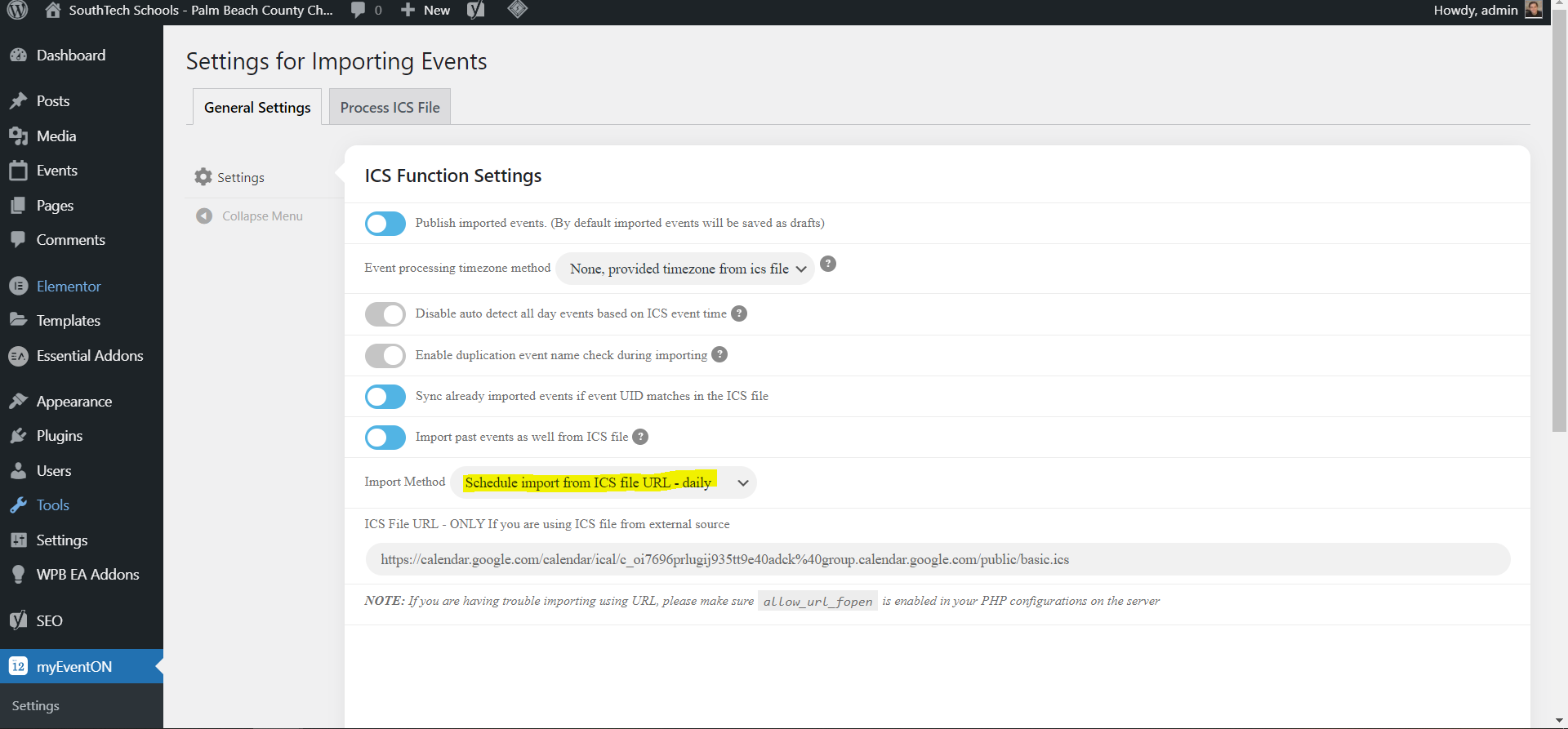
Hello,
Attached is the screenshot of where from the dashboard I selected daily. Also, the following is the new access:
https://www.southtechschools.org/wp-admin
EventON
EventON2021@
I entered credit info.
Can you check if the urls I entered on the Google Cloud Platform are right?
My event card:
Hey Basilis,
do you have any update on this at all?
that demo on the home page is jitsi you can try it with no download or anything from their home page https://meet.jit.si/ just type in a unique name and BOOM you are off. (and you then click settings then security to add the waiting room) thats essentially whats being embded on your site without the share or invite option
Zoom embed – is not very good quality, worse than jitsi tbh at the moment but zoom are proactive so perhaps one day it will run better Its OK if you are just showing yourself- but there is a lag a delay so you say something and then wait 5 seconds , or you move a hand and 5 second later you see it move on screen which is probably not great if you are doing fitness things
once zoom has a better browser version we will look at integration
with login – before viewing you want to streamline that as much as possible – (thats why I am working on the pop up) but ideally I’d like it to be similar to when you log into wp-admin – today and then tomorrow- I don’t have to physically log in- it remembers me- that would make it very easy to log in to view things you have bought tickets for
I was also looking at a simple login- so they only log in with their email address – but that can cause issues in security (but all the customer needs to remember is their email address)
in anycase play with jitsi- but if the client likes zoom then zoom is pretty good quality and their waiting room and lock off the join is great
Just make sure she tells her clinets how to whitelist her email address so it doens’t end up in spam folders (so they don’t miss out on the links etc) and if there was a way to have people log in once and remember them so they don’t have to log in again that would be fantastic for returning customers- nothing worse than trying to remember your password before a virtual event
I have often thought of a combined Jitsi with zoom-
so you have jitsi on the landing page as people go to the site where the host can walk them through how to join the zoom meeting- and at the end when the host goes away- the attendees can stay on the event page and chat with each other- that has not been implemented as yet- but possibly would be good for people to talk
we are brainstorming ideas so you can create break out rooms with jitsi (because its so easy to set up a meeting) so after a virtual event- attendees can break out into their own chat rooms but the how to on that has not been started as yet
Thanks very much for the demo and for the tips and recommendations. I wasn’t aware of Jit.si so it’s nice to have that as an option. For this client, however, it’s highly unlikely I’ll be able to get her to switch.
She does online fitness classes for seniors and has been offering them on Zoom for a while now. She seems comfortable with that platform and the features it offers (recording, waiting room, user account required to view, etc.). Her web skills, along with many of her clients, aren’t that in-depth (especially learning how to manage events in WordPress, EventON and WooCommerce) so keeping access as easy as possible is key.
That’s why the embed seems to be super simple since she won’t need to email clients beforehand with a new password prior to every event. And she wouldn’t need to worry about someone accessing it who shouldn’t since account/purchase is required to even view it. That means she can skip monitoring the users and doing check-ins too. Am I correct with all of that? The embedded Zoom can’t be accessed outside the site without purchase and login?
I’ll do a test to see how Zoom works when embedding into the events themselves. Now that I’ve convinced her that having an account to buy classes is required it should make things a lot easier. I may be able to convince her to try the Jit.si option—who knows!
I saw the preview of the event embed on your homepage but couldn’t seem to find anything showing it in action. Maybe I didn’t look hard enough?
from what I see with your map api
Geocoding Service: This API project is not authorized to use this API. For more information on authentication and Google Maps JavaScript API services please see: https://developers.google.com/maps/documentation/javascript/get-api-key
so its possible you have created the API but you have not added a credit card (you get 25K free hits a month) but thats about the only thing other than you using another google maps system on the website (some themes do)
Hello Jens, we are aware of this vulnerability which has only been reported by you. But we can not update to latest version because that breaks all the handle bar functions that are existing in various parts of eventON and its addons. We will have to slowly work on this as update to handlebars would effect so many people.
If you are not using our addons then you may use latest handlebar on your site by replacing the exisitng handlebar file with latest version file
Yes this will be further improved in the upcoming updates.
alrighty heres a long video – sorry I go off topic Moohoohahahaha but come back again
showing how to embed an event into the eventon event
is there a reason you are using zoom specifically?
Also zoom can be embded however the quality is simply atrocious – its really bad and we did play with the idea but we will wait for the browser zoom to get better before investing the time because right now browser zoom sux (for lack of a better way)
jitsi is a better browser experience and requires no downloads no apps no accounts