Hello,
In order to update please follow:
To update eventon to latest version: If you are unable to do autoupdate, you can go to codecanyon your account > download and get the latest eventon version as zip file. Then you can go to your website, deactivate old eventon, activate (Do not delete eventon settings & data when EventON is uninstalled) from eventon settings, delete old eventon, install new one and activate. This link will further explain the process it. Also you can follow us on twitter to get real-time announcements on updates!
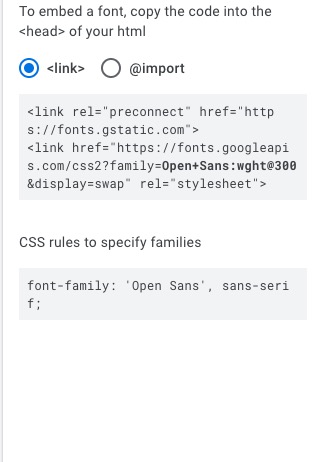
It seems that the problem can be in low case font name you use:
Instead of ‘open sans’, could you try ‘Open Sans’.
Please note that since we haven’t developed the theme we don’t really know how it works.
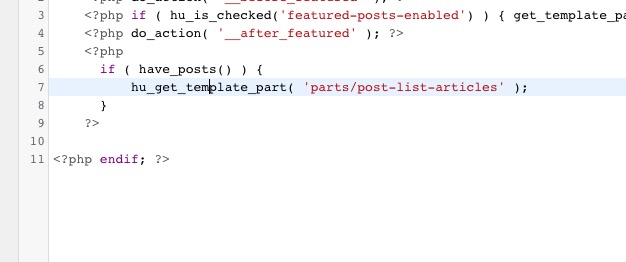
Could you show us a file that has a similar line:
but with sidebar.php and sidebar-2.php.
Please use RSVP – User RSVP Manager shortcode
[evo_rsvp_manager]
Hello,
Please use this form https://www.myeventon.com/my-account/lost-password/ to reset your password.
Could you send us the shortcode?
Hello,
Can you tell us when you resolve the issues? We have no news of you since last week.
Bests,
Jeff – Le Studio A
Hello, We had a problem with our payment authorization (the page timed out). We want to pay by credit card. Can you please send us the payment form again as we are now unable to access it. Thank you.
Hi Team,
Thanks for the reply
https://bnicoreregions.com/memberspage/
Please recheck this link, I have used category shortcode to display events from a particular category but still it is showing other event types also.
How can I show only a particular category event and not show other event types?
Thank You