Hi,
the problem is that I have not received any feedback from you at all since March 13. Nor that someone is working on it!!! You have in your policy that one wants to apply for a refund. So I kindly ask again for a quick refund.
Thank you for a quick confirmation and best regards
Gregor
Hi, FTP credentials for the staging site are here, apologies, I should have sent them before:
greenweekstage.sftp.wpengine.com
2222
greenweekstage-glyn
NYUqjBORwK6J
Website is here: https://greenweekstage.wpengine.com/
Login access to WordPress: https://greenweekstage.wpengine.com/wp-login.php
username: myeventonsupport
password: %Ez1^N2o38ia@*IwdJmp8ja&
It’s working now. It was probably caching. On that note, had a question about posts not showing up immediately after being posted. When I add new events, it takes a very long time for them to show up for users. What could be the issue?
see this page:
https://ezystreamlive.com/events/rsvp-test-2/
if you RSVP to the event- then log in- you can’t view the jitsi meeting
The problem happens when activating this option.
EventON Settings > Time Settings > try enabling “Use UTC offset time globally on calendars (BETA)
But if you deactivate that option, the progress bar of the live event is activated at 100% at the beginning of the event (no progressive advance)
Hello!
There was another question !
Example of a question – there is a site that hosts both virtual and real events and there may be not one but several of them on the site and now the question is-the user went to the site and left a couple of requests for events how can he see after a while what events he left responses that would not miss them ? Is there a personal account (or maybe you can implement it somehow) where you can see what events he left responses (requests) ?
ftp credentials are not working. Can you check please?
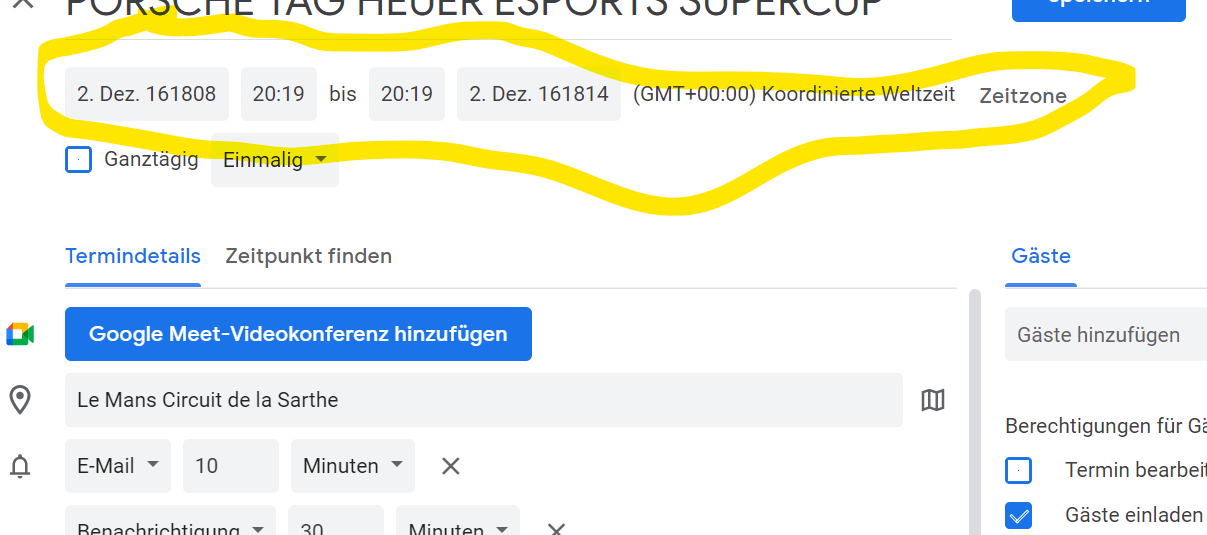
Hi, I changed the line to the ehat vou circled red. No change, it says, the ICS file is broken and Google Cal shows what I attached. It seems like there’s some kind of table wrong, like a xls file or something, if you look at the year. Maybe it’s something with the date format?
I uploaded the work. This is also a child plugin. All work is in a custom plugin eventON-229908-child
added shortcode evo_user_rsvp_list with parameter rsvp_status
[evo_user_rsvp_list rsvp_status=”only_yes”]
[evo_user_rsvp_list rsvp_status=”only_no”]
Thank you. That did the trick. 🙂