Following up on the question. Thanks
Archives: Replies
Replies for tickets on suppota
Reply to: tickets(227773)
AM – Posted 1 Day Ago – #230848
admin login
URL: my.Zessio.com/wp-admin
USER: support@letsalloy.com
PASSWORD: frdooWL7GQ$(XmtRZE4IJqpE
——
SFTP Address:portalzessio.sftp.wpengine.com
Port Number: 2222
USER: portalzessio-support
PW: QlCwzqHcRd65
Reply to: tickets(231106)
Hello,
single user signed in rather than a customer being able to share their username and password amongst multiple families
Could you elaborate more? You can test virtual events on our demo website: https://dev.myeventon.com/wp-admin/
Please also note that Virtual Events are included in the main plugin: https://docs.myeventon.com/documentations/how-to-set-up-virtual-online-events/
…for streaming to it with regard to video size limitations or bandwidth limits that I should know ahead of time.
It depends on Virtual Event Boradcasting Method:
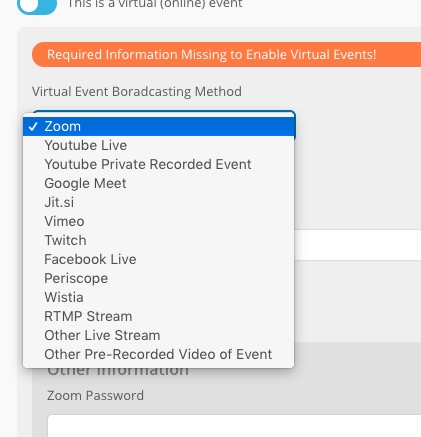
Reply to: tickets(231152)
Hello,
Could you try applying this patch fix to resolve this:

Reply to: tickets(231141)
Please use this shortcode:
[add_eventon_el el_type=”pe” number_of_months=”12″ month_order=”DESC” event_order=”DESC” show_et_ft_img=”yes” ux_val=”4″ show_year=”yes” event_past_future=”past”]
Reply to: tickets(223656)
We are glad your issue is resolved, if you have any further questions or concerns please create a new ticket.
Reply to: tickets(230918)
Thank you for your messages, I am going to assign this ticket to Ashan and he will be able to take it from here and find you a solution. Please allow some time for him to get back to you, we greatly appreciate your patience and thank you for being a eventon customer!
Meanwhile please follow https://docs.myeventon.com/documentations/how-to-cancel-addon-subscription-before-auto-renew/
Reply to: tickets(231188)
Hello,
Could you tell us more about what and how would you like to customize EventON?
If you want to customize colours or fonts you can go to EventON Settings > Appearance.
If you want to customize calendars themselves, you can use Shortcode Generator: https://docs.myeventon.com/documentations/shortcode-generator/
Please also note that we cannot refund the main plugin from here. You need to contact CodeCanyon.
Reply to: tickets(230768)
…filtered by date?
Could you elaborate more? Today, tomorrow, past? You can check this guide https://docs.myeventon.com/documentations/how-to-use-event-types-to-do-more/ and use Event Type to filter by date.
Is it possible to get direct link to the event via JSON data?
You can either use “name” and then translate it to event’s URL. Or add one by following https://docs.myeventon.com/documentations/add-additional-event-data-json-output/
Reply to: tickets(230980)
Hi James,
Yes, all functions you have listed will be added.
Very likely, this custom work will be a separate plugin which will work in similar way to a child-theme. This means, the original code will not be altered. Once it is complete, I will send you the work or I can install it for you.
Please provide your email address so I can send you payment request. Yes, it is USD.
Regards
-Ashish