Cool.
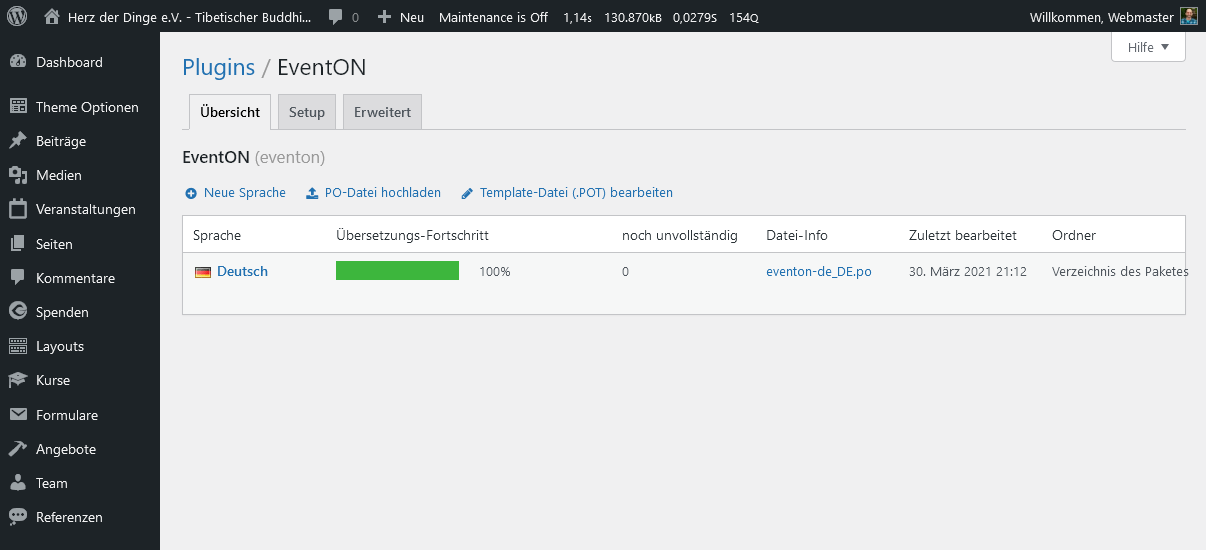
But still i have the issue, that my calendar main plugin do not use the translations from the .
For example “Event Details” is still not translatet in frontend or backend.
Please have a look: https://www.herz-der-dinge.de/kalender/
Backend Loco translation 100%:
https://www.herz-der-dinge.de/wp-admin/admin.php?bundle=eventON%2Feventon.php&page=loco-plugin&action=view
Hi Maxime,
Please clear both your browser and site cache and then check if the issue persists.
If the issue is not fixed then, send in some admin access to your site so that we can take a closer look.
Hi Cyndie,
Yes, I have looked at your site now and it seems that the latest version of the Eventon main plugin is installed. Would you mind creating a testing site where you can update the Action user plugin and send us the login access so that we can help you troubleshoot the issue without your live site being affected?
Hi Sam,
I have added the custom CSS below to EventOn > Styles on your site to fix the issue.
.single_ajde-events .evcal_evdata_row.evcal_event_details .evcal_evdata_cell p{margin-bottom: -15px !important;}
Let us know if this helps.
Hi Support:
Did you log in? I provided admin access. The plugin IS installed. I bought it directly from EventOn, not from ThemeForest. I re-downloaded when this issue started and reinstalled it. That crashed by site and I had to roll back to an archive.
Sorry my mistake, here is the correct amount: https://www.paypal.me/Basilakis/120usd
Follow this link, it is the updated request
It worked! Than you soooo much 🙂
” unfortunately when you increase the count it doesnt move waitlist to guest list. I will add tthis to future 🙂” Yes please!
Thank you
Elena
yes it is the
https://touaregaventures.com/events/formation-aventure-1-2-jours/
Formation aventure 1 – 2 jours
But all the other did not work yesterday, now they work exept that one.
Thanks
Hi
Yes but the purpose is to use it with my main theme. Is there anyway to manually add the code through functions.php.
Regards
Hi Basilis, Thanks for getting back to me. It looks like we’ve moved backwards now, as the ICS files I download are not getting added to my calendar because the start and end date data is not included. below is the code of an ICS file that I had working (with a 15M alarm) last year, and then the code for a test eventI just set up today (todd-test-3.ics).
We first need to get the start/end data back in, then need to solve the issue at hand, which is properly formatting the ICS file that is downloaded. Right now the hook is working and the value I add into the trigger field is being passed to the downloadable ics file, but the format is incorrect, therefore it’s not working.
Working code for old event with alarm:
BEGIN:VCALENDAR
VERSION:2.0
PRODID:-//eventon.com NONSGML v1.0//EN
BEGIN:VEVENT
UID:5eaaf4b9bbe75
DTSTAMP:20200430T115433
DTSTART:20200430T163000Z
DTEND:20200430T170000Z
LOCATION:
SUMMARY:Test Event
DESCRIPTION: Lorem ipsum dolor sit amet, consectetur adipiscing elit. Maecenas eu massa ac nisi facilisis malesuada sit amet quis nisi. Etiam sit amet ligula congue, faucibus ante eu, ultrices ligula. Sed interdum neque eget elit auctor luctus. Phasellus gravida justo in erat tristique, eu rhoncus mi pellentesque. Vestibulum ante ipsum primis[..]
BEGIN:VALARM
TRIGGER:-PT15M
ACTION:DISPLAY
DESCRIPTION:
END:VALARM
END:VEVENT
END:VCALENDAR
Current ics code that is not formatted the same and missing start/end dates:
BEGIN:VCALENDAR
VERSION:2.0
PRODID:-//eventon.com NONSGML v1.0//EN
BEGIN:VEVENT
UID:6065d4eec3eeb
DTSTAMP:20210401T101302
DTSTART:000000T000000Z
DTEND:-39600T000000Z
TZID:America/New_York
LOCATION:
SUMMARY:Todd Test 3
DESCRIPTION: This is a test
URL:https://mw.modernation.com/events/todd-test-3/
BEGIN:VALARMnTRIGGER:-PT15ACTION:DISPLAYnDESCRIPTION:nEND:VALARMnEND:VEVENT
END:VCALENDAR