Sorry about the delay should be good to go now
Archives: Replies
Replies for tickets on suppota
Reply to: tickets(228513)
Mate you have to request a refund for eventON from codecanyon we can not refund the eventON payments because they are sold exclusively via codecanyon.
Reply to: tickets(229042)
here is the link to the page https://dev.foogin.com/event-organizer/retreatsz123/ where you can see this event. As you can see it appears on Sundays and One Monday (the next Monday from the day when it starts).
Reply to: tickets(229042)
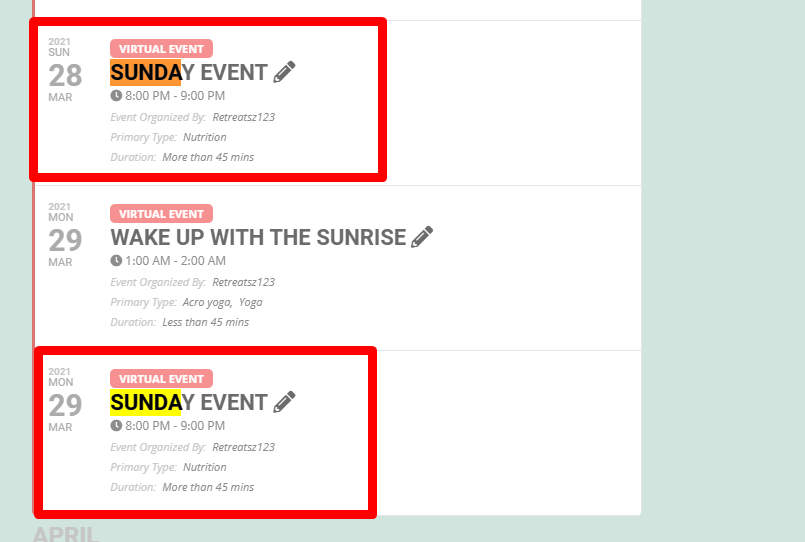
Hi Kenneth,
All our plugins are up to date.
The issue is still there. Can you please have a look
Reply to: tickets(229338)
Hi Tasmiya,
You can show the event time on the event top by going to myEventOn > Settings > EventTop and choose to show Event Time.
Reply to: tickets(229338)
go to myeventon>>>>settings>>>>event top
and then activate things you want to appear at the top
Reply to: tickets(225125)
It works great! Thank you so much. Just to confirm, all of the code lives in our functions.php, correct?
Reply to: tickets(226185)
from what I see there are no event types or event type 2’s on the live site
https://cachecreate.org/wp-admin/edit-tags.php?taxonomy=event_type_2&post_type=ajde_events
not sure what you are using to create a staging site- you are supposed to be able to 1 click and make the staging site the live site- but if you are going to copy settings over then you’ll need to create the event types again and then edit every event and assign them the right event type- best to use quick edit
Reply to: tickets(228724)
we can only answer based on the information within a question .
You can use it if you use the L2 language (or L3)
and in myeventon>>>>settings activate – activate Language corresponding events
Now when creating an event you will have a new option on the edit event- which is to make the event based on the L1 or L2 language
L1 could be virtual and L2 could be streaming
Reply to: tickets(226185)
Hi, the page was private but I just made it public. If you follow that same link, you should be able to see the calendar now.
Thanks!