Hi,
Sorry for the delay. I will send you the work asap. Thanks
Replies for tickets on suppota
Hi,
Sorry for the delay. I will send you the work asap. Thanks
here is a test within elemento https://www.zd-bb.de/eventon-test-2/
I was able to edit this page https://www.zd-bb.de/veranstaltungen/ with the shortcode to show 10 events
So please clear your web browser cache
looks like you already have eventon on your site
https://cfa.fsu.edu/news/events/
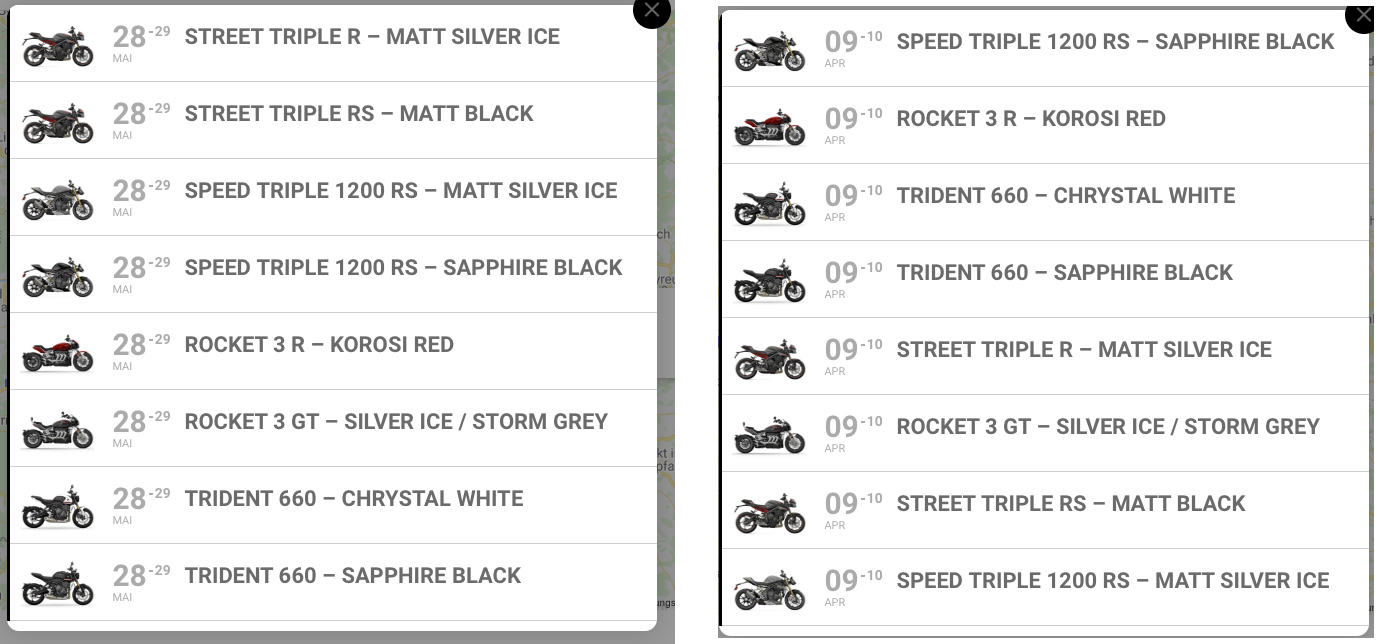
No I have 2 event cards in different locations with the same events (see screenshot)
How are the events sorted? How can I affect the order?
Hi there,
nothing happened and no answer! Really?
It appears to be working now! Thank you so much.
Hello, I have now updated Eventon and Eventon Events List, but I can now no longer see my calendar in Elementor. It keeps loading in Elementor, but it’s not showing up. On the live site, the calendar looks as it was before the update. But in Elementor it keeps loading. Can you tell me why that is, please? I still want to fix the issue regarding the number of events (my original request as part of this ticket), but if I can’t see the calendar in Elementor, I can’t see if my changes in the code work.
You said: It seems that the problem is not in the theme or other plugins, but in overall performance when everything is activated at once
So with all the plugins activated the problem is in your plugin. right?
Hi there,
Thank you for reaching out!
I am going to assign this ticket to Ashan and he will be able to take it from here. Please allow some time for him to get back to you, we greatly appreciate your patience and thank you for being a eventon customer!
Well, any update about why the time remaining is not showing and the slider is all the way to the end for the live events. Please see the screenshot above in this post. (https://helpdeskx.s3.amazonaws.com/wp-content/uploads/2021/03/21061828/time-left.png)
Thanks.
And, what did you exactly do to remove the strikethrough? Any custom css you added?