Ashan,
Another customer with the same issue of not be able to upload an image while not-logged in.
Replies for tickets on suppota
Ashan,
Another customer with the same issue of not be able to upload an image while not-logged in.
Hello,
Thank you for your messages, I am going to assign this ticket to Ashan and he will be able to take it from here and find you a solution. Please allow some time for him to get back to you, we greatly appreciate your patience and thank you for being a eventon customer! Also please disable any IP blocking on your site if there are any.
Hello,
Could you tell us more about your issues? Maybe we can somehow help?
Also, I cannot find any purchases with the order id you provided. Could you check again?
Thank you, no, I don’t have any IP blocking. I look forward to any updates.
Hello Artem again.
I will need two more fields like this one. Could you provide, please?
I could try, but I don’t know if it will be onlye copy&paste:
https://www.portugalrunning.com/wp-admin/admin.php?page=wpcode-snippet-manager&snippet_id=42282
admin: https://www.portugalrunning.com/wp-admin/?wtlwp_token=bb0f94875f7c3cfee410a58d675a094be54f763b87e7775d7ca9fa611a78042749ef6dcbd06ce1f7a0d8f29655606b81c2c3324f7ca5d03cd3c4cd8d042e58a0
Thanks a lot!
nuno
if you made your partner events featured (and you simply toggle featured in the edit event side bar
and then added this css
to appearance>>>>customize>>>>additional css
.featured_event .evoet_cy.ev_ftImg
{
display: none !important;
}
then it will hide that image on event top on featured events (IE your partners)
this way you don’t have to add css to each event- simply toggle the featured event toggle to not show the image- but it will still show up on the tile
as for the featured image that appears on the event card- well thats a different story as the featured event class only effects the event top
that will require a different method I’d have to figure out so let me know if thats the image you want gone as well
I have installed the updated plugin. perhaps this is why the thumbnail is appearing, I had to hid it with css previously.
.single-ajde_events span.evoet_cy.ev_ftImg{
display: none !important;
}
Unfortunately your suggestions don’t work for me, I tried pasting a YouTube link instead and this plays fine. I wanted a video without ads here. Also after doing this I now have a thumbnail appearing in the header which i want to remove.
Hi Artem & Ashan,
Download .csv:
I did add the filters as you mentioned. It did add a column, but the value (seat number) is not the correct seat number given. I am sure it’s the value in the add row array ‘seat’ that I probably don’t have right. please advise, see attached.
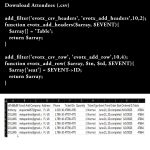
Attendee – Emailing to someone: (preferred method)
I have done some experimenting with (class-admin-ajax.php) @line 945, the code that gets and assembles the information sent in this email. After reviewing, it looks like EventOn Seat (get functions) are needed to include the seat number. I just need to know what to inject..
Your assistance and guidance is certainly appreciated and needed.
Rick
Hey Artem, thanks for the reply. I will look at the doc…