SFTP:
sftp://hbt2020.sftp.wpengine.com
U: hbt2020-eventon
P: Th@NkY0u!
Port: 2222
Archives: Replies
Replies for tickets on suppota
Reply to: tickets(220141)
Ashan with eventon deactivated it goes from this with eventon https://gtmetrix.com/reports/hbt2020.wpengine.com/0olztxo6/
to this
https://gtmetrix.com/reports/hbt2020.wpengine.com/IyrNSIeN/
Reply to: tickets(220141)
Please send us FTP access to your staging site as a private message, so we can perform several tests from our end and resolve your issue faster!
Reply to: tickets(225530)
can you let us know how to change it to left to right and back to right to left
we would like to be able to toggle and change and view things in Left to right and see if there is an issue between left to right and right to left
Reply to: tickets(225517)
quick question before we give the full answer
How are people registering for the event
Are they buying a ticket or RSVP’ing are you using any of our addons (namely the tickets or RSVP addon)
Reply to: tickets(224926)
see video below
Reply to: tickets(225523)
when they are logged in and on checkout- it will auto fill in their details on checkout
Reply to: tickets(225525)
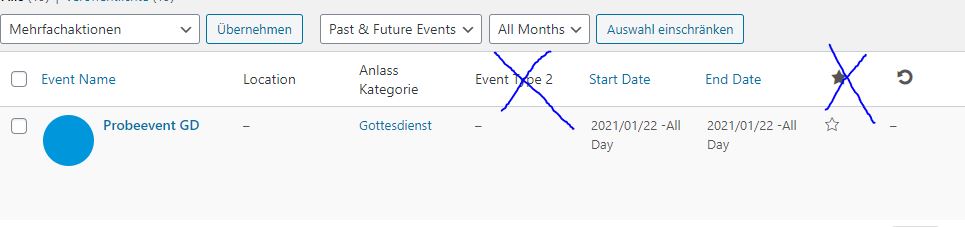
add_filter(‘manage_ajde_events_posts_columns’, function ( $columns )
{
unset($columns[‘tags’], $columns[‘author’], $columns[‘categories’], $columns[‘comments’]);
return $columns;
} );
That’s how I deleted the columns from WordPress itself
Reply to: tickets(225525)
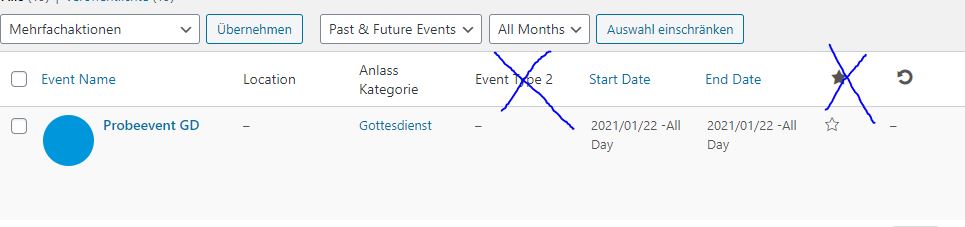
I would like to take away the columns that I have crossed
Reply to: tickets(224926)
Hi – please log in as: EventOn user name and password EventOn123