Hi Trisha,
Sure we can do that. What this field should do, if it is selected or not?
Replies for tickets on suppota
Hi Trisha,
Sure we can do that. What this field should do, if it is selected or not?
Christian did you say commenting that line did not stop ajax from running? I have tested it out and it work perfectly.
I will see if we can add an option to disable this if calendar is not using ajax. But it get little tricky because sometimes ppl use several calendars on the page and if one of those use ajax we still need to run this. Anyways more improvements on this to come 🙂
see video below
what I believe you need is this https://www.myeventon.com/addons/event-lists-extended/
However if you just want a calendar of Future events- (even if its 76 events) then try this shortcode
[add_eventon_list number_of_months=”24″ hide_empty_months=”yes” show_year=”yes” show_et_ft_img=”yes” event_past_future=”future” hide_past_by=”ss”]
Hello,
How much longer for this?
Thank you.
Hi Bryan,
I have assigned Ashish this ticket and he will get back to you as soon as possible.
Hi Kelly,
If you have any other questions, please do not hesitate to reach out again.
Cheers!
Hi JP,
No worries even if you are a beginner, we are here to help 🙂
I am not able to see the attachment. However, the option is in MyEventOn > Settings > Scripts and Styling and enable “Write dynamic styles to header”.
Let us know if that works.
we need to solve this problem so here is the FTP access data
User name: runonlin
Password: ke6ohv3M
FTP server: vh113.hoster.by
SSH port: 22
Hello!
something does not receive notifications to the mail maybe somewhere that is not included? something I revised the settings of both EventOn and RSVP settings
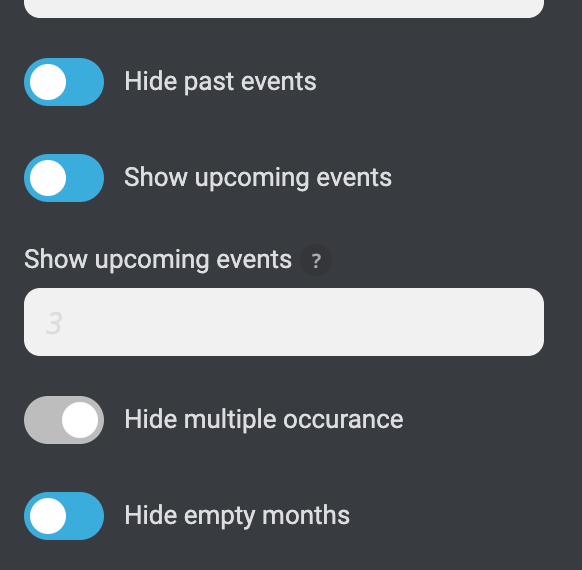
Actually I have no problem with fonts for the shortcodes, it’s OK.
The point is that I need “show upcoming events” feature that is available in the widget and not in the shortcode (I have not seen it).
Because I want to show all coming events without the need of clicking next month to see them.