Thank you for your great suggestion, at the moment it is not supported. However please create a new ticket and select Feature Request as category so others can vote on your idea and get it moved into development faster.
currently you would have to do it on a per event basis
Alternatively there “might” be a plugin on the repository that can download custom post types as I believe each RSVP is a custom post
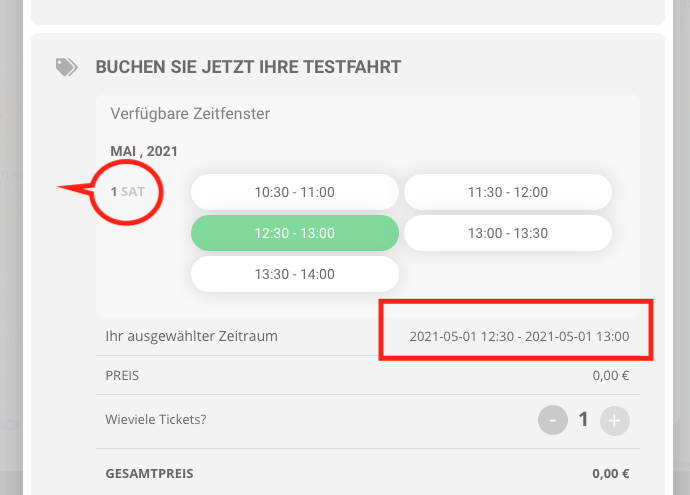
Hi Artem, thanks for your answer.
- I already have installed the Map Add-on as you can see on your own screenshot. So please select one of the places and you will see what I mean.
- Perfect! I will buy the RSVP Add-on too as it is due to our needs.
- Take a look at MONTS AND DATES and you will see that I can NOT change SAT because there is no such short code. I already translated all other words. (See screenshot)
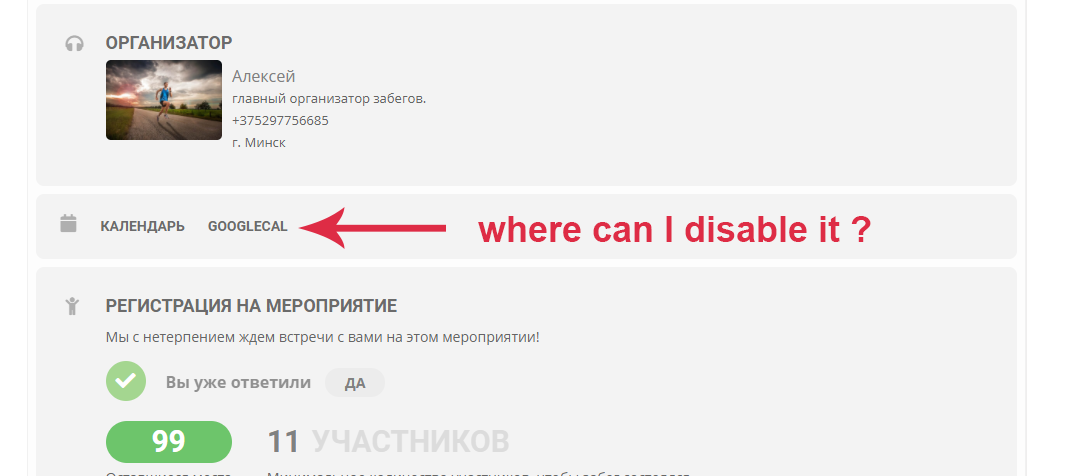
tell me something I can’t find in the settings where to disable it?
Hi Guys,
Do you have any news on this?
Otherwise I’m going to call my credit card company and say that this was an unsolicited charge. This is gonna cause way more headache for you and for me.
Cheers,
Pedro
Hi!
Tell me how to properly update the “RSVP” to the new version?
maybe there is a link to the instructions ?
Thanks so much for the quick reply. That is great!
Maybe I was not clear with point #2: We wanted to change the banner header the the new event to something specific to that event. So all events can have the default – however if the admin wants to change the header image for a specific event … I was not sure where this setting was. I tried changing the featured image but this did not work.
Hello Ian McLean,
Could you create a separate ticket with included login info so we can check.
Hello,
Unfortunately, you cannot have multiple fonts for each WPML language. However please create a new ticket and select Feature Request as category so others can vote on your idea and get it moved into development faster.
You can also send us a customization job request by creating a new ticket in here and selecting Customization Request as the category.
Sorry if I should have started a new ticket, but I’m having the same problem.
I updated to the latest versions of both the main EventOn plugin and the tickets plugin and I’m unable to change any of the switches on the events page even after clearing the cache.
PDFer only works with EventON’s tickets. You cannot attach it to WooCommerce.
Please try sending us a customization job request by creating a new ticket in here and selecting Customization Request as the category. Maybe one of our developers can implement this compatibility.