You can also try Cédric Zeiter’s suggestion and let us know.
Archives: Replies
Replies for tickets on suppota
Reply to: tickets(214644)
b) Yes. Please make sure that it’s enabled.
About the manual import. Please check this message: Reply to: 217137
The issue was not enough memory. So Manual Import was just a temporary solution for you to make sure that the import works. If it works you can then change Import Method to Scheduled to import events automatically from now on.
Reply to: tickets(218620)
Thank you. Just checked and it is working. How do we make it work on our theme? Is there anything specific we need to fix/ add for this to work?
Reply to: tickets(221452)
Hello,
It seems that you can create two events: one with seats (for your admin) and the other one is a regular tickets event. Customer purchases the ticket from the second one, then your admin selects the seat, uses customer’s email during Woo’s checkout and they receive a notification email with their ticket and seat number.
Try Tickets https://www.myeventon.com/addons/event-tickets/ and Seats https://www.myeventon.com/addons/seats/ add-ons on http://dev.myeventon.com/wp-admin/.
Reply to: tickets(221435)
thanks
Reply to: tickets(221454)
Hi Cedric,
I am afraid there is no option to do that. You can send us a customization job request by creating a new ticket in here and selecting Customization Request as the category.
Best regards,
Reply to: tickets(221435)
Hello,
Unfortunately, Search Box shortcode doesn’t support fixed_year option as you can see here:
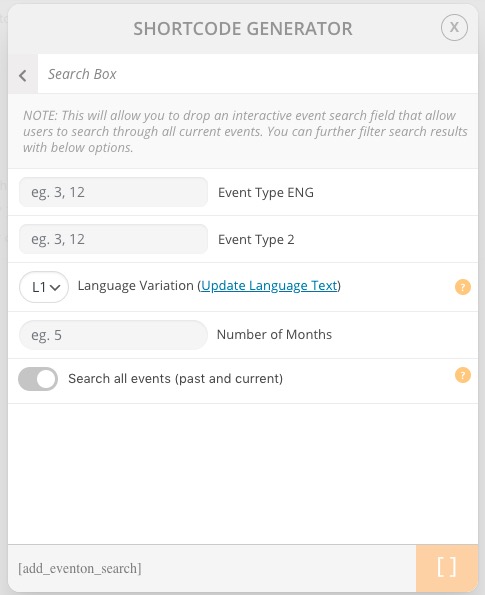
The best solution is to use Event Lists: Ext with “Select Event List Type: Date Range” set to 2021:
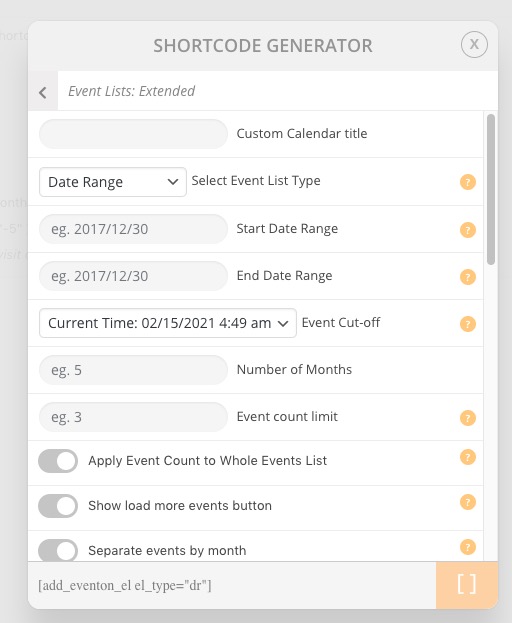
This way your users can search 2021 only. Try on http://dev.myeventon.com/wp-admin/
Reply to: tickets(221414)
Hello,
Could you please try the instructions mentioned in this documentation? it seems that your theme or a third-party plugin can cause this.
Reply to: tickets(200667)
Hello,
…on this event calendar on March 2nd there is a class…
Could you send us a link to the event?
Reply to: tickets(221072)
Maybe try to add the content in the Gutenberg Blockeditor and it should also be displayed in the eventcard.