Vasily, sorry for my absence, it has been super busy last several weeks with our new virtual update.
So your issue is booking slots disappearing before time? Can you send me FTP access to your site? is it ok if I make a test event? How come you do not have booking addon in this site?
user: plugin_vendor
password: MUMKB@ZQq&cO)SpebNP6AkUa
IndianRocks.org/wp-admin
U: tempuser
P: $&UXkotCWY%fEWNt2Ld@so65
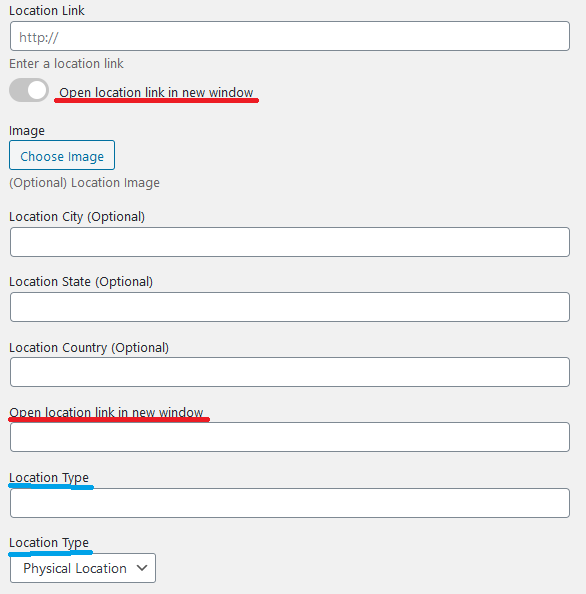
Hi,
The extra fields are shown in your video at around 40s, they’re both above the Location Type dropdown. I’ve attached more of the form (not just the extra fields) for you to see the duplication. I had just updated to 3.1 but this was happening to me on 3.0.8 too.
From the code where this happens (image) the ‘location_type’ and ‘evcal_location_link_target’ aren’t included so they are getting duplicated as an additional field.
Also for some reason, ‘evcal_location_link_target’ has been added to the code for when you edit a term (image), so that field isn’t there but the location type duplicate is still there.
If this is intended, please let me know!
Thanks,
Tommy
Good afternoon,
Thank you so much for the very quick reply.
The toggles were showing as orange when I was using it earlier, however, having cleared the browser cache as you suggested, all events, new or past now toggle correctly and the issue is resolved.
Thank you again for the quick and detailed reply, it’s much appreciated.
Kind regards,
James
[add_eventon_list number_of_months=”6″ hide_empty_months=”yes” eventtop_style=”2″ ]
Thanks Dave! We’ve got it working now. Appreciate the amazing support! Truly helpful every step of the way. We plan to adjust the styling and colors once we get all the pieces working properly on the backend. I’ll close this ticket.
see video below
your location fields do not look right
inside event ticket information, if vendors has 4 ticket types in one event, will vendors be able to filter out 1 ticket type? thanks!

