|
EVOTX2c37e183-294d-4487-a453-bc0db8ad2072
|
Order #97437 was placed on October 2, 2020 and is currently Completed.
Replies for tickets on suppota
|
EVOTX2c37e183-294d-4487-a453-bc0db8ad2072
|
Order #97437 was placed on October 2, 2020 and is currently Completed.
Hi, so is this what has caused the issues? All sales for April have gone through without any problem. My client is nervous remaining with the platform without an proper understanding of what has happened, which I totally understand.
I’ll update, but would be great to know whats happened, along with a solution in changing all the event times to the correct dates?
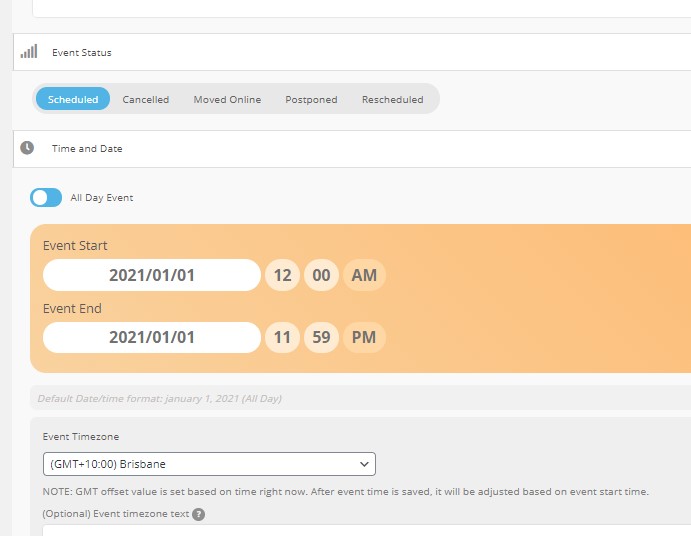
Cleared the cache both times and on those other devices. Button when it is changed appear blue on items I previously was able to select them on.
I am able to interact with the event status, event start date and time, event end date and time, event timezone in the screenshot, the radio button was already changed, I am not able to change it back
it’s the home page: https://latinxartsalliance.org/
the only location on the site with sliders is the homepage. As you can see all the permanent events on the slider are listed first.
Can you just confirm that you understand what we’re requesting? I just don’t understand why this part is still not done?
Thank you
Ashan its possible??? that the jitsi api is causing the conflict however I am unsure without a good look underneath the hood
could potentially be the jitsi API as thats the only new API in the latest version
perhaps Ashan can create a way to shut it off if not used
Please send us wp-admin access to your site as a private message for us to further assist your situation.
Thank you for your messages, I am going to assign this ticket to Ashan and he will be able to take it from here and find you a solution. Please allow some time for him to get back to you, we greatly appreciate your patience and thank you for being a eventon customer! Also please disable any IP blocking on your site if there are any.
give us exact url of the page where you have the slider as shown in screenshot
Tell them to log in and have another go
So what did I do?
well the first half of the video is what I did to make it work and then I stuff up and create an event as an admin (why?- don’t ask) and then I create it logged in as a subscriber so its working
Ok last update.. and I’ll leave it alone until you reply..
I rolled back the RSVP and Action User plugins to previous versions and now Action User and RSVP buttons work fine..
BUT…
My event calendar no longer shows..
Do you have access to a staging site so that we can install the latest without effecting your live site?