Please check and let us know. We can then finalize this work for you.
Regards
Replies for tickets on suppota
Please check and let us know. We can then finalize this work for you.
Regards
# So, since ticket for event is already ‘variable’, seat addons will not be available to the ticket.
# You need to choose a ‘simple’ ticket, to enable seat addons and assign manual wc product ‘variable’ to bypass seat addons restriction.
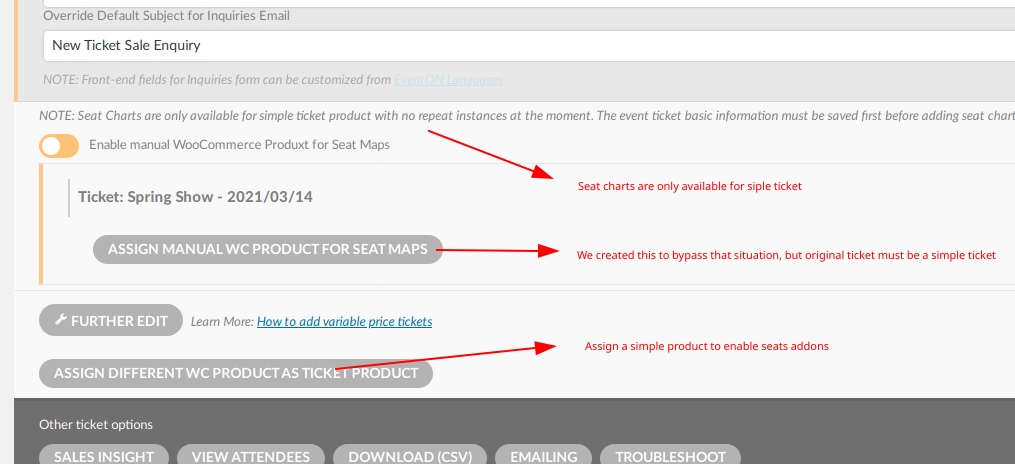
Hi Ashish,
We get the answer of the theme support. Those warnings can not stuck the way we interact/edit the page or event. He tells us to invite you to check your code.
Regards,
Arnaud.
see video below
https://vimeo.com/514186347
OK in (from wordpress)
appearance>>>>>customize>>>>>additional css
The last css line I have added- you will want to change that color to whatever you want to
I made it green so it stands out in tests
No payment is needed I come with open arms not open hands 🙂
thank you, sorry I could not have been more helpful and give you a 100% solution
Hello!
Tell me how to properly update EventOn Settings (ver 3.0.8) to version 3.1?
I read the article https://docs.myeventon.com/documentations/update-eventon/
but it was written for more than 2 years, and for this version that I can update in a different way?
Can I just update the ZIP archive with the new version and install it on top ?
Tell me how to properly update EventOn Settings (ver 3.0.8) to version 3.1? – what is the procedure ?
Hello,
I found the problems… I am using chrome browser which made all the enable button of each option disable.
If I am using Firefox, everything is fine.
I have another problem.
I follow this guide (https://docs.myeventon.com/documentations/wpml-eventon-front-end/) as I am using WPML.
at Step 2:
Go into myeventon> Language and select a language and type in correct language text for matching WPML language.
I could not find way to type in the language text.
Please kindly advise.
Regards,
Borin
you have been excellent dave, is there any way i can tip you for your top service?
Hello,
May I know why I could not click on the enable button? It seem disabled for me.
Please kindly advise.
Regards,
Borin