My website’s hosted on GoDaddy and I’ve never accessed it via FTP.
Can you let me know what details you need?
Thanks,
Tim.
Replies for tickets on suppota
My website’s hosted on GoDaddy and I’ve never accessed it via FTP.
Can you let me know what details you need?
Thanks,
Tim.
Hi Dana,
Thanks for the additional info.
If you are looking to modify the permissions on the backend, you can use a user role editing plugin and assign the following permissions to your contributors:
I hope this helps!
Hi again,
Can you try this:
https://yesunvrs.com/wp-login.php?redirect_to=https%3A%2F%2Fyesunvrs.com%2Fwp-admin%2F&reauth=1
Username: @karoline
password: Q92Kj8m6f&r^$yADZo
Ashan you fixed a similar tixket with this issue- could you please fix it for this guy
Yes, Ashan fixed this error on another ticket- if you provide FTP details I can get him to get in there and do the same
Thanks Dave.
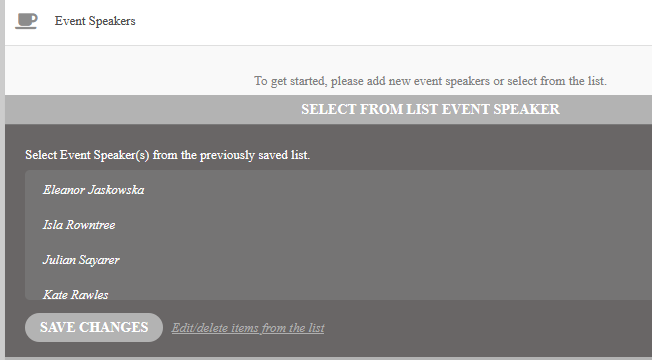
I bought and installed the plugin but it’s not working properly.
When I edit an event, I can see the list of speakers but it won’t let me select them.
Someone else had posted about this on the forum yesterday, but I can’t see the message any more.
Could you help?
Thanks,
Tim.
So NO response. No update. Nothing. What a service!!!!
If they turn up on the day either create it on the event itself- as in go to the event and click RSVP and get them to fill it out on your phone or
You can also do tickets and rsvp from the backened
see video below on adding rsvp’s and tickets yourself
Thank you!
Leila, good news we are going to add this as part of RSVP addon in the next version which I am working on and will release this week 🙂