Perfect! Do you need our help with anything else?
Archives: Replies
Replies for tickets on suppota
Reply to: tickets(215544)
1. Could you update EventON to 3.0.8? To update eventon to latest version: If you are unable to do autoupdate, you can go to codecanyon your account > download and get the latest eventon version as zip file. Then you can go to your website, deactivate old eventon, activate (Do not delete eventon settings & data when EventON is uninstalled) from eventon settings, delete old eventon, install new one and activate. This link will further explain the process it. Also you can follow us on twitter to get real-time announcements on updates!
2. It seems that Google Map isn’t visible. Please go to EventON Settings > Google Maps API > add Google maps API Key.
Reply to: tickets(217941)
Hello, I managed to find the mistake. It was in the formula:
[add_eventon_list tiles=”yes” tile_bg=”1″ tile_style=”1″ tile_height=”350″ show_year=”yes” add_eventon hide_past=”yes” add_eventon_list number_of_months=”12″ ]
It is the ”“ before/behind the 12. This code works:
[add_eventon_list tiles=”yes” tile_bg=”1″ tile_style=”1″ tile_height=”350″ show_year=”yes” add_eventon hide_past=”yes” add_eventon_list number_of_months=12 ]
Reply to: tickets(217941)
It seems that your quotes weren’t correct. Please make sure to use the correct ones:
Please also make sure that you don’t add more than one shortcode name. So instead of
[add_eventon_list tiles=”yes” tile_bg=”1″ tile_style=”1″ tile_height=”350″ show_year=”yes” add_eventon hide_past=”yes” add_eventon_list number_of_months=”12″ ]
it should be
[add_eventon_list tiles=”yes” tile_bg=”1″ tile_style=”1″ tile_height=”350″ show_year=”yes” hide_past=”yes” number_of_months=”12″ ]
Reply to: tickets(200667)
The shortcode on this page https://www.americank9country.com/reg/ contains event_type_2=”49,” which removes all events except assigned to Training Classes Event Type.
And the shortcode https://www.americank9country.com/about-us/news-events/ doesn’t have any Event Types specified. So if you want to “all the classes should appear on this calendar” then you need to remove event_type_2=”49,” and for “but you can see the class scheduled for August 6th on there arena events calendar found here” you need to add event_type_2=”NOT-49,” in order to hide the event on Aug 6th.
Reply to: tickets(217941)
Hello,
in terms of #1, I don’t know why that is – I created a completely new page and added the calendar with this basic code: [add_eventon_list tiles=”yes” tile_bg=”1″ tile_style=”1″ tile_height=”350″ show_year=”yes” add_eventon hide_past=”yes” add_eventon_list number_of_months=”12″ ]. Same thing there – only 1 event is showing up. For all the other months, ist says ‘no event’. But If I use a different calendar format (the list/no tiles), all months show up.
This ist the new page where it doesnt work: https://www.zd-bb.de/vorlagentest/
And this is the page with the other calendar where it works: https://www.zd-bb.de/entwurf-veranstaltungen-michaela_standard-cal-coloured-boxes/
Reply to: tickets(218358)
We are glad your issue is resolved, if you have any further questions or concerns please create a new ticket. If you have a moment, we would greatly appreciate if you could kindly leave us a review at codecanyon! from your account > downloads. Cheers!
Reply to: tickets(218358)
OK found it! Thanks
Reply to: tickets(218358)
I don’t find it… where? I can see only version number but nothing about detailed changelog…
Reply to: tickets(218337)
Hello,
The problem is in this custom CSS code:
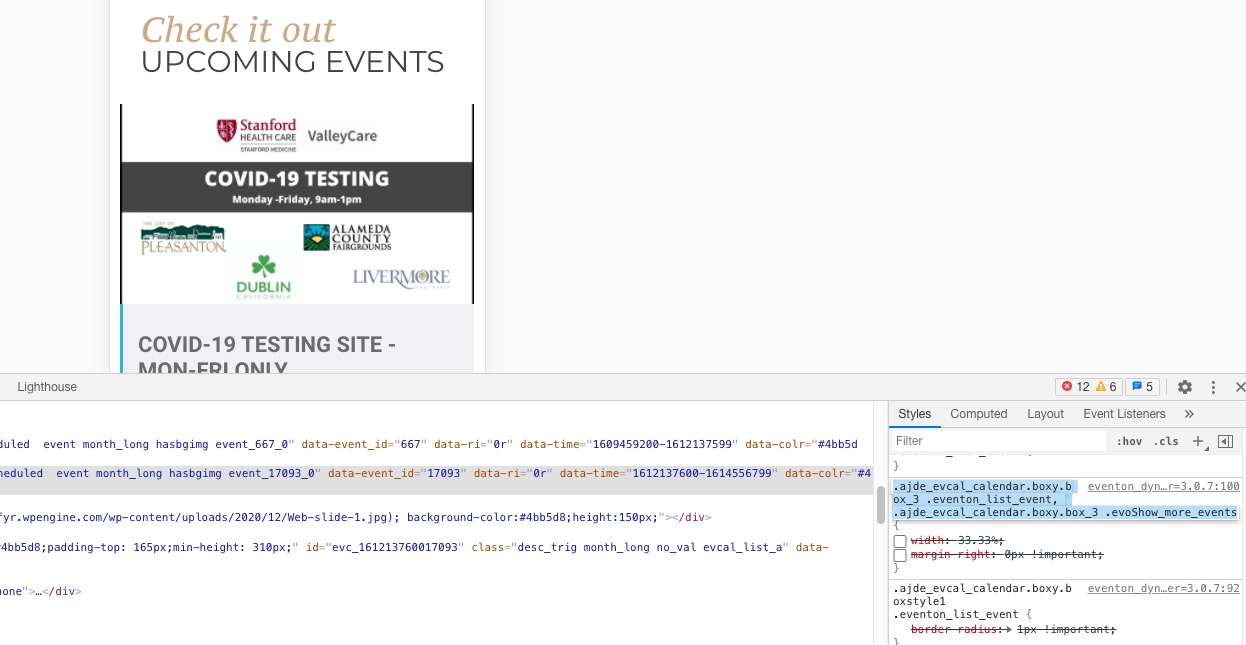
Could you remove it from EventON Settings > Styles?