Hi,
Please download the work from the link:
http://momothemes.com/eventON-213237-child.zip
Replies for tickets on suppota
Hi,
Please download the work from the link:
http://momothemes.com/eventON-213237-child.zip
Hi,
Try this:
http://p79117-730-20699.s730.upress.link/wp-admin/
Thank you
Nitzan
Hi, It is already one year, I’m hearing this answer with no results
Best regards
Hi,
I need functions to be hidden in admin event single page, just because i do not use it anywhere.
Best regards
Please provide the login address I cannot seem to get the welcome page or wp-admin to work for me
for starters
“the Problem is that we made an Update to the new Version”
OK what did you do?
but it works on my mobile which is android. so clear your mobile browser cache
wp-admin says user name not activated
so please do whatever you need to do to activate the user so we can get in and diagnose the issue
ie please post the right wp-admin access username and password
Please send us wp-admin access to your site as a private message for us to further assist your situation.
and also please provide a direct link tot he event with RSVP on it so we can see if there is some css to remove it
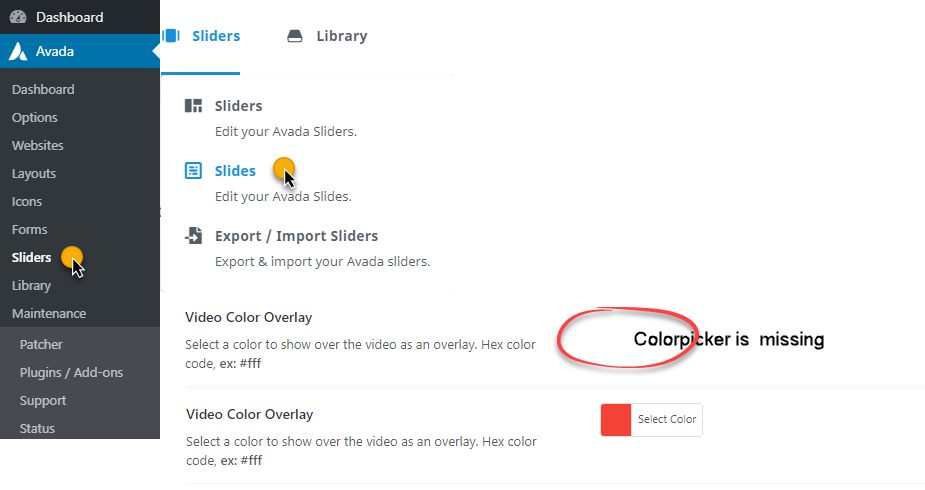
To add details to the above…
The Soundcloud app is fine, but I find other places where color picker missing when EventOn plugin activated. Please go to the Avada > Sliders > Slides > harvest (slide)
Screenshot attached.
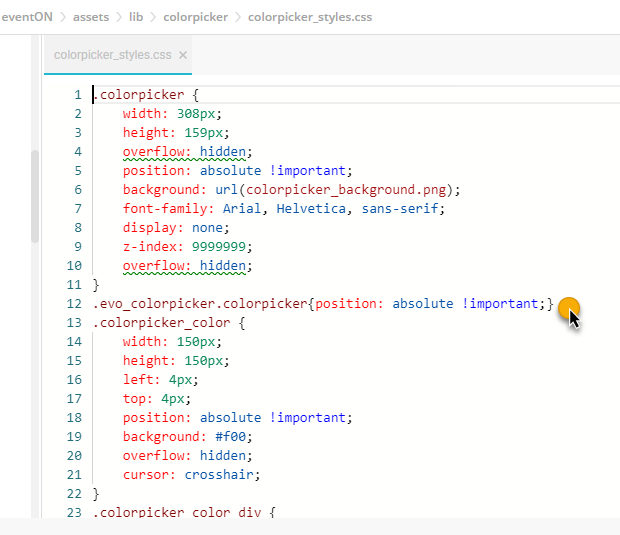
Hello,
I have installed the site to the internet from my local install and I still cannot seems to get this Color Picker field to working correctly. I have added the code “.evo_colorpicker.colorpicker{position: absolute !important;}” the way instructed to the colorpicker_styles.css. But when the EventOn is active themes colorpicker field displaces.
Here is the new site and the admin credentials.
https://newsite.scfellowship.org/
Backend Login User: EventOn
Password: @Vent0n$upP0T