Hi there,
Thanks for the follow-up.
I think we have been able to rule out that this is not an issue in the plugin. The next step would be to reach out to your host and check if there are some missing modules that would cause the problem.
Feel free to contact us should any other issues come up.
Hi Sam,
Thanks for getting back to us.
The manual method will require manually syncing the events once you add new ones in your Google calendar.
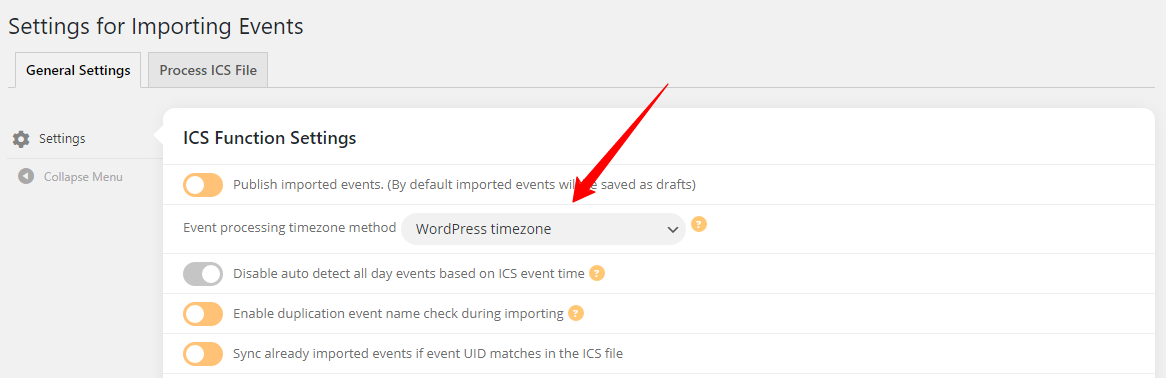
I can see that your WP Timezone is set to New York, if this is the same as your Google calendar, could you please force your events to be processed in this timezone as shown below and let us know if this fixes the issue for you?
just mailed you. Please check. Thank You
“In case you were interested the issue was caused because I spelled “fourth” as “forth” the missing U was the issue”. I know I shouldn’t but… 😂 I cannot stop laughing, and I totally get why it happened.
Thanks for letting me know, I’m not most of the people would just say it in public, and I truly appreciate it.
All the best.
Hi,
Yes, we received the work and have already started work.
I will let you know when the work is completed.
Regards,
Ashish
how did you get his email address?
Om Ashan,
It works well now : when the PDFer is activated + a client RSVPed a new event, the email will be sent perfectly
Thank you Ashan
Marc.
Hi Basilis, shall/can I go in and test now? Just noticed today there’s a new update of EventON so I guess I must update to that as well.
Didn’t get your reply via email.
Let me know please.
Thank you
Thanks for the video! Awesome support! But the issue is on this page:
https://neu.lorfeo.com/wp-admin/term.php?taxonomy=event_location&tag_ID=942&post_type=ajde_events&wp_http_referer=%2Fwp-admin%2Fedit-tags.php%3Ftaxonomy%3Devent_location%26post_type%3Dajde_events
Please try to enable “Open location link in new window”
It doesn’t save.
here is the patch fix.

https://codeshare.io/an9ZlX
add this to wp_admin.css as well as to eventon_styles.css
we will get this resolved in next version update to eventon.
