Admin access: plugin_vendor / 6(fEq388lc2jSD#j&r@DD3yy
Regarding event template. I found that article and followed the instructions. If the option to have a sidebar is enabled, widgets don’t show and the layout is still wrong. If I replace your sidebar insertion code with that provided by the theme, the sidebars show but are on the bottom of the page. If the option to have sidebars is disabled, the layout is correct, but widgets do not show.
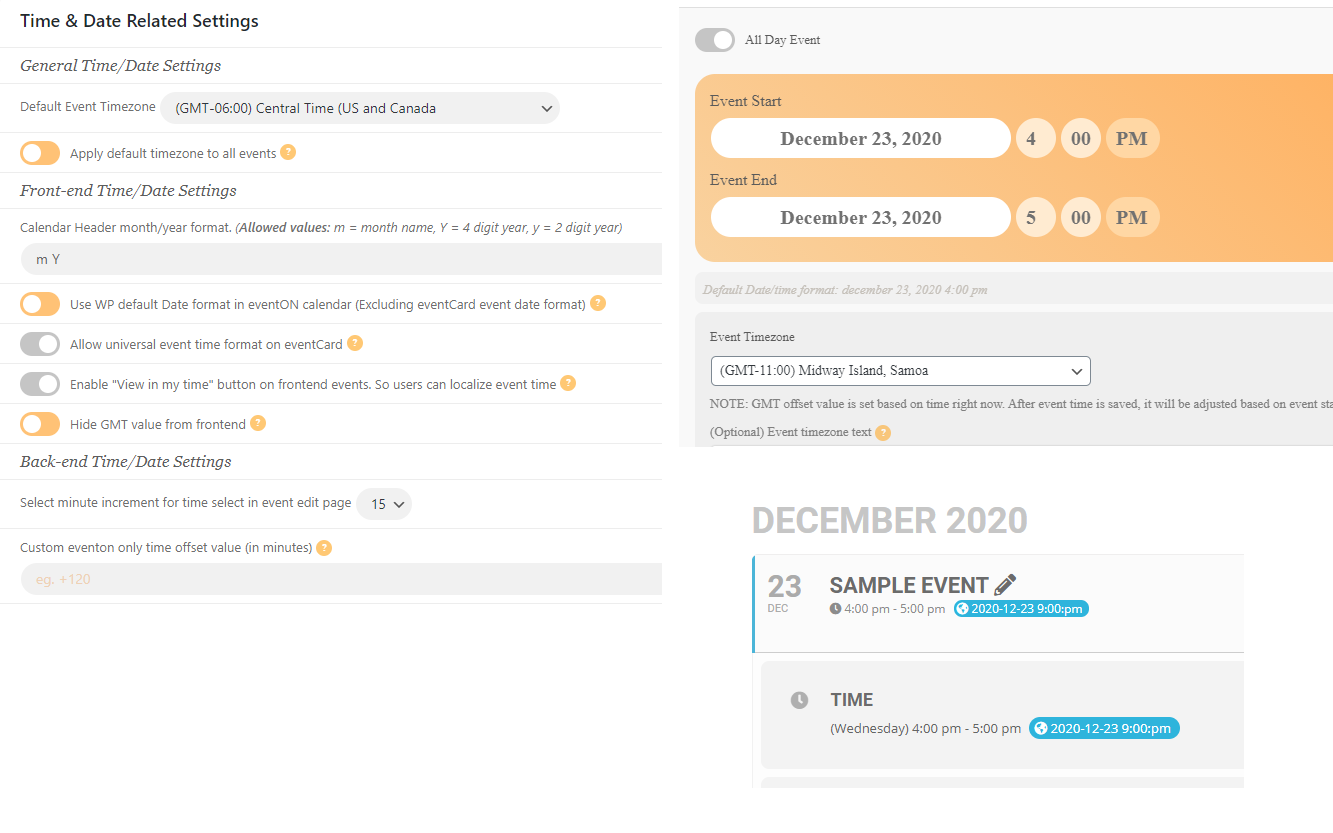
Regarding the time setting, that does not work. See the attached image. It shows the time settings, the default timezone in a new event, and results if you save the event without overriding the setting when creating the event. The same thing happens regardless of the value of the “Apply default timezone to all events” setting.
Dana
Resolved after refreshing Zoom KEY
We use WP Mail SMTP but we set up everything correctly I believe, we are able to send test emails fine. Also emails such as the purchase confirmation email and the other emails are being sent out, only the email that would contain the event tickets is not being sent out. Also we run this site through a code pipeline that pushes the code live, so we do not have a method to access site files through FTP. We make any and all changes locally and test them on a local environment and VM. The closest thing to thing FTP access is to use the plugin WP File Manager.
I cleaned the cache and it worked for the “undefined”, thanks!
But I keep having the same error with the fourth day of the month repeat for when I set up a recurring event for the 4th Saturday, it repeats the same month day instead of the day of the week.
Hi there, we appreciate you sorting this out for us. Many thanks for your assistance.
Merry Christmas to you and your teams as well.
Sorry another one and can I change the color of the buttons – update and the RSVP button on the rsvp in weekly view to match the rest of the site? At the moment is the defaul EventOn pale orange color
Hi and thanks I am being unfair is a great plugin and marked it 10 out of 10 on Envato.
Ashish is doing a customisation job. I will share my thoughts in a feature request.
The code you sent worked fine but the text Booking ID is still visible? Can I hide the text too please?
…not able to delete the repeating events or to show them all…
This seems to be working on my side:
Could you try cleaning your cache?
The time of the repeating events still shows 4:30 and not 16:30 like the initial event.
Unfortunately, it seems that you need to re-add repeats to make them work correctly. We apologize for this. Could you add them again and let us know?
1. These options are for admins only and for future use.
2. & 3. Please send us wp-admin access to your site as a private message for us to further assist your situation.
1. Please follow https://docs.myeventon.com/documentations/customize-single-events-page/. It seems that you need to customize the single event page template.
2. Please go to EventON Settings > Time Settings > enable Apply default timezone to all events.
Please add this CSS code to EventON > Styles (If you don’t see any change, EventON > Scripts & Styling > turn off Write styles to header > save settings > turn on Write styles to header):
.eventon_rsvp_rsvplist p em.checkin_status { display: none !important; }
.rsvpmanager_event.check-in b { display: none !important; }
I must say the flexibility of the RSVP manager in terms of changing colours showing hiding text is very poor
The thing is that nobody asked us about these options. Could you send us a feature request?
