Hi Jeff!
Activating addons will not work when they are network activated on a multisite.
You’ll need to disable network activation and activate this addon on a single site. Also, each sub site will require a separate license activation.
Replies for tickets on suppota
Hi Jeff!
Activating addons will not work when they are network activated on a multisite.
You’ll need to disable network activation and activate this addon on a single site. Also, each sub site will require a separate license activation.
Hi Ashish,
Just wanted to let you, that I figured out how to fix the issue of having two layers (pink layer over a green layer), so do not worry about that issue.
Thanks
romany
Hey Kurt,
I have changed the code, can u test now? I do not know if I should try, because you are a live web site.
Let me know if not,
Hello Antonio,
I do understand what you want to reach, yes.
Yes, we can make it $80 I agree.
Do u want to start|?
Hi Vinay,
Thanks for reaching out!
Would you mind letting us know the tool that you used to export?
Please note that special characters will be saved as HTML entities when being saved in plain text format. You can see a reference of the most common HTML entities here: https://dev.w3.org/html5/html-author/charref and https://www.w3schools.com/html/html_entities.asp
I hope this helps.
Hi Jo,
Thanks for reaching out!
The plugin currently allows the selection of icons from some pre-defined options. You can access this feature by heading over to Events > Taxonomy > Category name as shown below:
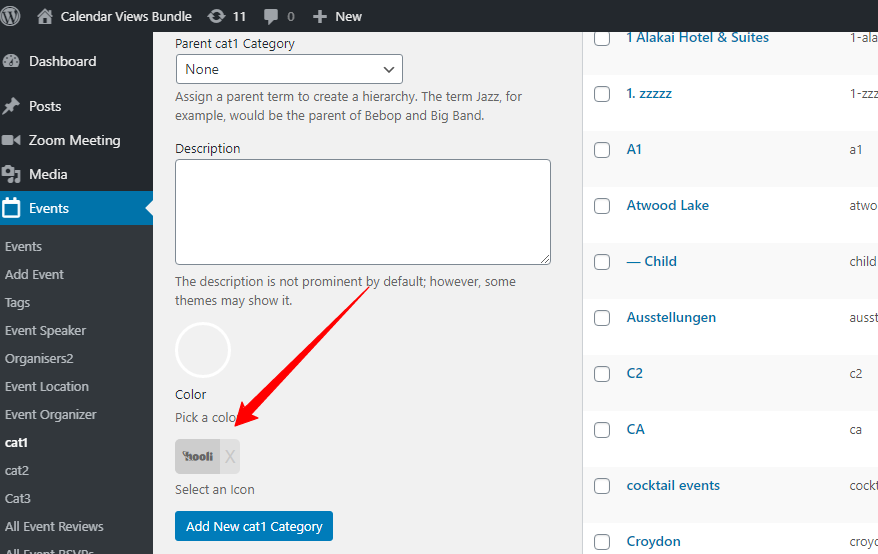
I hope this helps!

I tried all the possibilities, two-day event (what I need), just one day and nothing seems to work. Please check the screenshot.
Could you please send me the previous versions of the plugins, EventOn and Tickets? It worked fine. This started with the update. It’s preventing me from working and I’m spending a lot of time trying to troubleshoot it.
could be a variety of things- first step to really know whats causing the issue is
Could you please try the instructions mentioned in this documentation to make sure your issue is indeed coming from eventon.
for example switch themes- then clear your cache and see if that fixes the issue- also there is a pop up creator on your site- it might interfere so it could be a combination of theme and plugin so do the things in the documentation- and once you have the results we can phrase a question based on the results
Could you please try the instructions mentioned in this documentation to make sure your issue is indeed coming from eventon.
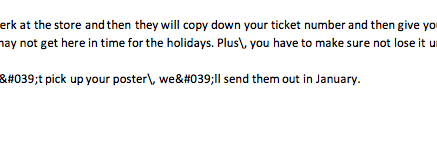
A couple of examples in the screenshot attached