Do you use a SMTP plugin
I an getting an error as this.
“SMTP Error: data not accepted.SMTP server error: DATA END command failed Detail:
Message rejected: Email address is not verified. The following identities
failed the check in region US-EAST-1: webdev@eagledream.com, NYK <webdev@eagledream.com>
↵ SMTP code: 554“
I wonder if this email is a verified email to send emails from within your SMTP application?
This ticket is private if you would like to send us FTP access to your site i can take a close look Tommy.
please try re-downloading the 2.2.4 from myeventon.com/my-account 🙂
here is the patch fix to resolve this issue.
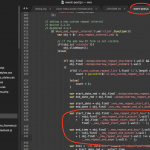
I will include this in the next version update. 🙂
We are glad your issue is resolved, if you have any further questions or concerns please create a new ticket.
If you have a moment, we would greatly appreciate if you could kindly leave us a review at codecanyon! from your account > downloads. Cheers!
Hello,
Please follow this guide: https://docs.myeventon.com/documentations/single-events-page-not-working-404-error/
Just refresh your Permalinks and that will fix the problem.
Hello,
Unfortunately, Search Box shortcode doesn’t allow you to use ux_val option. The same with event_count.
You can see available options on this screenshot:
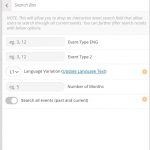
The only available option is to enable search by adding search=”yes” to the shortcode:
[add_eventon search=”yes”]
You can use this in Main Calendar or Event Lists.
Hi there Nicolas I have identified this issue there was a code error that created one more repeat. Here is the patch fix to resolve this.
 just need to change the operator to <

Hello!
Suddenly I explained myself not clear, you wouldn’t have to make so many modifications to those components (if I’m not mistaken, correct me if im wrong please)
The edit is mostly in the file/page (submit form) of action user something like enable the switch button by default js/php (image attached ) and hide the button/switch with css
With this all events will go to dokan dashboard by default
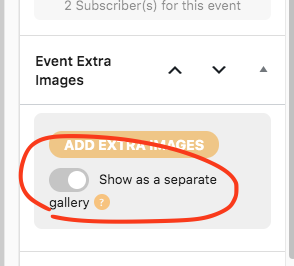
that is controlled by the Event extra image meta box 🙂
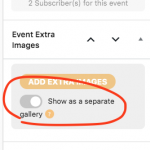
So by disabling this it will show images without a gallery 🙂
I see whats happening the add new event page does not have any value set to the first value in the timezone string is what is applied when saved. and timezone value set via event will override the settings timezone.
I will get this fixed in next version, but for now when you add new events please set correct timezone.