Hello,
1. This link https://soloxolo.com/wp-admin/edit.php?post_type=ajde_events# shows: Sorry, you are not allowed to access this page.
Could you send us a screenshot with the issue?
2. Please add this CSS code to EventON > Styles (If you don’t see any change, EventON > Scripts & Styling > turn off Write styles to header > save settings > turn on Write styles to header):
.single-ajde_events #eventon_comments { display: none !important; }
Hi Marco,
We are glad your issue is resolved. If you have any further questions or concerns please feel free to create a new ticket.
Perfect!
We are glad your issue is resolved, if you have any further questions or concerns please create a new ticket.
If you have a moment, we would greatly appreciate if you could kindly leave us a review at codecanyon! from your account > downloads. Cheers!
Please check our subscription https://docs.myeventon.com/documentations/terms-and-conditions-and-refund-policy/. After one year if you decide not to renew your subscription you will no longer receive updates and support for the extension when your license expires, but the product will still work.
Hello,
Please use Event Lists: Ext add-on https://www.myeventon.com/addons/event-lists-extended/ for this.
Try on http://dev.myeventon.com/wp-admin/ with this shortcode:
[add_eventon_el el_type=”pe” number_of_months=”12″ month_order=”DESC” event_order=”DESC” show_et_ft_img=”yes” ux_val=”4″ show_year=”yes”]
Hello,
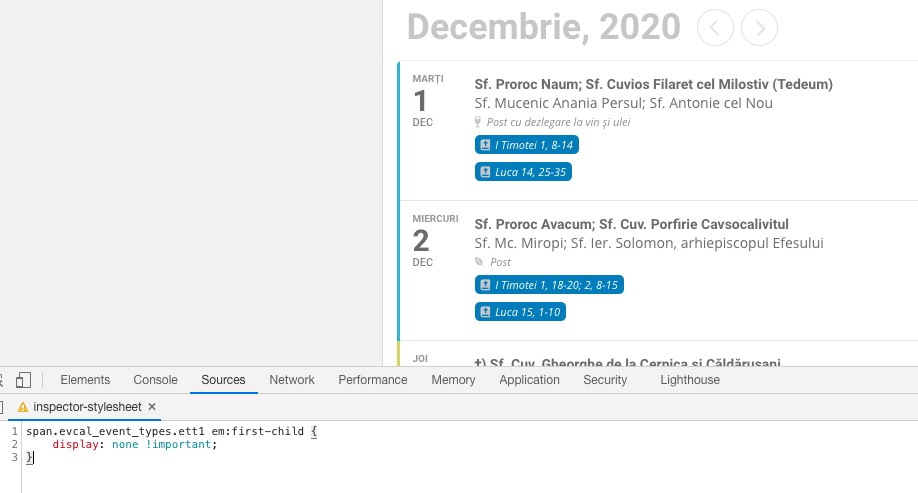
Please add this CSS code to EventON > Styles (If you don’t see any change, EventON > Scripts & Styling > turn off Write styles to header > save settings > turn on Write styles to header):
span.evcal_event_types.ett1 em:first-child { display: none !important; }
It should look like this:
Hello,
WooCommerce doesn’t allow this by default. Only an admin or role with similar capabilities can do this from wp-admin > Woo > Orders.
Hi Bruno,
I am not able to replicate this on my end. Could you please try the instructions mentioned in this documentation to make sure your issue is indeed coming from eventon?
Let us know how it goes.
Hello,
Please try using WooCommerce Autocomplete plugin for this: https://wordpress.org/plugins/autocomplete-woocommerce-orders/
Please note that in some cases this can cause some issues so test it before going live.
Hello Ashan, thank you for your refund that I just received 👍 All the Best, Alain