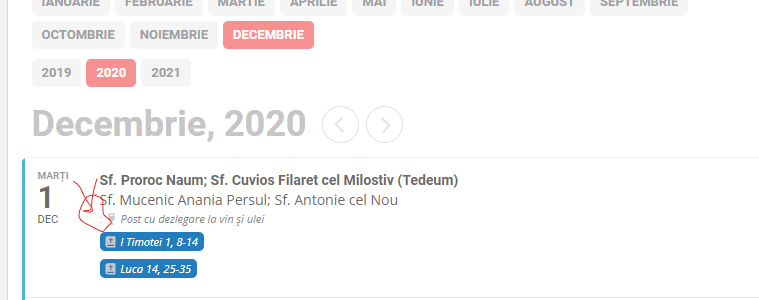
Still doesn’t work. Check here: hristosinafrica.org/en/calendar/ . Currently I used a trick: type a ” ” character at Language translation , but still the field exist. Screenshot attached. Basically there are “:” and a space I need to remove.
Replies for tickets on suppota
Still doesn’t work. Check here: hristosinafrica.org/en/calendar/ . Currently I used a trick: type a ” ” character at Language translation , but still the field exist. Screenshot attached. Basically there are “:” and a space I need to remove.
En venant voir le probleme en live sur notre site et nous dire ce que l on doit faire pour le resoudre 🙏
The latest version seems to have fixed the issue.
Thanks for your help
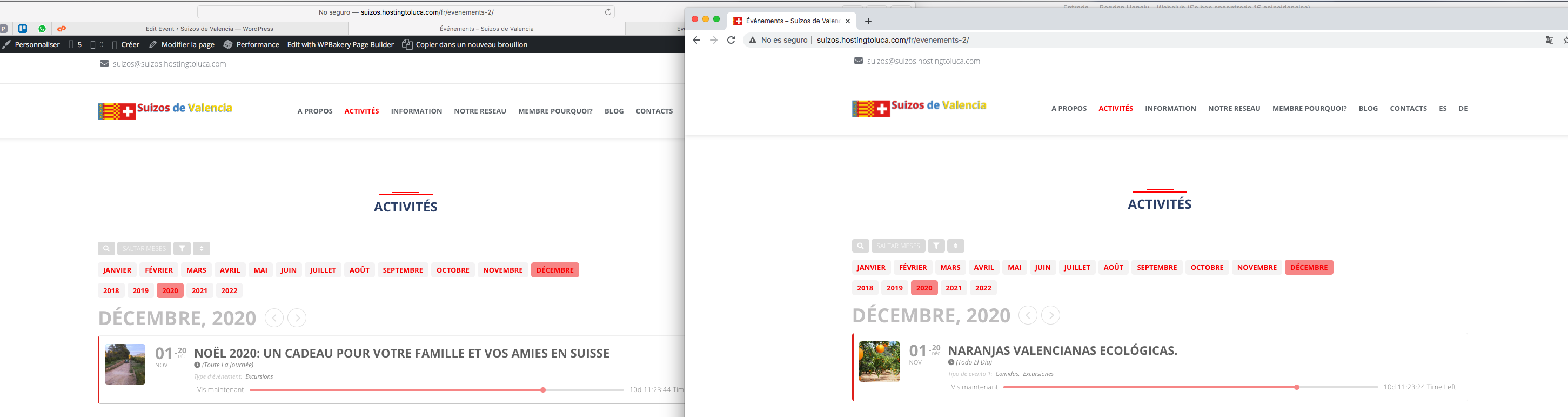
Hi, thank you for your help. I can resolved so see it how we want.
But, we have te problem with the language. I dont understand how is working the system. Right now I can see well the events in Safari but not in Chorome or Firefox.
Look at the picture that I attached, the same page, in Safari the event is correct (FR) but in Chrome is putting in Spanish event instead in French.
http://suizos.hostingtoluca.com/fr/evenements-2/
I put EventON Settings > disable Enable language, and now I can not select L1/L2/L3 in the Events detail (there is no option)
please help
Thank you very much.
Yes please, if it disrupts the live website could you keep it to a minimum please?
Hello,
1. Thank you for your messages, I am going to assign this ticket to Ashan and he will be able to take it from here and find you a solution. Please allow some time for him to get back to you, we greatly appreciate your patience and thank you for being a eventon customer! Also please disable any IP blocking on your site if there are any.
2. Could you send us a link to one of your events with this issue so we can replicate on our test server? Calendars are empty here: https://journal.medizzy.com/events/
Ashan,
1. The same as here and on dev2: https://helpdesk.ashanjay.com/ticket/invalid-url-in-field-image/
May I please try the instructions mentioned in this documentation to see if it’ll make any difference in performance?
Hello,
Thank you for your great suggestion, at the moment it is not supported. However please create a new ticket and select Feature Request as category so others can vote on your idea and get it moved into development faster. OR You can send us a customization job request by creating a new ticket in here and selecting Customization Request as the category.