Hello,
Could you update EventON to 3.0.4 and check with clean cache?
To update eventon to latest version: If you are unable to do autoupdate, you can go to codecanyon your account > download and get the latest eventon version as zip file. Then you can go to your website, deactivate old eventon, activate (Do not delete eventon settings & data when EventON is uninstalled) from eventon settings, delete old eventon, install new one and activate. This link will further explain the process it. Also you can follow us on twitter to get real-time announcements on updates!
I enabled WP_DEBUG, but the problem is that https://loveshannon.ie/wp-content/debug.log doesn’t have any fatal errors, even so it must have because of
Server Error
503
Service Temporarily Unavailable
The server is temporarily unable to service your request due to maintenance downtime or capacity problems. Please try again later.
Could you contact your hosting provider so they can tell you where we can find PHP errors?
But I quite sure that the issue is in server memory. Could you try following https://docs.myeventon.com/documentations/increasing-wordpress-memory-limit/?
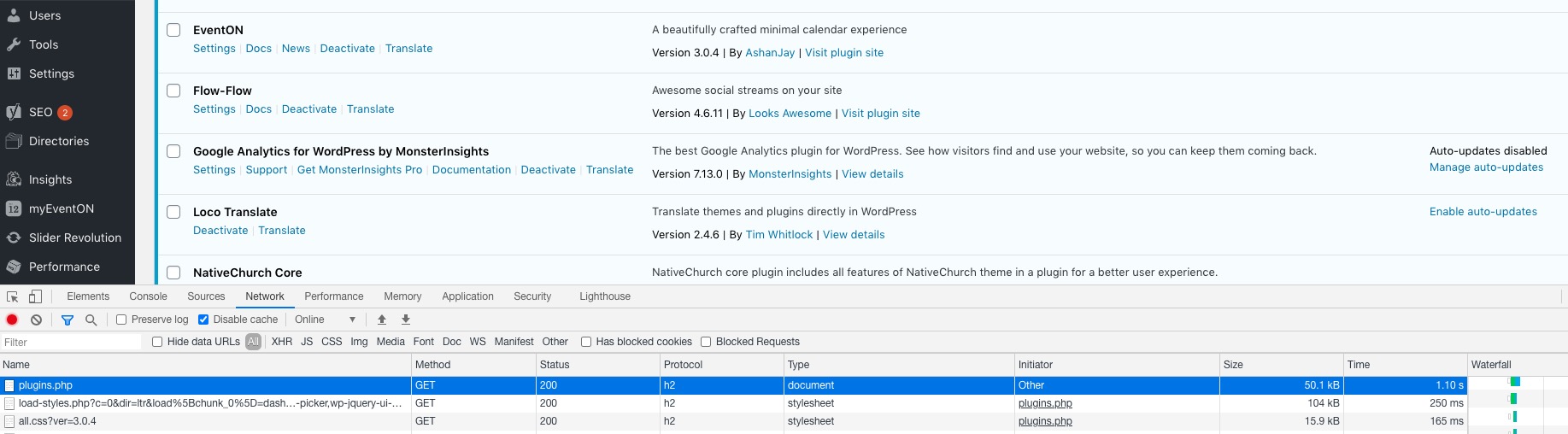
I cant even browse to the WordPress plugins page with your plugin enabled – it just times out.
It takes only 1 second to load Plugins page:
generally you can test it- most features work without activation
You’ll just want to use the live sites shortcode generator to add certain shortcodes in the test site
hi again,
sorry that is not what we need.
We do not look for the JSON
We habe the calcener with the events on the external page!
now we want to link back to the events and want to generate a link from the external page to the page where the calender runs…
Example:
externalsite.de we see the event with a button “open event on original site”
so we have to generate the link to the original site with the API Addon paramters need : www.originalsite.de/xyz….event_id…. the outgoin link to original event page…
i dont know how to explain in in an other way 🙂
Hello,
the website mamafit.at is online and in use by some people (for this resason alsothe User Action plugin). So i can’t turn the licennses off.
I want only to test the update to look if there are some problems (like the max. 4 event at the repeating Event https://helpdesk.ashanjay.com/ticket/4-03-number-of-repeats-is-limited-to-only-4-and-control-does-not-allow-manual-entry/ ).
And also look for the new features before i confront the other autors with it.
thanks
Hello,
Please go to EventON Settings > Licenses > deactivate licenses. Now you can go to your subdomain and activate them there.
Hello,
Could you try going to EventON Settings > EventCard Data > make sure that EVENT TICKET BOX is enabled > save Settings (even if you didn’t change anything)?
1. Please first line from this message Reply to: 206847
2. Please use this code:
.evoRS_status_option_selection span, .evors_rsvped_status_user, .evors_change_rsvp span.change { background: red; }
3. Please use this code:
.eventon_rsvp_rsvplist p a.update_rsvp { background: red; }
4. Please go to EventON > Single Events > Create Single Events Page Sidebar > add Windgets.
It seems that your theme is showing “Comments” title. Please go to Edit Event > Disable Comments.
PS: your helpdesk app is great, can you tell me what tool you use so I may use the same as well ?  Thank you
This is our own product we’ve developed, so unfortunately it’s not possible to find/purchase it.
Hi Basilis
See below for admin and ftp
hostname: loveshannon.ie
loveshannonie / Yhq4@h85
https://loveshannon.ie/wp-login.php
martin_admin / 8cIM$6hZp9
Thanks
Martin
Here are the order ID and the mail adresse
#42853
Email office@planetdichtl.com
thank you