Hi Mats,
I was able to see the images, thanks.
I have looked at your site and the event dates are displaying just fine on my end (see the image below). https://pasteboard.co/JC7tdys.png
Kindly confirm, were you able to fix this issue or am I missing something?
The email is: ccarrion@dinaltia.com
Hi Alain,
1. To change the color for the YES/ NO areas, please use:
#evcal_list .eventon_list_event .evcal_desc em{color:#fff;}
2. To change the background color of YES please use:
.evoRS_status_option_selection .evors_rsvped_status_user{background-color:#2f89c5;}
3. To change the text + background for the green area please use:
#evorsvp_form p.evors_rsvpid_tag{background-color:#2f89c5; color:#fff;}
4. To change the green button on hover and not on hover please use:
#evorsvp_form a.evors_submit:hover, #evorsvp_form #change_rsvp_form:hover{background-color:#2f89c5; color:#fff;} /*on hover */
#evorsvp_form a.evors_submit, #evorsvp_form #change_rsvp_form{color:#fff; background-color:#2f89c5;}
Hope this helps.
Cheers!
What??? The images are just above.
Hi Milk,
Thanks for reaching out!
RSVP events are saved under the “evo-rsvp” post type.
I’d recommend performing a get_posts() query or perhaps a direct SQL query on your database to fetch the posts.
In case you are interested in the PHP function method, please take a look at this page for more details about the function: https://developer.wordpress.org/reference/functions/get_posts/
What other questions can I answer for you? I’m happy to help. =)
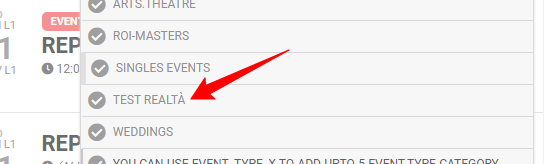
Hi Rossano,
Thanks for the additional details.
I’m afraid that I cannot replicate the problem on our servers. The filter dropdown modal displays all accented characters as expected as shown on the attached image.
The problem might suggest that this could be related to your database encoding. Would you mind reaching out to your host and checking if this is something that they can resolve on their end?
Let me know if I can clarify anything above. =)
Hi Bill,
Thanks for reaching out.
We recommend specifying the number of months that you’d like listed on the list to ensure that the shortcode does not only run for the current month’s events. I’ve modified the shortcode to the following to fix this:
[add_eventon_el number_of_months=”2″ event_count=”5″ eventtop_style=”2″ hide_so=”yes”]
Let me know if I can answer more questions. =)
Glad the new version resolved the issue Karen 🙂
the login info is in that page as well 🙂
Hey Tamara, if you go to dev.myeventon.com/wp-admin you should be able to see all those addons in action in there to do testing.