-I don’t have the older version. As you know i faced with same issue with 2.8.1.
It all depends on how many events you have, how much memory your server is already using and so on. I think that your original issue is not about plugins but lack of memory on the server.
-As you can see, i have only two published future events and only one of them is repeating that i can’t edit. Are we sure about eventon not using more than it needs?
What will happen next? Thanks,
Hey Raff, thats a good analogy 🙂 the link you sent us get redirected to an ip address. what issue are you having?
Raff, all the softwares have issues even apple’s iOS have issues, when we find issue we try our best to get our software issues resolved as soon as we can and release updates 🙂
Update done. The payment, ticket, email, etc seems to work properly now. Hey guys, I am really satisfied with your team, but I can´t understand why with your plugin sometimes you must suffer a bit. It´s like a Ferrari with a broken steering wheel. I continue being unable to update this event: https://arsmagna.es/wp-admin/post.php?post=30429&action=edit. Please help me to resolve it completely.
Thank you again!
I just tried a new shortcode, thinking this would help – show_upcoming=”5″ number_of_months=”2
But no luck.
[add_eventon show_et_ft_img=”yes” tiles=”yes” tile_count=”5″ tile_bg=”1″ add_eventon hide_past=”yes” show_upcoming=”5″ number_of_months=”2″]
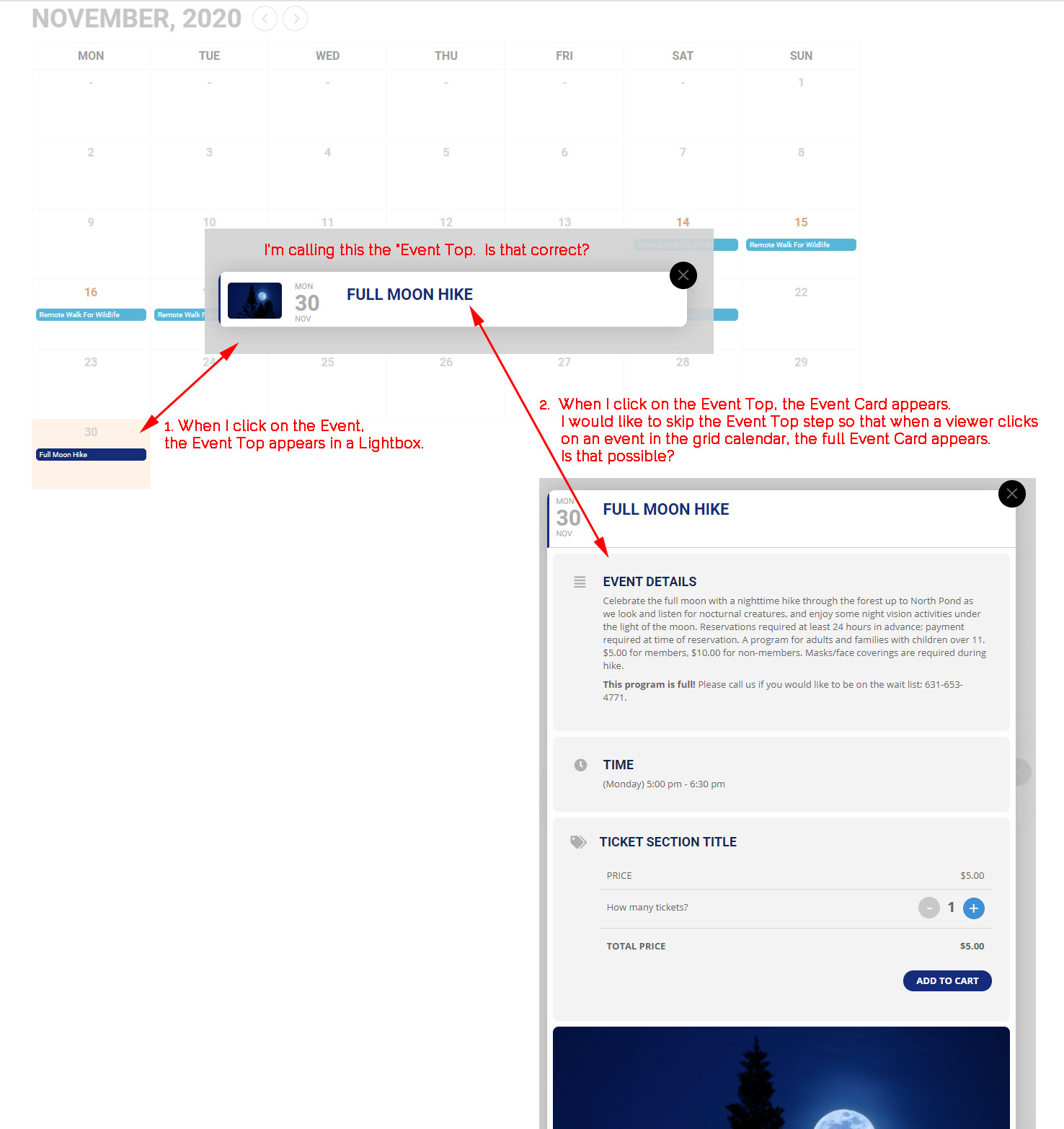
Perfect – thanks so much!
If I could ask one more question:
On the home page – https://www.dlmwebdevelopment.com/qwr/
I am using this shortcode to display tiles –
[add_eventon show_et_ft_img=”yes” tiles=”yes” tile_count=”5″ event_count=”5″ tile_bg=”1″ ]
Since there are only 4 events in November, the 5th tile is blank.
Is there a way to show the next 5 tiles regardless of the month? We don’t need to display the month title of “November”, and we can do without the arrow jumpers as well. We would just like to always display the next 5 event.
Thanks again!
I have updated to 3.0.4 but the issue still exists.
Hello,
We are very sorry for the issue. Could you please try updating EventON to 3.0.4 and let us know if it helps?
To update eventon to latest version: If you are unable to do autoupdate, you can go to codecanyon your account > download and get the latest eventon version as zip file. Then you can go to your website, deactivate old eventon, activate (Do not delete eventon settings & data when EventON is uninstalled) from eventon settings, delete old eventon, install new one and activate. This link will further explain the process it. Also you can follow us on twitter to get real-time announcements on updates!
I still haven’t gone through all of the troubleshooting but one thing I do know it was working on a temp domain at the new hosting location. When I moved my domain discoverlamirada.com to the new host as the primary domain (and replaced the temp domain), that is when the problems started. Is there a way to do a clean uninstall that deletes all previous plugin files? I have tried to delete and reinstall and that doesn’t work. Are there files outside of the plugin folder that also need to be deleted before I reinstall the plugin?
C est fait vous êtes admin 😉👍
Hello,
First of all please update EventON to 3.0.4.
To update eventon to latest version: If you are unable to do autoupdate, you can go to codecanyon your account > download and get the latest eventon version as zip file. Then you can go to your website, deactivate old eventon, activate (Do not delete eventon settings & data when EventON is uninstalled) from eventon settings, delete old eventon, install new one and activate. This link will further explain the process it. Also you can follow us on twitter to get real-time announcements on updates!
After the update please go to EventON Settings > ICS Import > disable Enable duplication event name check during importing. There are a lot of events with the same name so EventON cannot import them.
Please try my suggestions and let me know.