How do you make it display more than two event names?
Archives: Replies
Replies for tickets on suppota
Reply to: tickets(186164)
Hey Omar,
So here is how to use it:
[add_eventon lang=”L2″ ux_val=”3″ jumper=”yes” jumper_offset=”2″ jumper_count=”3″ accord=”yes” hide_so=”no” filter_type=”select” show_et_ft_img=”yes” tiles=”yes” tile_height=”400″ tile_bg=”1″ wishlist=”yes” hide_past=”no” fixed_year=”2020″ tile_count=”3″]
This is your shortcode. What you have to do is:
[custom-add-eventon]
use this shortcode only. Then, you load this on your url, for example:
https://www.spainonyou.com/calendario-de-eventos/?event_type=694
it simple will load the following:
[add_eventon event_type=”694″]
Basicaly, what I am doing is that on the background, through [custom-add-eventon] I am adding things that are not visible on the shortcode, but they are on the backgriund.
is that clear, I tried to explain as much as possible
Reply to: tickets(206758)
Please try this
eventonadmin
6yM*8V&yMTCavmjvhgeDE$ay
Reply to: tickets(198763)
Can you please tell me if what u see, works as should?
I will provide rest detals, just confirm if what you see is what you need and please DO NOT UPDATE AGAIN.
Reply to: tickets(205822)
We are glad your issue is resolved, if you have any further questions or concerns please create a new ticket. If you have a moment, we would greatly appreciate if you could kindly leave us a review at codecanyon! from your account > downloads. Cheers!
Reply to: tickets(206990)
Hello,
You are referring Edit Event > Tickets > Allow customers to submit inquiries, correct?
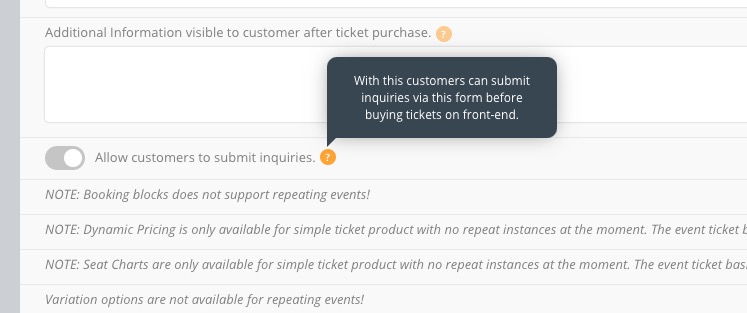
The only possible solution in this case is to customize the source code. You can send us a customization job request by creating a new ticket in here and selecting Customization Request as the category.
Reply to: tickets(206735)
Great! Please keep us updated.
Reply to: tickets(206280)
Please check https://mflworld.com/staging-mflworld/?page_id=1415
Reply to: tickets(207041)
Thank you. What we need is a simple calendar where a client would select a time slot, and be booked for that slot. We do use the RSVP add-on for general events but we needed this to be more refined and streamlined for the users.
1. Using Woocommerce overcomplicated it. It initially would not work with the price placed in the tickets area; instead, I had to go into WC and set the price on the product.
2. In the example I shared – https://www.charterseniorliving.com/events/edgewood-virtual-tours/ – the idea was to have rolling dates, so I set the date range and put in the time slots, but since the “event” started already, tickets come up as unavailable. It’s just unsustainable for us to have a separate event for each day. We need one single event page where a client can book a tour.
Thank you for your response. Like I said we are generally happy with EventOn and we use it on most of our client websites.
Reply to: tickets(182907)
It shows this fatal error in debug.log:
[19-Nov-2020 18:03:57 UTC] PHP Fatal error: Uncaught Error: Call to a member function load_google_maps_api() on null in /home/derece/domains/1200derece.com/public_html/wp/wp-content/plugins/eventON/includes/calendar/class-calendar_generator.php:111
Stack trace:
#0 /home/derece/domains/1200derece.com/public_html/wp/wp-includes/class-wp-hook.php(287): EVO_generator->wp_header(”)
#1 /home/derece/domains/1200derece.com/public_html/wp/wp-includes/class-wp-hook.php(311): WP_Hook->apply_filters(NULL, Array)
#2 /home/derece/domains/1200derece.com/public_html/wp/wp-includes/plugin.php(478): WP_Hook->do_action(Array)
#3 /home/derece/domains/1200derece.com/public_html/wp/wp-includes/general-template.php(3009): do_action(‘wp_head’)
#4 /home/derece/domains/1200derece.com/public_html/wp/wp-content/themes/Avada/header.php(21): wp_head()
#5 /home/derece/domains/1200derece.com/public_html/wp/wp-includes/template.php(730): require_once(‘/home/derece/do…’)
#6 /home/derece/domains/1200derece.com/public_html/wp/wp-includes/template.php(676): load_template(‘/home/derece/ in /home/derece/domains/1200derece.com/public_html/wp/wp-content/plugins/eventON/includes/calendar/class-calendar_generator.php on line 111
And if you disable your plugin does it fix the issue?