Reply to: tickets(206095)

I can see this js error in Developer Console:

Uncaught SyntaxError: Unexpected end of JSON input

    at JSON.parse (<anonymous>)

    at Function.n.parseJSON (load-scripts.php?c=0&load[chunk_0]=jquery-core,jquery-ui-core,jquery-ui-widget,jquery-ui-mouse,utils,jquery-ui-sortable,moxiejs,plupload&ver=5.5.3:4)

    at Object.t.setInitElementsJson (admin.js?ver=2.2.4:45)

    at HTMLDocument.<anonymous> (post.php?post=8927&action=edit:1426)

    at i (load-scripts.php?c=0&load[chunk_0]=jquery-core,jquery-ui-core,jquery-ui-widget,jquery-ui-mouse,utils,jquery-ui-sortable,moxiejs,plupload&ver=5.5.3:2)

    at Object.fireWith [as resolveWith] (load-scripts.php?c=0&load[chunk_0]=jquery-core,jquery-ui-core,jquery-ui-widget,jquery-ui-mouse,utils,jquery-ui-sortable,moxiejs,plupload&ver=5.5.3:2)

    at Function.ready (load-scripts.php?c=0&load[chunk_0]=jquery-core,jquery-ui-core,jquery-ui-widget,jquery-ui-mouse,utils,jquery-ui-sortable,moxiejs,plupload&ver=5.5.3:2)

    at HTMLDocument.J (load-scripts.php?c=0&load[chunk_0]=jquery-core,jquery-ui-core,jquery-ui-widget,jquery-ui-mouse,utils,jquery-ui-sortable,moxiejs,plupload&ver=5.5.3:2)

Could you try disabling Essential Grid plugin?
Reply to: tickets(206189)

I added the code (copied below) & upgraded to 3.0.4 & 1.8.7 but there is no change. Here is the login and FTP info.


https://shomee.life/wp-admin

evo-support

W1Eh~lpLwy@}

ftp: evo-support@shomee.life

pass: W1Eh~lpLwy@}


============

// get product title
function get_ticket_product_title($post_id=”){

$post = get_post($post_id);
$_date_addition = ”;

// wc prodduct name structure
$structure = !empty(EVOTX()->evotx_opt[‘evotx_wc_prodname_structure’])? EVOTX()->evotx_opt[‘evotx_wc_prodname_structure’]: “Ticket: {event_name} {event_start_date} – {event_end_date}”;

$__sku = !empty($_REQUEST[‘_sku’])? ‘(‘. $_REQUEST[‘_sku’].’) ‘:”;
$structure = str_replace(‘{sku}’, $__sku, $structure);

$structure = str_replace(‘{event_name}’, $post->post_title, $structure);

$event_start = !empty($_POST[‘evcal_start_date’])? $_POST[‘evcal_start_date’]:”;
// patch fix for calendar picker next 2 lines
if(empty($event_start) && !empty($_POST[‘event_start_date_x’]))
$event_start = $_POST[‘event_start_date_x’];
$structure = str_replace(‘{event_start_date}’, $event_start, $structure);

$event_end = !empty($_POST[‘evcal_end_date’])? $_POST[‘evcal_end_date’]:”;
// patch fix for calendar picker next 2 lines
if(empty($event_end) && !empty($_POST[‘event_end_date_x’]))
$event_start = $_POST[‘event_end_date_x’];
$structure = str_replace(‘{event_end_date}’, $event_end, $structure);

return $structure;
}
}

Reply to: tickets(206189)

You can just apply them direct into the file because we will include these changes in the next version update to tickets addon and you will not lost these changes 🙂

Reply to: tickets(198763)

Hi Basilis, I hve cleared the cache both the browser and the website but it displayed nothing on the tile view (frontpage). Could you please informed further the sample of customization on the tile view. Thanks

Reply to: tickets(205822)

Hi there, ok so looks like it is not an issue with eventON

on single event pages the shortcode works https://staging1.actagis.ch/events/isaca-conference-grb-measuring-cyber-maturity-and-closing-the-gaps/?preview_id=51145&preview_nonce=389b43fdba&preview=true&_thumbnail_id=51149

But in here it is not working. https://staging1.actagis.ch/

This is not really a server side processed shortcode, it is a shortcode processed on client side. Meaning, the shortcode is processed after the page is loaded. 

So contact divi builder and see if there is a way for you to run process shortcodes after shortcode is loaded to page via ajax. 

Reply to: tickets(206189)

OK I will test this out. If I want to create a subfolder in the theme to preserve these changes, what folder name should I use?

Reply to: tickets(205850)

Yes, if I disable Blubrry with Yoast enabled the same issue occurs. I am researching through Bluburry – however I have created a workaround with CSS that corrects the issue throughout my site. You can close this ticket.

Reply to: tickets(204799)

Ok, sorry, yes, I can make it work, thanks for the suggestion.

Can it also work for variable tickets? I don’t see the option but I’m not 100% up to date at the moment. Will update everything during the weekend and will post back if I don’t see the option.

Thanks for your time.

Reply to: tickets(206095)

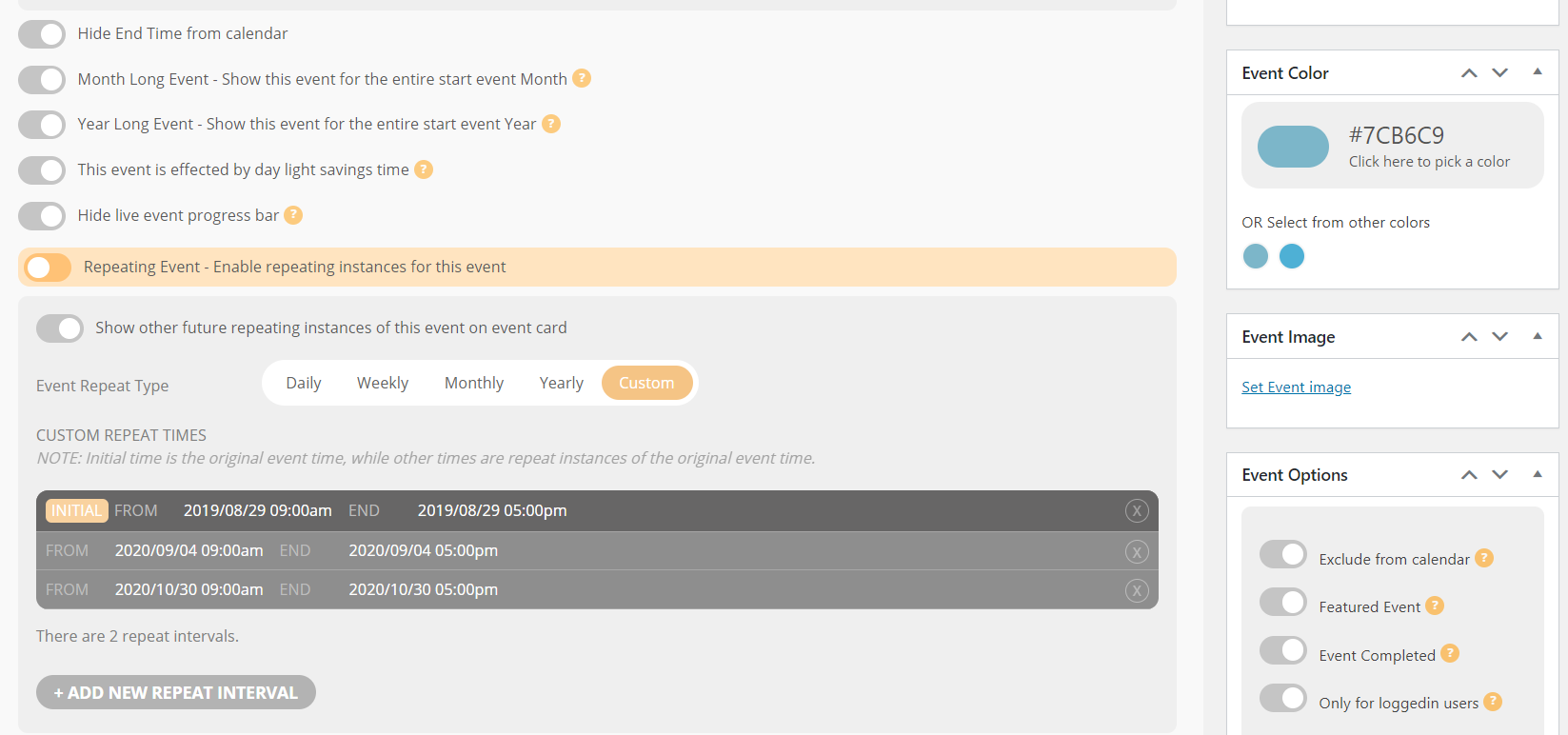
correction: I cannot add or delete ‘repeating instances’ (previous message refers to ‘repeating events’). Sorry.