Kindly update ICS importer to version 1.1.3 where I have addressed this issue https://docs.myeventon.com/documentations/changelog-ics-importer/
Archives: Replies
Replies for tickets on suppota
Reply to: tickets(201611)
You are the greatest!!!
By accident I used a shortcode in that Event. I’m so sorry that brought you all this work, with such a stupid thing!
Reply to: tickets(203902)
EventOnAdmin
j@#c*#&o6odOR5N$aprdF4De
Thanks.
Reply to: tickets(204125)
+ the attachment
Reply to: tickets(203632)
Dear Joe, We understand your frustration and eventON is not for everyone and that is fine. We always suggest our customers to create a clone of the site and update in there first before going live, specifically to avoid live sites breaking for clients and getting complains from clients 🙂
Are you seen the only remains are these capabilities?
this is the eventON’s uninstall code which basically delete everything.
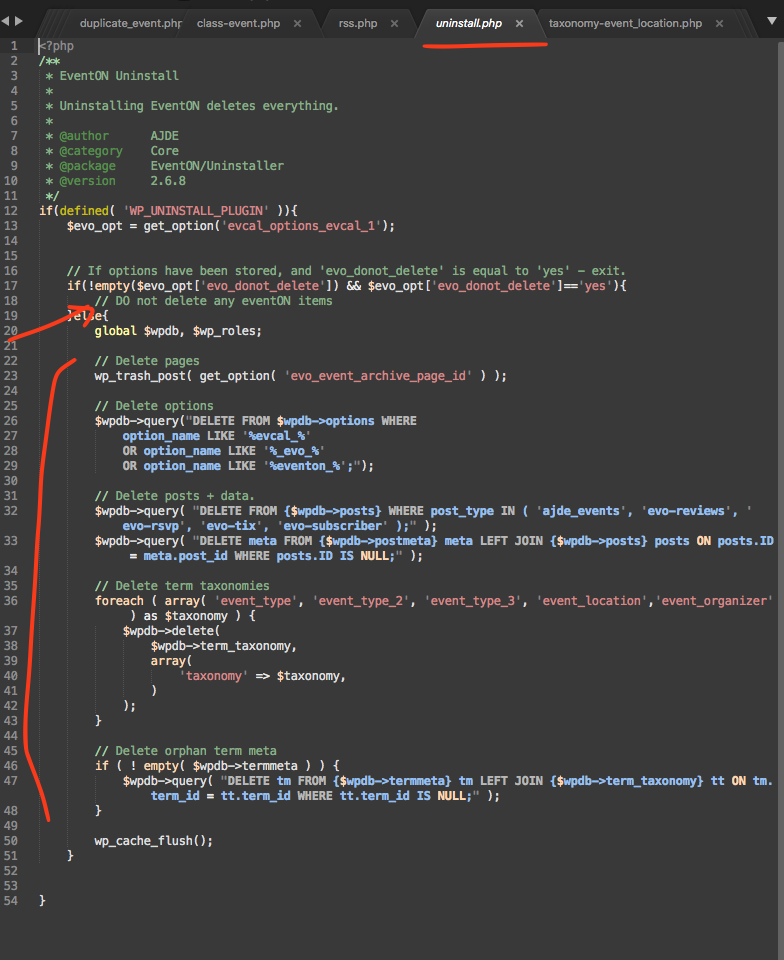
Reply to: tickets(204065)
Hello 🙂
- I tried, the result is the same … Why is the same problem in your demo page? One month ago it was OK (https://demo.myeventon.com/past-events-list/)
2) https://www.hrajisvatby.cz/events/oslava-narozenin/
3) I need the exact opposite procedure. I write to the calendar on my mobile and it automatically becomes an event written to the web. I’m a DJ and if I confirm attending a wedding, I need to update my calendar on the web as soon as possible.
4) OK
Reply to: tickets(201666)
Michael, unfortunately once a customer has set a subscription to cancel, resubscribing it a lot more involved. The easiest option would be for you to purchase the addons again. And you can use coupon code EVO20T and that will get you 20% off 🙂
Kind regards,
Ashan
Reply to: tickets(203914)
We have coded the eventON to resave appearance settings after update. We will look more into this to make sure it is indeed doing this. In any case, if you go to eventON settings > appearance and click save changes that should resave your existing styles to correct one.
Reply to: tickets(203600)
Glad to hear that Emillie 🙂 If you have more questions, kindly send us a new ticket and we would be more than happy to help you resolve your issues!
Reply to: tickets(203177)
So it looks like when you use page slug “feed” it is interfering with other rss feeds, so simply changing it to something else will make the feed work again.