this was and is the colouring set up under the appearance settings. but it now is all black like in your screenshot..
Replies for tickets on suppota
this was and is the colouring set up under the appearance settings. but it now is all black like in your screenshot..
worked
sorry.. but first of all it should not be black.. it was white background.. and with version 3.02 we downgraded since we have a major event on Monday.. but we are now fighting with the black background and the appearance setting are ignored… t
when upgrading to 3.03 it ignored the CSS files… so there was no layout..
hard to tell without seeing the environment- theres not a huge difference between 302 and 303
so, do you have a staging option?
I just updated to 3.0.3 . But now it is not working! when I try to insert the short code… non of them are work. I tried only with [add_eventon] .. it break the page when I insert any kind of code from the eventon calendar. the Action user works well. Please contact me as soon as you can… I don’t no what to do at this moment.
Thanks
Send from info@creativeg.gr
Bye.
Updated the main eventon plugin to 3.0.3 and the same issue happened again, with the logs filling
truncated for brevity
[13-Nov-2020 12:37:30 UTC] PHP Notice:  Undefined variable: hide_past_by in /home/customer/www/staging13.yeshinnorbu.se/public_html/wp-content/plugins/eventON/includes/calendar/class-calendar_generator.php on line 921
[13-Nov-2020 12:37:30 UTC] PHP Notice:  Undefined variable: hide_mult_occur in /home/customer/www/staging13.yeshinnorbu.se/public_html/wp-content/plugins/eventON/includes/calendar/class-calendar_generator.php on line 933
[13-Nov-2020 12:37:30 UTC] PHP Notice:  Undefined variable: only_ft in /home/customer/www/staging13.yeshinnorbu.se/public_html/wp-content/plugins/eventON/includes/calendar/class-calendar_generator.php on line 913
[13-Nov-2020 12:37:30 UTC] PHP Notice:  Undefined variable: hide_ft in /home/customer/www/staging13.yeshinnorbu.se/public_html/wp-content/plugins/eventON/includes/calendar/class-calendar_generator.php on line 914
[13-Nov-2020 12:37:30 UTC] PHP Notice:  Undefined variable: hide_past_by in /home/customer/www/staging13.yeshinnorbu.se/public_html/wp-content/plugins/eventON/includes/calendar/class-calendar_generator.php on line 921
[13-Nov-2020 12:37:30 UTC] PHP Notice:  Undefined variable: hide_mult_occur in /home/customer/www/staging13.yeshinnorbu.se/public_html/wp-content/plugins/eventON/includes/calendar/class-calendar_generator.php on line 933
[13-Nov-2020 12:37:30 UTC] PHP Notice:  Undefined variable: only_ft in /home/customer/www/staging13.yeshinnorbu.se/public_html/wp-content/plugins/eventON/includes/calendar/class-calendar_generator.php on line 913
[13-Nov-2020 12:37:30 UTC] PHP Notice:  Undefined variable: hide_ft in /home/customer/www/staging13.yeshinnorbu.se/public_html/wp-content/plugins/eventON/includes/calendar/class-calendar_generator.php on line 914
[13-Nov-2020 12:37:30 UTC] PHP Notice:  Undefined variable: hide_past_by in /home/customer/www/staging13.yeshinnorbu.se/public_html/wp-content/plugins/eventON/includes/calendar/class-calendar_generator.php on line 921
[13-Nov-2020 12:37:30 UTC] PHP Notice:  Undefined variable: hide_mult_occur in /home/customer/www/staging13.yeshinnorbu.se/public_html/wp-content/plugins/eventON/includes/calendar/class-calendar_generator.php on line 933
[13-Nov-2020 12:37:30 UTC] PHP Notice:  Undefined variable: only_ft in /home/customer/www/staging13.yeshinnorbu.se/public_html/wp-content/plugins/eventON/includes/calendar/class-calendar_generator.php on line 913
[13-Nov-2020 12:37:30 UTC] PHP Notice:  Undefined variable: hide_ft in /home/customer/www/staging13.yeshinnorbu.se/public_html/wp-content/plugins/eventON/includes/calendar/class-calendar_generator.php on line 914
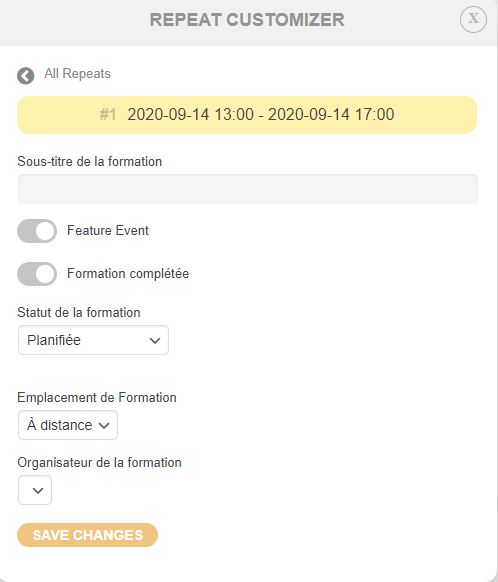
No it’s not solved… You are showing me how to display or not the “Out of stock” tag, which is not what I asked.
I’m asking: How can I manually set a repeating event’s unique repetition so “Out of stock”
I use repeating events customizer and I can individually set a repetition to “Featured”, “Completed” manually. See attached but not “Out of stock”.
How could I achieve this? Thanks
Paypal account: abdm@basedemusica.es
I expect full refund.
Hi again, How about this issue?
Thanks for the update