Hi
I have resolved the issue by going to
myEventOn > Settings > General settings > Select calendar event content filter type
and changing to Default WordPress Filter
Replies for tickets on suppota
Hi
I have resolved the issue by going to
myEventOn > Settings > General settings > Select calendar event content filter type
and changing to Default WordPress Filter
Hi Basilis,
The time for UTC+0 is still not being displays correctly. My team is looking into this.
They looked at eventON/assets/js/eventon_scripts.js but could not find the script that changes the time and date. They said that it has a lot of functions but they could not find the ones responsible for time/date change.
Please indicate where exactly in the stript you set this up? The exact code?
Thank you.
Vasily
please test again (error may have occured due to two different types of ticket ). ( update: checked if not variation ticket )
Hye Pedro,
Updates on this one?
Hi,
Closing this ticket because of inactivity.
Hello,
Thank you for your great suggestion, at the moment it is not supported. However please create a new ticket and select Feature Request as category so others can vote on your idea and get it moved into development faster. OR You can send us a customization job request by creating a new ticket in here and selecting Customization Request as the category.
Hello,
Please go to EventON Settings > Appearance > press RESET TO DEFAULT COLORS. Now go to EventON > Scripts & Styling > enable Write dynamic styles to header > save.
Do you think we can get this job to an end this year? Is this possible?!
Added self event to ticket variation list (top of the list).
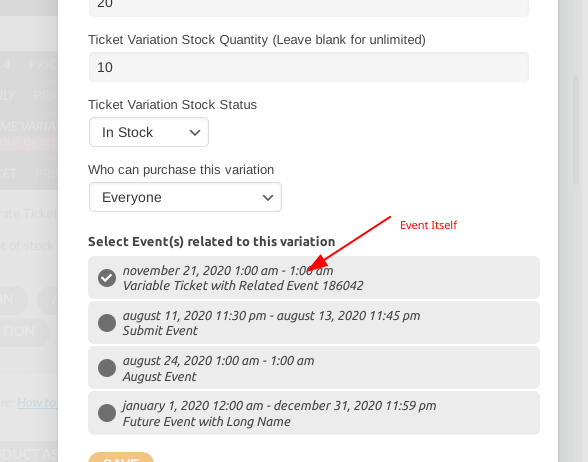
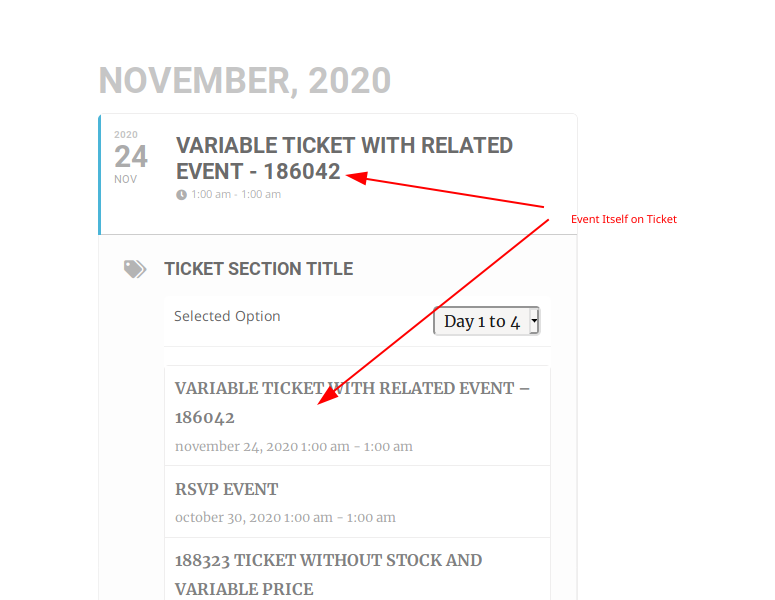
You can download the revised work from same link:
http://momothemes.com/eventON-186042-child.zip
We are using twentysixteen theme.