Sure. The CSS override will work for now. But I don’t think it’s a long-term solution. Thank you for your help.
Archives: Replies
Replies for tickets on suppota
Reply to: tickets(189891)
Hi,
Sorry, for the delay in this response, i was unable to respond you before now and wee needed the ticket office in good working order.
Yes, we by one of your guys, it’s”Basilis Kanonidis”.
Waiting for your answer,
Have a nice day
Reply to: tickets(199757)
Hello,
If you go to EventON Settings > ICS Import > disable Disable auto detect all day events based on ICS event time, it’ll enable Edit Event > Time and Date > All Day Event in imported allday events.
Reply to: tickets(204222)
Thank you for your messages, I am going to assign this ticket to Ashan and he will be able to take it from here and find you a solution. Please allow some time for him to get back to you, we greatly appreciate your patience and thank you for being a eventon customer!
Reply to: tickets(204222)
Ashan,
The same on dev2: http://dev2.myeventon.com/23664-2/
Customer’s shortcode with EventON Settings > EventCard > Open all eventCards by default enabled.
This temporary solution seems to work.
Reply to: tickets(204776)
Hello,
When using WPML you don’t need to enable EventON Settings > Enable language corresponding events.
Please follow this guide to enable WPML compatibility with EventON and it should work: https://docs.myeventon.com/documentations/wpml-eventon-front-end/
Reply to: tickets(204774)
Hello,
Please check Ticket Variations & Options add-on: https://www.myeventon.com/addons/ticket-variations-options/
Try it on http://dev.myeventon.com/wp-admin/ by following this guide: https://docs.myeventon.com/documentations/how-to-setup-and-get-started/
Reply to: tickets(204771)
Hello,
I cannot access your website:
Error 1020
Access denied
What happened?
This website is using a security service to protect itself from online attacks.
Could you check?
One of our customers had similar issue so this was my answer to them:
Your theme adds “position: absolute” to all selects. Here’s how it looks on our test site:
http://dev2.myeventon.com/events/test-54/
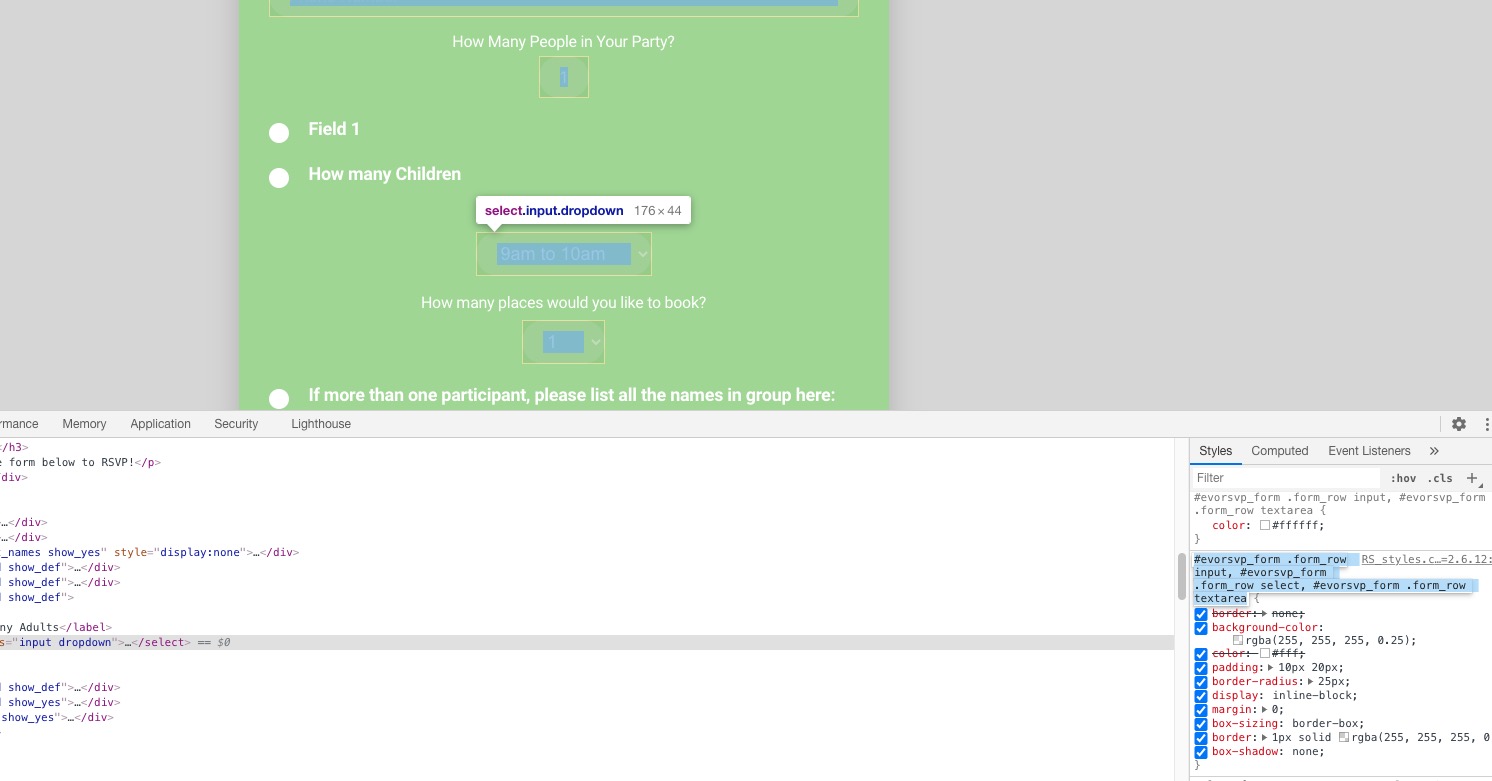
position: relative is the best solution in this case.
Could you check it and let me know?
Reply to: tickets(189198)
Hello Eric Sadoun,
You can also try going to EventON Settings > Scripts & Styling > disable Load eventON scripts and styles only on eventON pages.
Reply to: tickets(193006)
And?