I am using the latest version of EventON and Action User. I enabled “Write dynamic styles to header” as suggested and it did not work.
Archives: Replies
Replies for tickets on suppota
Reply to: tickets(204676)
Event background used to be white.
Reply to: tickets(187739)
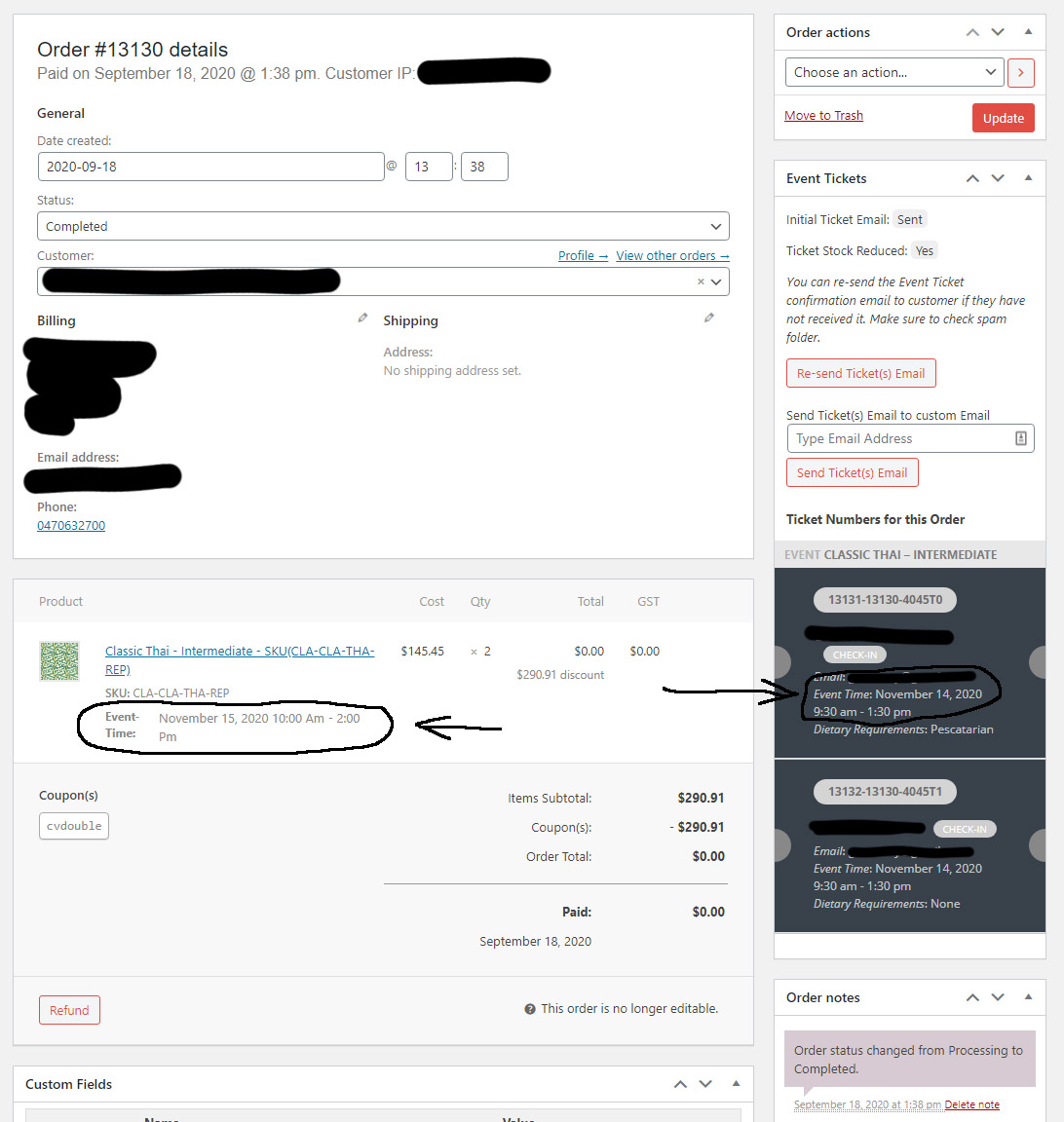
This has happened again. Sending you a link will not help as the problem occurs in the booking process. I have not been able replicate the problem but occurs and ends up double bonking a class causing major problems. Please see attached image. Also please see previous message to meet on Zoom to get this sorted.
Reply to: tickets(204670)
Hi,
FYI, currently the php is set to 7.0 so no errors are showed.
https://inschrijven.foutloosrekenen.nl/wp-admin
eventon_helpdesk
9eLfABuZxzBTAfrYKu^yGoT0
Greetings,
Joeri
Reply to: tickets(204670)
Please send us wp-admin access to your site as a private message for us to further assist your situation.
we would need to see whats going on in the backend
Reply to: tickets(204663)
could you update eventon to 3.0.2
To update eventon to latest version: If you are unable to do autoupdate, you can go to codecanyon your account > download and get the latest eventon version as zip file. Then you can go to your website, deactivate old eventon, activate (Do not delete eventon settings & data when EventON is uninstalled) from eventon settings, delete old eventon, install new one and activate. This link will further explain the process it. Also you can follow us on twitter to get real-time announcements on updates!
and events list extended to .20
To update eventon addons: You can download latest eventon addons from myeventon > my account. Then you can go to your website, deactivate old addon and install new one and activate then delete the old addon. This link will further explain the process. Also you can follow us on twitter to get real-time announcements on updates!
Below is the custom styles found in myeventon>>>>>styles just on the odd chance they get removed (You have the backup here)
.date {
font-family: Arial, Helvetica, sans-serif;
margin-top: -10px;
font-size: 80px;
color: #22903A;
padding-bottom: 20px;
}
.month {
font-family: Arial, Helvetica, sans-serif;
font-size: 30px !important;
font-weight: bold !important;
font-style: normal !important;
color: #404040 !important;
padding-bottom: 20px;
}
.eventon_events_list .eventon_list_event .evcal_desc, .evo_pop_body .evcal_desc, #page-content p.evcal_desc {
margin-left: 35px;
}
.evo_above_title {
color: #22903A;
}
Reply to: tickets(204654)
what you need to do is select the right + number- Its currently not taking into account daylight saving time
But by pickeing the right + it will show corrctly
we are working on a fix right now to take into account daylight saving
Reply to: tickets(186164)
Basilis, we need to wrap this up please. I cannot sit here waiting for something we started months ago.
Give me a shout please.
Reply to: tickets(199793)
Right now the only issue I’m still facing is checking in guests in the All Events RSVP pages…
The same on dev2: http://dev2.myeventon.com/wp-admin/edit.php?post_type=evo-rsvp
Could you check?
Reply to: tickets(199793)
We are sorry for the delay.
It seems to work on my end now too! What was the workaround you guys found for the builder?
It seems that Ashan removed Divi elements from the page by changing the edit mode to Default.
Right now the only issue I’m still facing is checking in guests in the All Events RSVP pages. It goes green, but if you exit the page and load it again or refresh, it reverts back. I know it’s nothing much since the other forms of check in work now, but I was wondering if I was supposed to be able to just click check-in on those pages.
I’ve contacted Ashan about this one. As a temporary solution could you go to Edit Event > RSVP > View Attendees > Check-in there.