Please add this CSS code to EventON > Styles (If you don’t see any change, EventON > Scripts & Styling > turn off Write styles to header > save settings > turn on Write styles to header):
.ajde_evcal_calendar.boxy.boxstyle0 #evcal_list .eventon_list_event .desc_trig, .ajde_evcal_calendar.boxy.boxstyle0 #evcal_list p.desc_trig_outter { height: auto !important; }
Hello Basilis
Is there any progress with the edit ?
Can it be set yet ?
Hi Charlie,
We have asked our CEO to review this, so it can be done for you.
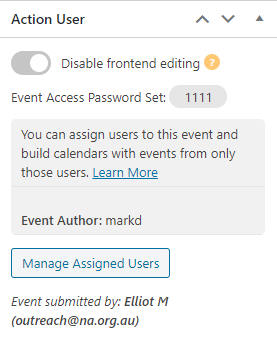
I attempted created a test event as an anonymous user and from the back end I was successfully able to remove the passcode.
Its a really confusing field to be honest. Most people think (reasonably) that this is the access code to enter the meeting not the access code to view the event details on the website. Could you make that clearer please?
Perhaps some explanatory text like: This is not the Virtual (online) event pass code. This is to prevent people without an an access code from viewing the event details on the website.
Perhaps an additional field for the actual meeting entry details is also required…
Hi Pedro,
If you have requested, our team will review and decide if it will be processed or not.
Thank you for that.
Hey Rafael,
Yes you can, the shortcodes have a lot of options and order is one of them.
Let us know if you have more questions.
Hey Allyson,
I do not think compatibility with that plugin exists, emails have specific functionality and they do need to be loaded inside the plugin to work with it.
My apologies – I was able to update the main plugin via the normal method but I still have to go through the deactivate/remove/upload/reactivate/apply license process with the add-ons.
You can see the issue here:
https://www.mooreexeced.com/calendar-test/
Updating is such a painful exercise with Eventon. Why can’t we just update it like normal wordpress plugins? Plus I still have to edit lines of code to turn off the js moment.min.js setting. You advised a switch would be added so this could simply be turned off but I don’t think this has happened yet. Its affecting a number of our Areas who’ve followed our site example by using your plugin.
https://github.com/bmlt-enabled/crouton/issues/217