Hello,
Could you go to EventON Settings > Time Settings > select Default Event Timezone > enable Apply default timezone to all events?
Replies for tickets on suppota
Hello,
Could you go to EventON Settings > Time Settings > select Default Event Timezone > enable Apply default timezone to all events?
Not from Single Event Pages, I am afraid. If you need to remove them from your calendars please go to EventON Settings > enable Hide past events for default calendar(s).
You can also send us a customization job request by creating a new ticket in here and selecting Customization Request as the category.
Hello,
We are sorry about this issue. Please go to EventON Settings > Scripts & Styling > enable Write dynamic styles to header > save.
In this case you can use Event Lists shortcode with “Hide empty months (Use ONLY w/ event list)” enabled:
[add_eventon_list hide_empty_months=”yes” number_of_months=”12″]
And to show past events please follow https://docs.myeventon.com/documentations/how-to-show-past-events/ (replace add_eventon with add_eventon_list).
Ah, ok, that explains it. Thanks for clarifying!
Susan thank you for letting us know of this. We have found the issue and will get this resolved and issue a new version release to API addon today.
https://docs.myeventon.com/documentations/changelog-event-api/
If you have more questions, kindly send us a new ticket and we would be more than happy to help you resolve your issues!
sorry for the late reply. This issue is resolved in version 1.1.3 of ICS addon. If you have more questions, kindly send us a new ticket and we would be more than happy to help you resolve your issues!
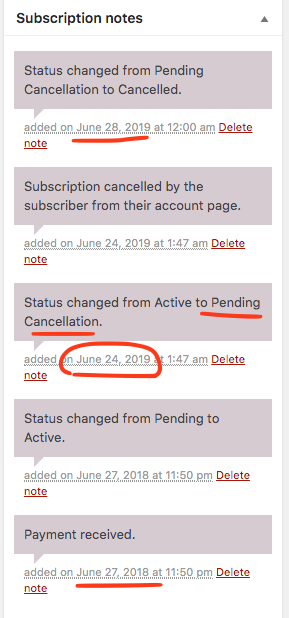
From what I can see from our system log. It was set to pending cancel on june 24, 2019 and then cancelled on renewal date. Please disregard my above dates, these are the correct system dates.
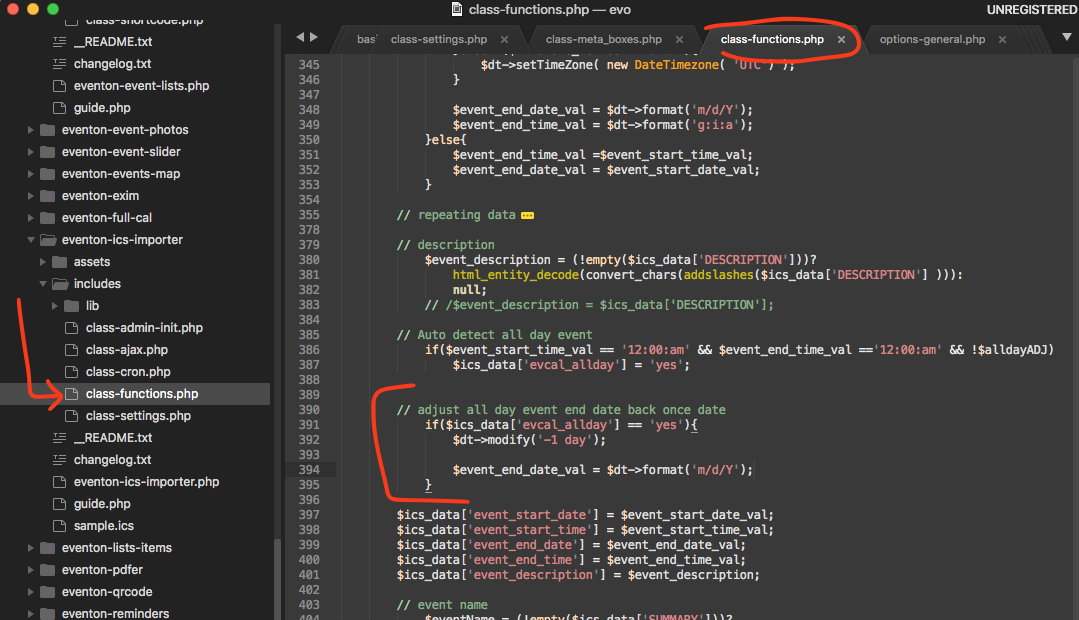
Hello Christian thank you for pointing this out. Here is a patch fix that will switch end date back one day. This fix will be part of next version release for ICS addon.
Thanks! This is what I did. So there is no way to auto remove past events? You have to manually remove?