Hello,
Could you try going to EventON Settings > Scripts & Styling > enable Write dynamic styles to header?
Please also make sure that you are using latest versions of EventON (3.0.2) and Action User add-on.
Replies for tickets on suppota
Hello,
Could you try going to EventON Settings > Scripts & Styling > enable Write dynamic styles to header?
Please also make sure that you are using latest versions of EventON (3.0.2) and Action User add-on.
We are glad your issue is resolved, if you have any further questions or concerns please create a new ticket.
If you have a moment, we would greatly appreciate if you could kindly leave us a review at codecanyon! from your account > downloads. Cheers!
Thank you! It worked.
That worked. Thanks 🙂
Thanks.. it works althought it isnt the best solution.
And now anothe question: ¿is there any way to insert to this metadata a css class to styling before? or how can i select this element in my css?
here you can see and examaple of this implemtation (i wan t styling via CSS this words “Otras sesiones: 17:00h (2020/11/08)”
https://kulturagernika-lumo.eus/es/portada_esp_reserva
Thanks in advance…
You can also wait for our next update where we fixed this issue.
Hello,
Please add this CSS code to EventON > Styles (If you don’t see any change, EventON > Scripts & Styling > turn off Write styles to header > save settings > turn on Write styles to header):
.ajde_evcal_calendar.boxy.boxstyle1 #evcal_list .eventon_list_event .desc_trig { box-sizing: border-box !important; }
And if you turn it off, will that fix the issue?
Could you also tell how did you update RSVP add-on?
By following this:
To update eventon addons: You can download latest eventon addons from myeventon > my account. Then you can go to your website, deactivate old addon and install new one and activate then delete the old addon. This link will further explain the process. Also you can follow us on twitter to get real-time announcements on updates!
Hello,
1. There are multiple js errors on the page:
https://siotformazione.algores.it/wp-admin/post.php?post=1748&action=edit
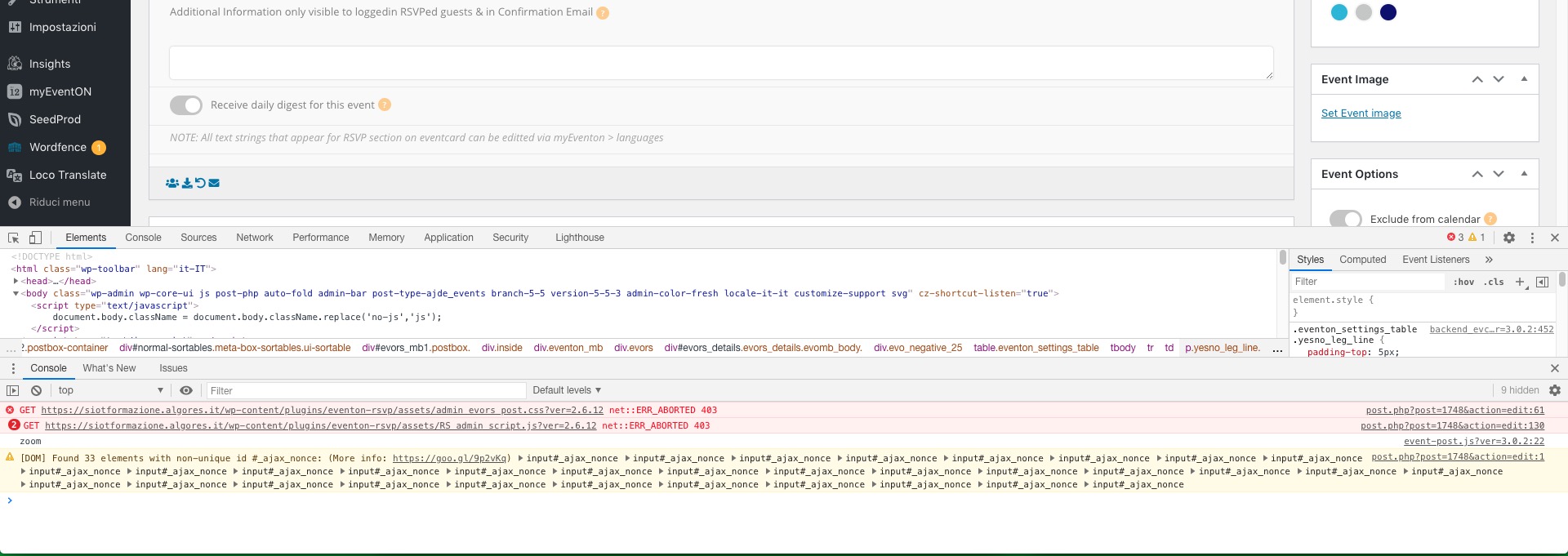
Could you please try the instructions mentioned in this documentation?
2. The same issue as in 1. RSVP add-on cannot load files with JS scripts and CSS styles.