I am not sure what this copy option is. Is it something you do using another plugin?
Archives: Replies
Replies for tickets on suppota
Reply to: tickets(203600)
Emillie, thank you very much for the lovely messages. It is our mate Dave who suggested the view time in local as a feature 🙂
We are delighted to hear you like that feature, if can only be improved from here. We wont be surprised if this is copied by other wordpress calendars soon 😉
So as for opening in 2 tabs please try this patch fix. just simply comment out any codes in here with //
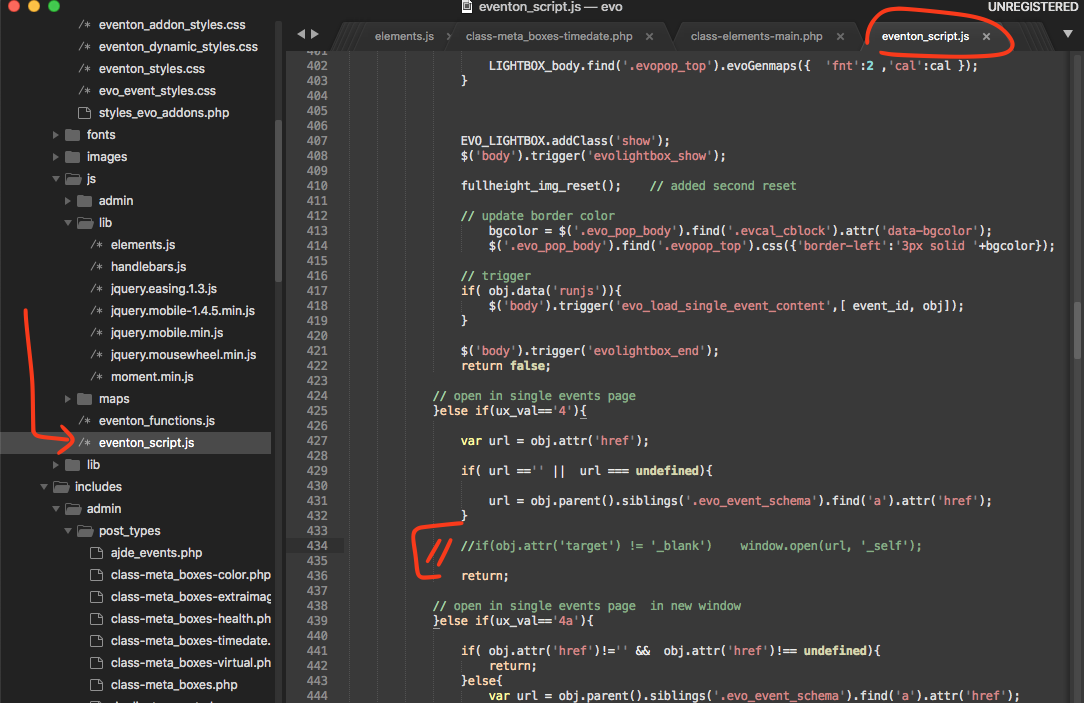
I will certainly add end time and add option to hide them. and make local time load on load. We are working on daylight savings issue with local time rightnow. Expect those in the next update to eventON 🙂
Reply to: tickets(200667)
Not sure about Square. I think all you need to do is to install it and it should work without having to interact with it.
About WooCommerce. If you install and configure it once it should work completely fine. All your site owner need to do is to create events and enabled tickets on Edit Event page.
Reply to: tickets(203066)
Great! If you have any further questions or concerns please create a new ticket.
Reply to: tickets(203394)
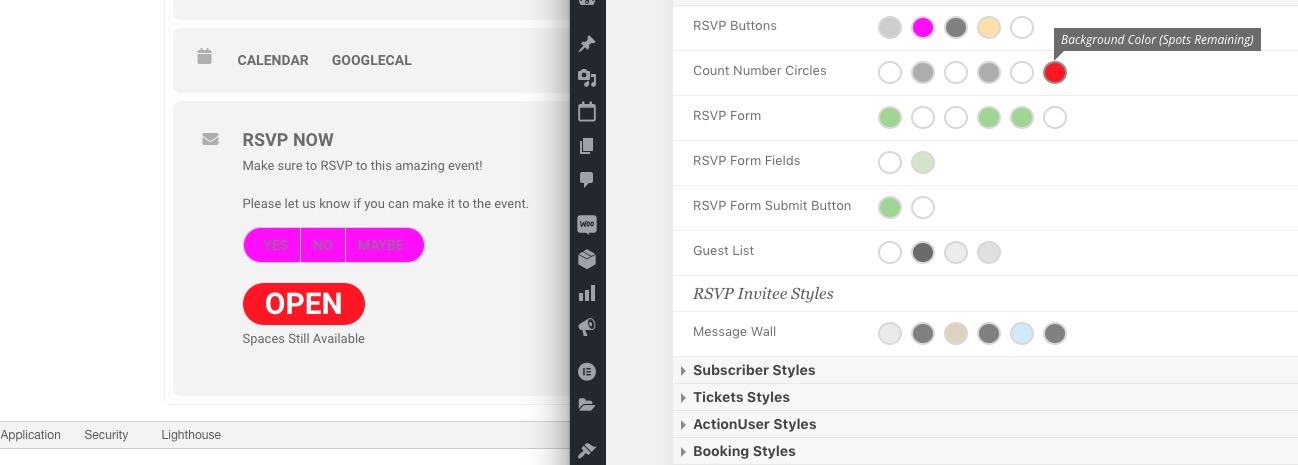
You can change this by going to EventON Settings > Appearance > RSVP Styles > Count Number Circles > Background Color (Spots Remaining).
If you don’t see any change, EventON > Scripts & Styling > turn off Write styles to header > save settings > turn on Write styles to header.
Reply to: tickets(203832)
Hello,
Thank you for your great suggestion, at the moment it is not supported. However please create a new ticket and select Feature Request as category so others can vote on your idea and get it moved into development faster. OR You can send us a customization job request by creating a new ticket in here and selecting Customization Request as the category.
Reply to: tickets(203077)
Should I turn any of them on (besides “Write dynamic styles to header”)?
If it working, you don’t need to turn any of them on.
Please add this CSS code to EventON > Styles (If you don’t see any change, EventON > Scripts & Styling > turn off Write styles to header > save settings > turn on Write styles to header):
.ajde_evcal_calendar.boxy .evcal_list_a span.evcal_event_types.ett2, .ajde_evcal_calendar.boxy .evcal_list_a span.evcal_event_types.ett3, .ajde_evcal_calendar.boxy .evcal_list_a span.evcal_event_types.ett4, .ajde_evcal_calendar.boxy .evcal_list_a span.evcal_event_types.ett5 { display: block !important; }
Reply to: tickets(203837)
Hello,
I activated it. Please check and let me know.
Reply to: tickets(203801)
Please go to EventON Settings > ICS Import > change Import Method to Schedule import from ICS file URL – daily. Now your events should be scheduled automatically. You can also go to https://artmassa.it/ordine/wp-admin/admin.php?page=evoics&tab=evoics_2 > press Start External Importing.
Reply to: tickets(202618)
Ok found it order ID is 24923, purchased in 2017. Ok so please login to myeventon.com/my-account
use email address: alexandrenapoli@yahoo.com.br to login. If you forgot password, try forgot pass. Once you loggedin you should be able to download the latest versions from there.