If you’ll go to https://opencampus.uni-koeln.de/?page_id=134 and click on TEST-VORLESUNG ENTREPRENEURSHIP, you’ll see that Event Details contains Main Calendar shortcodes. Could you remove them?
Could you also try the instructions mentioned in this documentation to make sure your issue is indeed coming from eventon. Maybe your theme or a third-party plugin affect this?
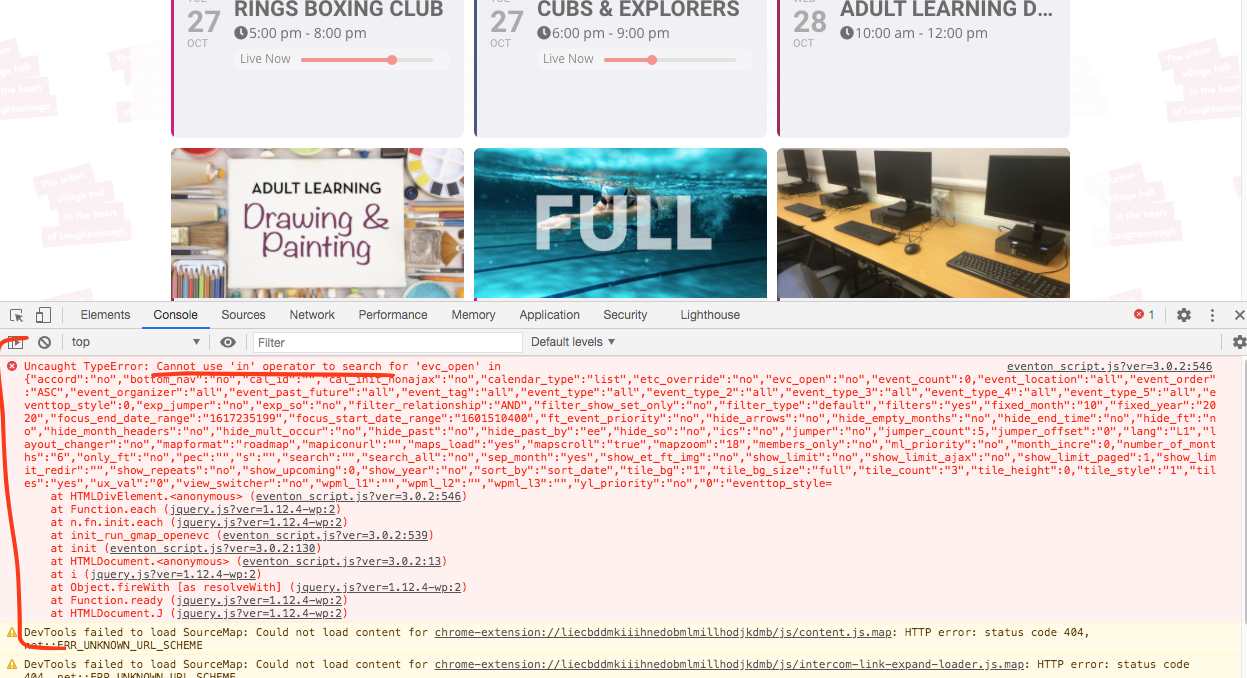
are you able to send us wp-admin access chris? i am seeing this javascript error which is what is stopping the events lightbox from working.
Hello kristen, thank you for sharing this, this gives much insight into solving this issue. Are you able to provide us with admin or editor level access to your site? I want to run some javascript debugs on day light savings
i can confirm the change you have made today has broken the frontend so you need to fix it, i had the backup of the plugin from last week when I try that version frontend works perfectly fine
Let me get more information first. I am waiting to hear back from them.
Actually, nevermind. I still have to load the `evcal_cal_default` stylesheet in order to hide the modal close element. Bummer. So nothing has changed for me with the 3.0.1 / 3.0.2 update.
url: http://carlosmariob.sg-host.com/
user: dev
password: Wsq^&kR^4ZtOe2t4BuWaRNH6
ftp
host: giowm1167.siteground.biz
user: dev@carlosmariob.sg-host.com
pass: (1u$y4_DDKs4#:5$]
The site is in other language i currently setup as English so you can understand it
Hello!
With v3.0.2, I have these set to OFF:
– Load eventON scripts and styles only on eventON pages and
– Load eventON scripts and styles only on eventON pages
And I have these functions to only load style and scripts on required pages
if ( ! is_page( 1103 ) ) {

	wp_dequeue_style( 'evcal_cal_default' );
	wp_deregister_style( 'evcal_cal_default' );

	wp_dequeue_style( 'eventon_dynamic_styles' );
	wp_deregister_style( 'eventon_dynamic_styles' );

}

if ( ! is_page( 1103 ) ) {

	wp_dequeue_script( 'evcal_functions' );
	wp_deregister_script( 'evcal_functions' );

	wp_dequeue_script( 'evcal_easing' );
	wp_deregister_script( 'evcal_easing' );

	wp_dequeue_script( 'evo_handlebars' );
	wp_deregister_script( 'evo_handlebars' );

	wp_dequeue_script( 'evo_mobile' );
	wp_deregister_script( 'evo_mobile' );

	wp_dequeue_script( 'evo_moment' );
	wp_deregister_script( 'evo_moment' );

	wp_dequeue_script( 'evo_mouse' );
	wp_deregister_script( 'evo_mouse' );

	wp_dequeue_script( 'evcal_ajax_handle' );
	wp_deregister_script( 'evcal_ajax_handle' );

	wp_dequeue_script( 'eventon_init_gmaps' );
	wp_deregister_script( 'eventon_init_gmaps' );

	wp_dequeue_script( 'eventon_gmaps' );
	wp_deregister_script( 'eventon_gmaps' );

}
And everything works great. So it seems the 3.0.1 made it so that I no longer need to load the evcal_cal_default stylesheet. The .evcal_cal_default is now set to visibility: hidden;
Thanks!
-Alex
Sure, you can login at:
- https://vicar.com.ar/wp-admin/
user: ashanjay
pass: ash2020anjay20
But please also let me know WHY the calendar API script is HIDING all my another HOMEPAGE site at:
https://www.mercadoganaderopampeano.com/
something very strange with the script is happening !
Yes. Please provide the website address and both wp-admin and ftp access info. Also, please add the plugins so I can start the work. Thank You