Perfect!
Unfortunately, you cannot filter by Event Organizer with Event API. However, you can use Event Type:
event_type (int) event type category term ID(s) separated by commas
event_type_{x} (int) event type {x} category term ID(s) separated by commas
Hello,
Could you please update EventON to 3.0.1 and check if it helps? If it doesn’t please send us wp-admin access to your site as a private message for us to further assist your situation.
Could you tell us do you still have this issue, even with EventON 3.0.1?
Hello,
Please send us FTP access to your site as a private message, so I can install both versions and activate WP_DEBUG.
Could you also backup your website?
Could you update EventON to 3.0.1 first?
Reply to: 201745
I cannot see wp-admin access login info. Could you re-send it?
Hello,
You need to use Event Lists: Ext add-on for this: https://www.myeventon.com/addons/event-lists-extended/
Please try this shortcode on http://dev.myeventon.com/wp-admin/:
[add_eventon_el cal_id=”1” number_of_months=”6″ ux_val=”3″ hide_so=”yes” hide_month_headers=”yes” hide_empty_months=”yes” show_year=”yes” tiles=”yes” hide_end_time=”yes” etc_override=”yes” tile_count=”2″ event_count=”2″ event_count_list=”yes”]
I tried the shortcodes you listed above and they didn’t work – see here:
Could you tell us which shortcode are you referring to? It seems that you need to purchase add-ons first.
Hello,
Could you send us a screenshot of the issue?
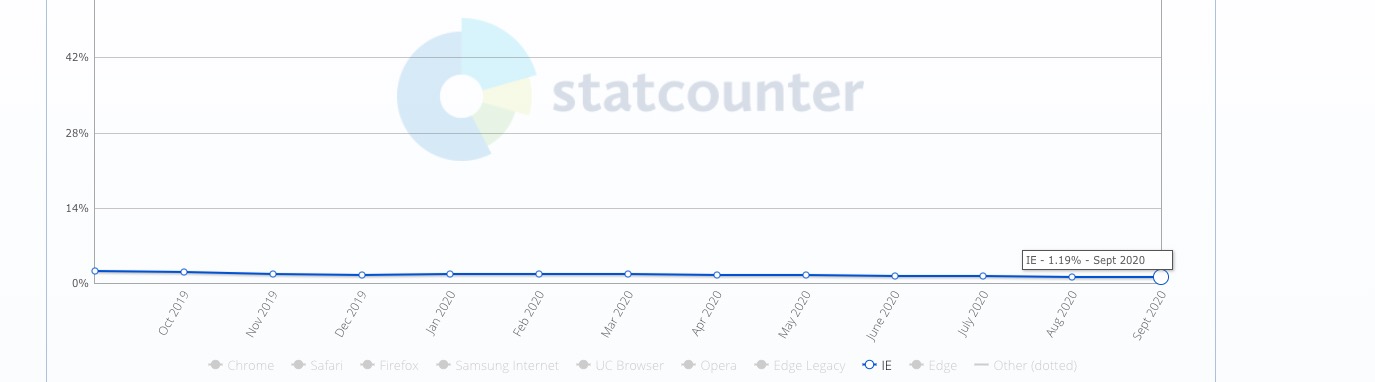
All versions of IE combined take barely 1% of the worldwide market share:
Hello,
We’ve just released a new version with this fix – 3.0.1. Please update to fix the issue. We are very sorry for the issue.
We are glad your issue is resolved, if you have any further questions or concerns please create a new ticket.
If you have a moment, we would greatly appreciate if you could kindly leave us a review at codecanyon! from your account > downloads. Cheers!