Please delete the current plugin and download the new one from the link and install it.
http://momothemes.com/eventON-186042-child.zip
Replies for tickets on suppota
Please delete the current plugin and download the new one from the link and install it.
http://momothemes.com/eventON-186042-child.zip
okay. Pls send it. I can then give you the estimate
Hi,
do you really need a login? If I get google/bing hits on multiple sites maybe this a known error/cause?
thanks
/M
if you really need it Ill set it up
Just so you know, I’m waiting for the reported behavior in the original ticket to happen again. I’m going to try and adjust some things with the Redirection plugin while the issue is happening to see if it has an effect.
Fortunately for me – but unfortunately for closing this ticket – I haven’t seen either issue reported in this ticket in a few days. It’s bound to happen again soon … it always does (until we fix this darn thing). 🙂
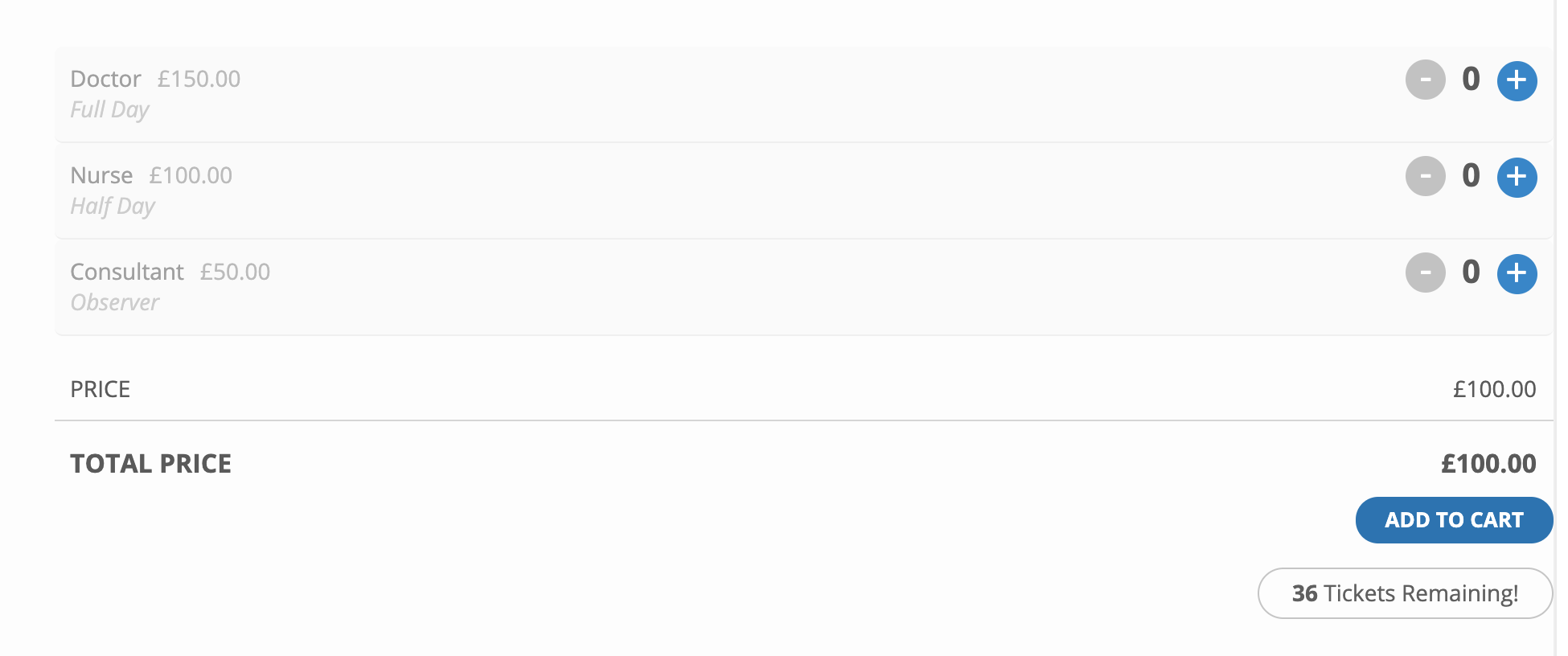
I’ve tried to change variables via Add New Ticket Variation Type and Add New Ticket Price Option.
This does then display the variable prices on the product. See screenshot.
But, as the ticket requires a standard price, when viewing the ticket it automatically adds that price to the total. Am I doing something wrong as the eventon event creator states Ticket price is required. In this case I have set this to £100.00.
Ideally what I need to do is create an event with three types of ticket which the customer can pick from.
Hi,
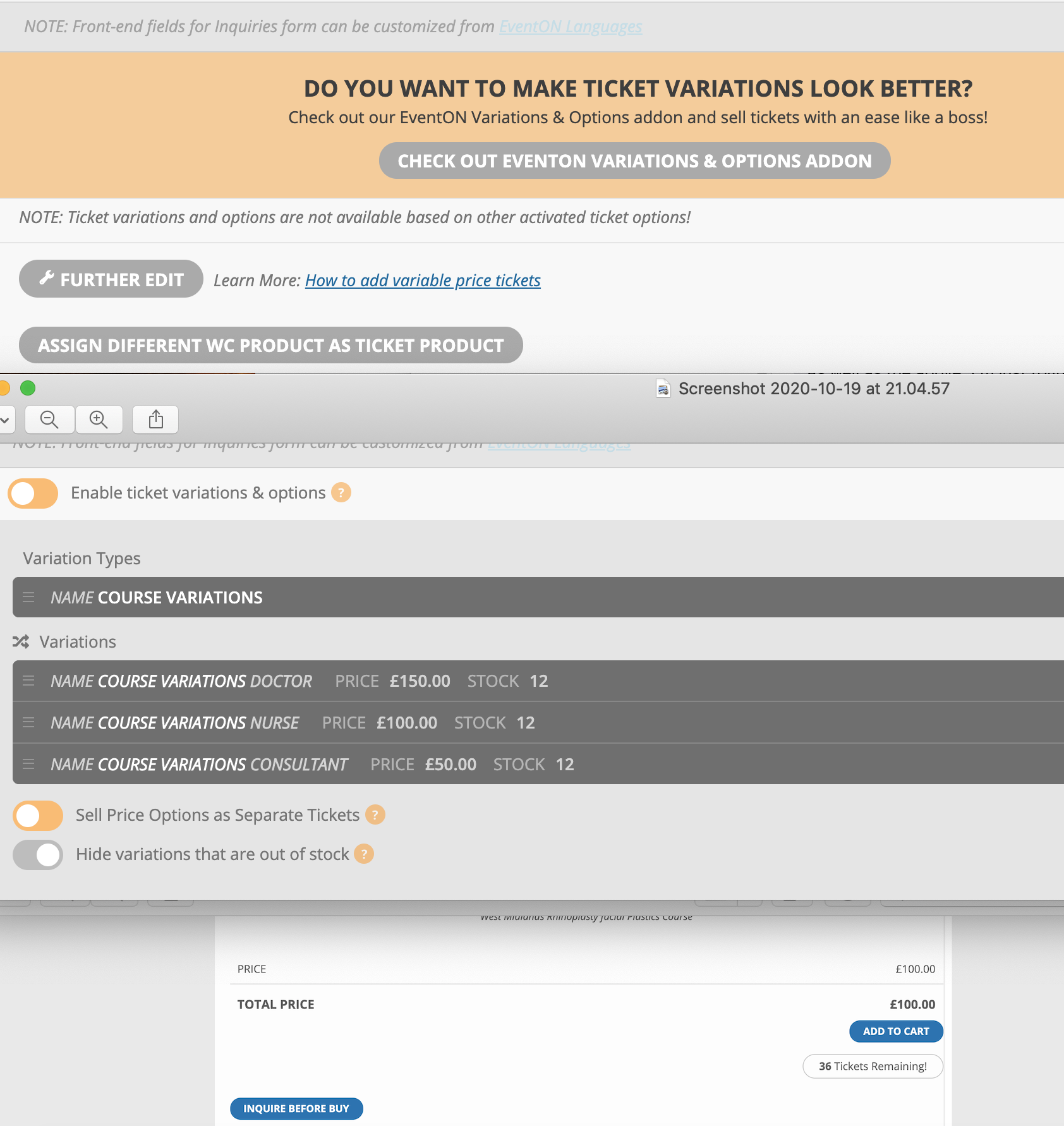
I followed the manual for variable and ticket products.
I’ve attached three screenshots which show the further edit (normal product management) which I’ve now changed from variable to simple and saved the product.
Then on the eventon product I’ve refreshed the page and the variables are showing.
Then a screenshot of the front page product which only shows the single product.
When I change back to variable, the product details such as price, stock and details are wiped. Going back to the eventon variables section I get the same issue you replied to.
As I can only upload one image I’ve taken a screenshot of all three.
Hello,
Please follow the instructions in this documentation to activate debug in your site to see any PHP errors recorded that can provide insight on to whats going on. Please reply with a link to debug.log file. If you are not able to do this please send us FTP access to your site so we can do this for you.
Please use this code instead:
#evcal_calendar_Halloween3 #evcal_list .eventon_list_event .desc_trig .evcal_cblock { display: none !important; }
Hello,
There seems to be a problem of incompatibility with the theme. Usually you can fix this by using this code:
body.evo_overflow { overflow-x: initial !important; }
html.evo_overflow { overflow-x: initial !important; }
But it seems that it doesn’t help. Could you please try the instructions mentioned in this documentation to make sure that the issue is in the theme?
Button styling looks bad in the event details. I have adding buttons using the WordPress block editor in the event details but once I look at the preview or published version of the event, the styling looks as if it’s broken.
I am sorry I dont quite understand what you are trying to explain here, could you please send us screenshots or video capture? thank you!
My google maps box is not showing up. I understand this to be a common issue so I am still trying to figure out the problem on my end. If you have any suggestions, please let me know.
The issue is in this error:
Geocoding Service: This API project is not authorized to use this API. For more information on authentication and Google Maps JavaScript API services please see: https://developers.google.com/maps/documentation/javascript/get-api-key
More info: https://elfsight.com/blog/2018/06/how-to-get-google-maps-api-key-guide/